
Deploying more sophisticated security protocols across a range of client settings is a daunting task for technical staff. Successfully achieving Cyber Essentials Plus in Microsoft 365? Automation architectures require a strategic shift away from manual interventions. Organisations must implement a robust IT infrastructure security strategy that scales efficiently without compromising the underlying security posture.
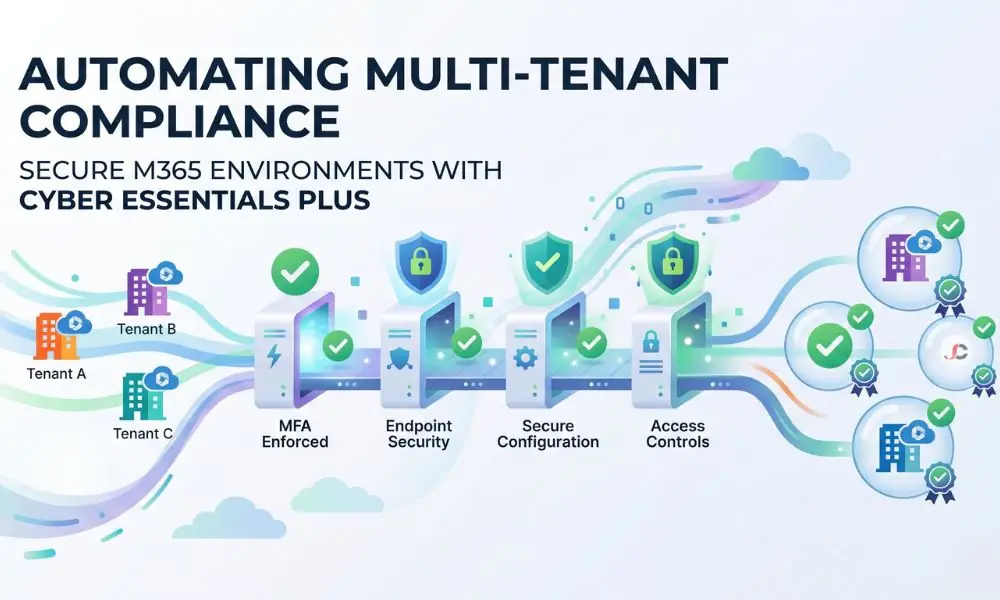
By focusing on automated deployment methods, technical compliance officers eliminate the high error rates inherent in repetitive manual configuration tasks. This level of standardisation necessitates moving beyond individual, tenant-by-tenant modifications. System administrators must deploy scalable solutions that uniformly apply strict security policies across their entire client portfolio.
The Operational Burden of Multi-Tenant Compliance
Managing different Microsoft 365 environments poses an enormous amount of work for technical staff. Every customer requires personalised attention, hence increasing the time required to validate access control and equipment compatibility. The absence of a standardised structure usually leads to dangerous configuration drift, in which actual configurations deviate from the organisation’s officially designated baseline.
The considerable number of manual configurations always results in non-compliance during external audits. Technical staff spend time identifying errors made across different administrative interfaces when they could be doing other tasks. Establishing uniform baselines remains the only viable method for controlling this exponentially growing operational burden and maintaining profitability.
Securing the London Headquarters and Remote UK Workforce
Modern-day businesses usually have their London head office complemented by employees scattered throughout the United Kingdom. This makes security management extremely challenging as the devices will be logging in remotely from unknown locations, such as residential areas. Technical teams must ensure that remote hardware receives the same rigorous security enforcement as devices located in the corporate office.
Deploying tenant-wide configurations guarantees that all users remain subject to the necessary conditional access policies, regardless of their physical location or network connection. This universal application directly eliminates the critical security vulnerabilities inherent in disparate, location-based network access models. Consistent enforcement enables remote employees to operate securely and maintain full compliance without requiring constant, disruptive administrative intervention.
Defining the Cyber Essentials Plus Baseline in Microsoft 365
The April 2026 Danzell update to the certification framework requires strict compliance with stringent identity and device management procedures. Administrators must carefully translate the high-level Cyber Essentials Requirements for IT Infrastructure, issued by the National Cyber Security Centre, into specific technical configurations within the administration centre. This translation includes enforcing multi-factor authentication, strictly restricting legacy authentication protocols, and mandating automatic operating system updates across all devices.
To fully standardise these requirements across multiple tenants, administrators must define the exact parameters that constitute a compliant environment. The basic elements usually include the following control areas:
- Comprehensive identity protection and mandatory multi-factor authentication enforcement.
- Secure configuration protocols are applied to all company-owned and bring-your-own devices.
- Stringent access controls and continuous vulnerability management.
The correct mapping of these requirements is an important basis for all further implementation processes. When auditing Cyber Essentials Plus in Microsoft 365, automated control templates must include all required controls in accordance with the auditing authority’s criteria for successful implementation. This comprehensive baseline template serves as the definitive standard against which all future client environments will be measured.
Transitioning to Cyber Essentials Plus in Microsoft 365 Automation
Transitioning your operations from manual portal navigation to scripted deployments drastically reduces the time required to securely onboard new client environments. To achieve Cyber Essentials Plus in Microsoft 365, automation experts should ensure that any complex security structure is implemented flawlessly. It is necessary to automate any task that requires administrators to make changes manually.
Companies adopting such a methodology experience fewer instances of non-compliance during their stringent annual recertification processes. The automation process constantly monitors the environment and immediately flags any deviation from the approved security posture. This ensures that compliance is an ongoing process rather than something that happens once a year or every couple of years.
Standardising Policies with Microsoft 365 Lighthouse
For managed service providers monitoring several customers simultaneously, it is imperative to have centralised policy implementations across all tenants. The Microsoft 365 Lighthouse facilitates this process through its highly consolidated user interface. Utilising this platform to deploy Cyber Essentials Plus in Microsoft 365 automation templates allows administrators to push standardised settings to dozens of distinct businesses concurrently.
This centralised management approach drastically reduces the friction typically associated with updating security policies when new zero-day vulnerabilities emerge in the wild. Technical personnel can deploy updated threat parameters globally from a single, unified portal, ensuring uniform protection across the entire client portfolio. As outlined in the official guidance to deploy standard tenant configurations using Microsoft 365 Lighthouse baselines, this tool is indispensable for efficient multi-tenant management.
Implementing Configuration-as-Code Methodologies
Granular environmental control is achieved through advanced technical teams utilising scripting languages to program precise security parameters. Writing such configurations in code with tools like Microsoft365DSC enables strict version control, proper peer review, and replication across administrative boundaries. This modern methodology is particularly effective when deploying automated device compliance profiles to heavily regulated client machines within complex corporate structures.
Executing structured deployment scripts eliminates the human error inherent in navigating complex administrative graphical user interfaces. If an unauthorised administrator or a compromised account modifies any compliance-related setting, the automated deployment process can be restarted to replace the rogue modification automatically. The speed of fixing any problem guarantees that the system is always back to its approved status after the deployment.
Essential Security Controls for Automated Deployment
For an efficient and effective deployment process, certain technical requirements must be met to satisfy the high expectations set by external auditors. In deploying Cyber Essentials Plus in Microsoft 365, automation requires that both conditional access and device encryption be at the centre of the whole deployment process. Properly aligning these settings ensures businesses fully leverage their Microsoft 365 Business Tier subscriptions while maintaining an exceptionally robust operational security posture.
Technical teams must ensure their automated packages include aggressive account lockout thresholds and mandatory password complexity rules across the board. Furthermore, the deployment scripts must automatically configure cloud-managed firewalls and anti-malware solutions across all newly enrolled endpoints without user interaction. These fundamental technical controls form the non-negotiable core of any secure multi-tenant architecture designed for strict compliance.
Identity Verification and Conditional Access Enforcement
Securing user identity forms the basis of the first line of defence for any cloud-based application or data store. Any automated deployment scripts should prevent attempts to use old-style authentication, since multi-factor authentication systems easily circumvent older protocols. Furthermore, risk-based access policies must be configured to immediately require secure password resets if the system detects anomalous sign-in behaviour from suspicious geographic locations.
Administrators must precisely configure the automated deployment to mandate multi-factor authentication for every single user, including high-level administrative accounts. There can be absolutely no exceptions programmed into the baseline, as external auditors will immediately flag any bypassed accounts during their technical assessments. Strict, uncompromising identity enforcement delivers the highest possible return on investment for threat mitigation and compliance.
Device Hardening and Vulnerability Management
Securing the physical hardware endpoints is equally critical to protecting the digital cloud identities that access the sensitive corporate data. The automated baseline script must force comprehensive disk encryption via BitLocker and mandate the immediate, unattended installation of critical operating system updates. Any device that fails to meet these strict hardware requirements must be automatically restricted from accessing internal company resources until the issues are fully remediated.
Administrators should meticulously configure the deployment to turn off all unnecessary legacy services and protocols on endpoint devices, thereby reducing the overall attack surface. By comprehensively automating the deployment of these hardened security profiles, technical teams ensure that new devices are completely secure from the moment they are provisioned for the end user. This modern, zero-touch deployment strategy is highly effective and essential for adequately supporting remote workforces across the country.
Proving Compliance Through Automated Auditing
The process of preparing for an all-encompassing external evaluation traditionally took several weeks of painstaking manual work to obtain screenshots of the interface and meticulously export the list of active users. The correct Cyber Essentials Plus configuration in Microsoft 365 enables instant report generation. This immediate access to verifiable data significantly helps to streamline IT infrastructure management workloads during highly stressful audit seasons.
The automated management systems continuously log the exact compliance status of every user identity and physical device operating within the managed environment. When the independent auditor formally requests proof of configuration, administrators export the centralised compliance dashboard metrics provided by the reporting tools. This fully transparent, indisputable evidence radically accelerates the certification process and builds substantial trust with the regulatory bodies overseeing the assessment.
Integrating Continuous Baselines into Your IT Workflows
Being consistently highly secure requires sustained effort, since new configurations are always available on cloud platforms during updates. These practices should become an integral part of everyday operations rather than a one-time, separate activity. Continuously working to standardise advanced threat-protection policies ensures that the multi-tenant environment organically evolves alongside emerging malicious tactics.
To ensure ongoing success, administrators must consider implementing the following strict workflow integrations:
- Schedule automated weekly reviews of all deployment scripts to verify alignment with the latest vendor security recommendations.
- Establish a rigorous change management protocol to update the master baseline template whenever external regulatory requirements officially change.
- Implement automated alerting mechanisms to instantly notify the security operations centre whenever severe configuration drift is detected.
As the official certification requirements inevitably change, the master deployment template must be meticulously updated and systematically pushed out to all client environments. This highly proactive maintenance strategy ensures long-term compliance with all external regulatory standards and significantly reduces the overall risk profile for managed service providers and their corporate clients.
What is the fastest method to deploy Cyber Essentials Plus baselines across multiple tenants?
The use of highly automated software solutions, such as Microsoft 365 Lighthouse, or complex PowerShell scripts, enables system administrators to install these standardised profiles across numerous clients simultaneously. This method avoids repeated manual data entry. It significantly reduces the time required to deploy these systems.
How does automation assist remote workers in maintaining compliance across the United Kingdom?
Automation guarantees that whether the employee works from a central office in London or from home, the device will automatically download the necessary security settings from the cloud. This seamless process ensures that critical protocols such as full-disk encryption and strict firewall rules remain active. It functions entirely without requiring manual administrative intervention.
Can Microsoft 365 Lighthouse fully automate an external compliance audit?
While the software application cannot replace a human external auditor, Lighthouse provides comprehensive centralised reporting that successfully automates the initial gathering of required evidence. This powerful functionality drastically reduces audit preparation time. It produces highly exportable, verifiable compliance metrics completely on demand.
How do administrators prevent configuration drift across multiple distinct environments?
By actively utilising structured configuration-as-code methodologies, technical teams can continuously assess live tenant settings against a highly secure master baseline template. The automated scripts can be scheduled to overwrite any unauthorised administrative changes periodically. This systematically forces the entire environment back into full compliance.
Which Microsoft 365 licenses are necessary for automated baseline deployment?
To deploy both advanced conditional access policies and cloud device management strategies, tenants must have a license for the Microsoft 365 Business Premium edition. Lesser licenses lack the technical capabilities to enforce mandatory regulatory standards programmatically. They cannot effectively support a multi-tenant automated environment.
Does automating these configuration settings remove the need for managed service providers?
Automation exclusively handles the highly repetitive deployment of standardised security policies, but expert technical professionals are still absolutely required to manage complex technical exceptions. They must expertly interpret advanced threat intelligence reports. Continuous human oversight remains strictly essential to carefully adapt these automated baselines against rapidly evolving, zero-day cyber threats.