
The recent SQL Server 2022 end-of-sale deadline continues to demand strategic action from London business leaders. As the commercial availability of this iteration concludes, procuring the correct SQL Server licences transitions from a routine purchase to a critical budgetary exercise. Organisations must understand how these timeline shifts impact their infrastructure before making rash investment decisions.
Understanding the Microsoft Product Lifecycle Updates
Many technology procurement managers conflate commercial availability with technical support. These are distinct phases within the software lifecycle. A product reaching its end of sale means Microsoft will no longer process new orders for that specific version through primary distribution channels.
This does not imply your database will stop functioning or immediately lose security patches. Existing deployments remain fully supported under the standard and extended support lifecycles. A London financial services firm running critical workloads on the 2022 iteration can continue operating securely well past the commercial cutoff.
You must separate procurement urgency from operational risk. The withdrawal of a product from the commercial price list shifts how you buy, not necessarily how you operate. Hardware vendors like HPE align their server certifications with these extended support dates, ensuring the underlying physical infrastructure remains viable for its intended lifespan.
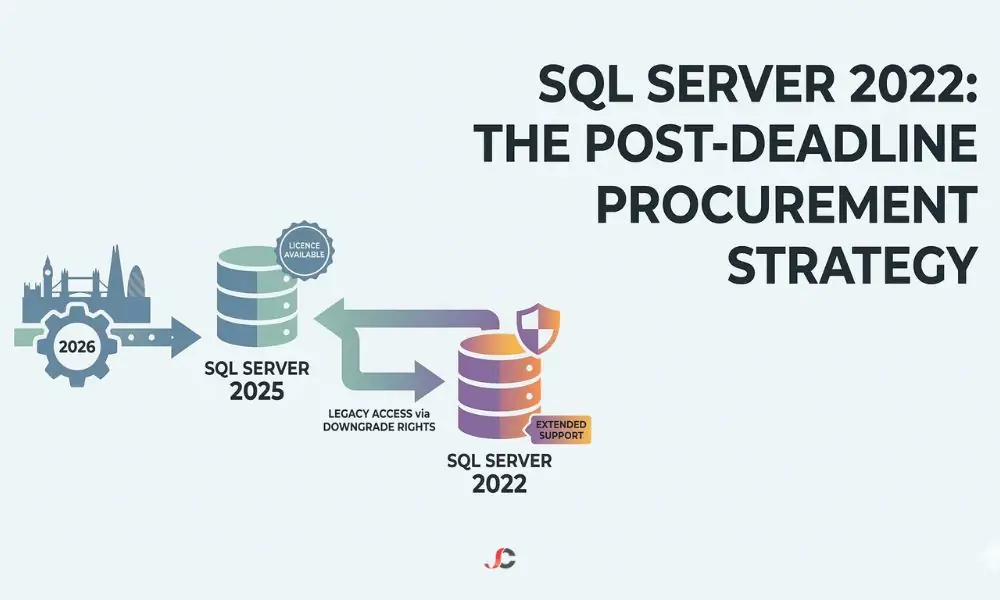
Following guidelines from authorities such as the National Cyber Security Centre (NCSC) on obsolete platforms, businesses must maintain a clear distinction between a product that cannot be bought and one that cannot be secured. The 2022 iteration remains under extended support and will receive security updates until 11 January 2033.
Understanding the Recent Timeline Changes
Knowing these exact milestones prevents last-minute compliance failures. Failure to meet these deadlines forces a business to change its purchasing strategy and, consequently, to buy the next version.
- Final Pre-Order Window: The period to lock in specific 2022-part numbers before they leave the catalogue.
- Commercial Cutoff Date: The absolute final day that Microsoft will accept orders for new 2022 perpetual licences.
- Software Assurance Renewal Deadline: The date active maintenance agreements must be verified to continue version upgrade rights.
- Channel Partner Inventory Depletion: The trailing period where distribution partners clear remaining tied Original Equipment Manufacturer (OEM) server images or legacy channel inventory.
How the SQL Server 2022 End of Sale Affects London SMBs
Growing businesses face immediate decisions regarding their infrastructure expansion. When deploying new database clusters later in the year, the recent commercial restriction means you must use the new SQL Server 2025 platform.
This shift severely impacts compliance and audit readiness. Software asset management relies on matching installed instances with specific purchasing records. Purchasing the 2025 version and running it in parallel with existing nodes running version 2022 will create issues that need careful management.
Audit discrepancies often arise when procurement teams lose track of version-specific rights. You must document exactly which servers operate under legacy agreements and which are covered by newly acquired licences.
Licensing Continuity and Downgrade Rights
Because businesses can no longer buy the 2022 version directly, the right to downgrade becomes the absolute most critical part of your procurement strategy. Buying the SQL Server 2025 licence to downgrade to the 2022 architecture is now the primary procurement path for those needing legacy compatibility. A business that has bought the latest generation of the licence is legally entitled to deploy the previous version of the software. Check Microsoft’s official lifecycle documentation to confirm the exact extended support dates for the SQL Server 2022 product family.
This mechanism ensures architectural consistency across your network. A legal practice with strict compliance requirements can purchase 2025 licences but install the 2022 version to maintain parity with their existing, validated document management systems—thereby securing compliance without breaking the application.
Budgeting for the Future: Pricing Alignment Updates
Financial directors have also predicted significant cost implications from moving to new software versions. Microsoft has confirmed that there will be no base cost increase in the next version. The cost model for the next version is similar to that of the current versions.
This pricing parity protects IT budgets from unexpected inflation. Knowing you face the same cost structure eliminates the pressure to execute panic purchases. You can allocate capital based on actual business needs rather than artificial vendor timelines.
Comparing Perpetual Licensing and Subscription Models
The recent cutoff serves as a natural catalyst to re-evaluate your consumption model. Although the initial spend can be substantial, perpetual licensing provides long-term usage rights without ongoing costs from the provider.
Subscription models require significant operational expenditure. They provide immediate flexibility to scale down core counts during quiet periods. This agility proves highly beneficial for retail businesses experiencing extreme seasonal transaction spikes during holiday periods, allowing them to pay only for the computing power they use.
Procurement Strategy and Licensing Planning
Proactive evaluation forms the foundation of robust IT governance. Your first action is to map out every active database instance across the organisation. Identify the specific version, edition, and core count associated with each deployment.
You must review your broader software licensing and subscriptions strategy to ensure complete alignment with vendor terms. Calculate the required core licences for your next three years of projected growth. Do not base future purchases solely on current usage metrics. Accurately forecasting compute demands prevents emergency purchasing at premium rates.
If internal resources lack the capacity for this forensic audit, seek professional IT consultancy services to assess your database requirements. Expert analysis prevents both costly over-licensing and dangerous under-licensing scenarios.
Evaluating Existing Agreements
Active Software Assurance changes the procurement dynamic entirely. Businesses with current agreements inherently possess rights to new versions released during their contract term.
Verify the expiration dates of all active Enterprise Agreements. If your coverage lapsed before SQL Server 2025 achieved general availability, you may have lost those free upgrade entitlements. It is crucial to maintain these renewals now that the commercial cutoff has passed. Allowing maintenance to lapse often forces a business to repurchase the full software suite at retail price.
Executing an Asset Management Audit
Before executing new purchases, you must perform a comprehensive Software Asset Management audit. Internal audits should be conducted quietly and methodically to avoid triggering formal vendor compliance checks prematurely.
Inventory physical cores and virtualised instances across your data centres. Identify whether your deployments use the Server plus Client Access Licence model or the per-core model. A healthcare provider in London may discover that moving from a user licence to a core licence is more cost-effective as their employee numbers increase. Compare those directly against your recorded entitlements within the volume licensing portals. Address any discrepancies immediately, as the recent commercial cutoff limits your ability to remediate.
Infrastructure Support During the Transition Period
Operating a mixed-version database environment demands rigorous administrative discipline. Your technical teams will manage distinct patch cycles, feature sets, and integration protocols simultaneously across old and new server nodes.
Administrators must verify that third-party applications from vendors such as Sophos or AvePoint fully support both legacy and newer database versions. Compatibility gaps can cause critical workflow interruptions during backup or security scanning routines. Ensure your internal documentation accurately reflects the topology of this hybrid deployment.
Running legacy software on newer physical hardware also presents challenges. You must ensure that your hardware lifecycle aligns with your software strategy. Deploying a legacy database on brand-new servers may require specific firmware configurations to achieve maximum throughput.
Securing ongoing server support for your backend infrastructure mitigates the risks associated with these complex transitions. Dedicated support personnel may be required to handle the complexities of cluster failovers and performance tuning across different SQL versions.
Data Protection and Continuity
Database migrations and licensing shifts bring about windows of vulnerability. The protection of underlying data remains an absolute priority. A simple procurement exercise must not compromise any disaster recovery postures.
You must implement robust backup and disaster recovery solutions tailored to high-availability database environments. Transaction log backups, along with synchronous replication, guarantee zero data loss, irrespective of the software version currently running on the host machine. In case your strategy includes moving your applications to the cloud to avoid licensing issues altogether, this data protection layer becomes more important. Hybrid environments require unified backup policies that provide total visibility across both domains.
Next Steps for Your IT Procurement Plan
Finalising your commercial strategy requires distinct, immediate actions. Delaying these steps increases the risk of budget overruns and compliance failures in this new post-deadline landscape.
- Conduct a Core Inventory: Audit every physical and virtual server running database workloads within your network.
- Verify Software Assurance: Check the exact expiration dates on your licensing portals.
- Analyse Downgrade Needs: Determine whether legacy applications strictly require older architectures to continue operating.
- Finalise the IT Budget: Lock in capital expenditure forecasts based on the guaranteed pricing parity.
Successfully migrating from the SQL Server 2022 end-of-sale cycle in 2026 is entirely possible with structured planning. Audit your core allocations today, verify your upgrade entitlements, and prepare your business for cost-effective database performance.
What does the product’s end of sale mean for my business?
It is the date on which Microsoft stops selling new licences for a certain version. This does not mean the application will no longer function or that support will be removed.
Can a business still use current database versions after January 2026?
Yes. Properly licensed installations continue to function and are supported.
Will the purchase deadline affect my existing perpetual licences?
No. Perpetual licences are owned by customers forever. The deadline only restricts new purchases of that product version.
Is the next version of the database software more expensive?
No. The base pricing model for 2025 is identical to that of 2022.
Do downgrade rights apply if I purchase a newer licence?
Yes. Buying the latest version allows the user to use the previously supported older version lawfully.
Should my organisation transition to subscription-based licensing?
It depends entirely on your cash flow preference. Subscriptions are operational costs, and licences are capital costs.
How do we verify our current database licensing compliance?
It is necessary to audit active cores and verify these against those in the volume licensing portal.
What is the most effective procurement strategy for a growing company?
Maintain active Software Assurance to secure free version upgrades and leverage downgrade rights to ensure application compatibility across mixed environments.