
A new server is a significant infrastructure investment, and a poorly planned deployment costs London SMEs in downtime, overspend and compliance risk. This server installation checklist for a London SME sets out every stage, from specifying the hardware to commissioning the live system. It is written for owners and office managers in finance, legal and recruitment who need a dependable plan and, in most cases, managed server support to deliver it.
Key Takeaways
- End-to-end timeline: A server installation for a London SME takes six to fourteen weeks from order to go-live, with procurement and delivery accounting for four to twelve of that total.
- Specification baseline: Most SMEs need eight to twelve processor cores, thirty-two to sixty-four gigabytes of memory, and solid-state storage in a resilient RAID array, sized with fifty per cent growth headroom.
- Commissioning is non-negotiable: Structured testing of backups, failover, and access before going live prevents the downtime and data loss that follow rushed deployments.
- Compliance matters in London: Finance, legal, and recruitment firms must demonstrate access controls, encryption, audit logging, and Cyber Essentials certification.
What does a server installation checklist for a London SME cover?
A server installation checklist for a London SME covers six stages: specification, procurement, pre-staging, on-site installation, commissioning and handover. The list specifies the hardware requirements, the appropriate delivery time, the cutover process to be followed, security hardening, and evidence of compliance. Compliance evidence is necessary for regulated businesses.
The checklist exists to remove guesswork from a high-risk project. Each stage depends on the one before it, so skipping or rushing a step tends to surface as a fault later, usually during go-live. The sections below work through each stage in the order you should address them.
How do you specify the right server for a small business?
Specifying a server starts with the workload, not the budget. Audit your applications, user count, data volume, and growth, then size processor cores, memory, storage, and resilience accordingly. Most London SMEs need a single resilient server or a small virtualised host, sized with at least 50% headroom for 3 years of growth.
List every role the server must perform: file and directory services, a line-of-business application, a small database, or virtualised machines hosting several of these. Each role has a different resource profile, and a database is far more demanding than file storage.
The most costly errors occur in specification when the servers are undersized, since they have to be replaced very soon afterwards. Independent IT consultancy at this stage matches the build to the workload rather than to a vendor template.
What CPU, RAM and storage does an SME server need?
A typical SME server runs file, directory and line-of-business workloads on eight to twelve processor cores, thirty-two to sixty-four gigabytes of memory, and solid-state storage in a RAID 10 or RAID 1 array. Virtualised hosts running several machines need 16 or more cores and 128 gigabytes of memory.
Below is a table of some examples of workloads typically encountered by SMEs and their matching recommended starting specifications.
| Workload | Processor cores | Memory | Storage | Resilience |
| File, print and directory (up to 25 staff) | 6–8 cores | 32 GB | 2× 1 TB SSD (RAID 1) | Single server plus cloud backup |
| Line-of-business app or small SQL (25–50 staff) | 8–12 cores | 64 GB | 4× 1.92 TB SSD (RAID 10) | Dual power supply, hot-spare disk |
| Virtualised host (multiple machines) | 16+ cores | 128 GB+ | 6× SSD (RAID 10) plus NVMe cache | Two-host cluster, replicated storage |
Always size storage for both capacity and performance. Solid-state drives are now the default for business servers, and a RAID array protects against single-disk failure without interrupting service.
Should a London SME choose on-premises, cloud or hybrid?
This will depend on data locality, latency, and predictable costs. The on-premises infrastructure is ideal for applications requiring low latency and for companies that must store their data on-premises; cloud computing is ideal for those looking to scale and remotely access data; and the hybrid cloud is ideal for retaining regulated data locally while scaling in the cloud.
| Model | Best suited to | Main trade-off |
| On premises | Latency-sensitive apps, on-site data residency, and predictable cost | Capital outlay and on-site maintenance |
| Cloud | Scalability, remote working, minimal hardware | Ongoing subscription and connectivity dependence |
| Hybrid | Regulated data on-site with cloud scale | Greater design and management complexity |
There is no universally correct answer. A recruitment agency with a remote workforce may favour the cloud, while a legal practice managing confidential matters may keep its primary data on-premises with cloud backup.
What are realistic lead times for a new server installation in 2026?
The realistic lead time is between six and fourteen weeks. It will take four to twelve weeks for procurement and delivery of the goods. The specification, pre-staging, installation, testing, and handover of the items will take an additional two weeks. Early order is the key to reducing lead time.
The most common planning error is assuming delivery is instant. Servers may have to be configured to meet customer needs, and enterprise support agreements could add more time. Please refer to the following numbers for guidance, but it is important to get your delivery date in writing.
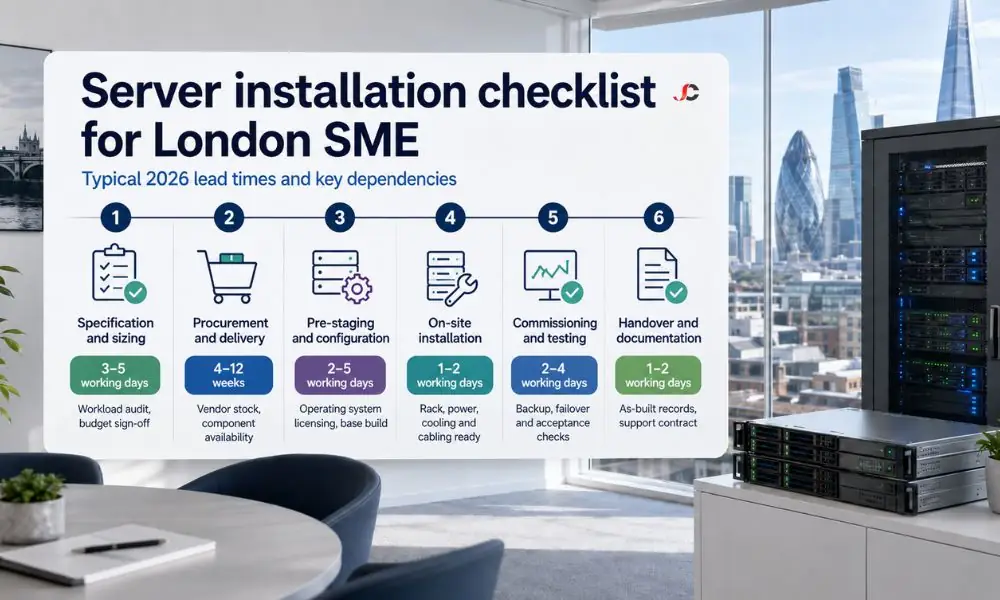
| Phase | Typical duration (2026) | Key dependencies |
| Specification and sizing | 3–5 working days | Workload audit, budget sign-off |
| Procurement and delivery | 4–12 weeks | Vendor stock, component availability |
| Pre-staging and configuration | 2–5 working days | Operating system licensing, base build |
| On-site installation | 1–2 working days | Rack, power, cooling and cabling ready |
| Commissioning and testing | 2–4 working days | Backup, failover and acceptance checks |
| Handover and documentation | 1–2 working days | As-built records, support contract |
Why do server hardware lead times vary?
The lead times will depend on component availability, manufacturing lead times at vendor sites, the number of customisations required, and the method of transport. Processor, memory, and storage customisation will add time to your delivery, whereas stock solutions will be delivered faster. You should also factor in worldwide semiconductor demand and freight conditions.
While a ready-to-go server can be delivered in under two weeks, a custom-made one will take longer, depending on the selected drives and warranty. In case there is a set delivery date, a standard configuration might be more sensible.
What does the on-site installation and commissioning process involve?
Installation at the facility involves rack installation, power supply, cabling, and connectivity, while commissioning involves configuration, integration, testing, and acceptance. In the case of the server, mounting and connecting the server to power and the network, followed by building the server with its OS, roles, security baseline, and backups, takes place before testing.
Installation and commissioning are two different processes that are often confused with each other. Installation is a fast process, but the real deal lies in commissioning, which should be treated as an entirely separate project to keep dependency issues clear. Structured IT project management holds the phases in the correct sequence.
How do you commission and test a new server before go-live?
Commissioning ensures that all features operate before users use them. Make sure you verify the operating system build, patch level, and security baseline; ensure that backups and restores work; validate failover and power availability; ensure application access and performance work; and then complete an acceptance checklist signed by both the business and engineer.
The sequence is important. You need to confirm the build and security baseline before verifying that the backups do what they are supposed to do, which is nothing without verification. The next step involves checking failover and power resilience by simulating a problem in either area and seeing whether the server continues to run.
How do you minimise downtime during a server installation?
Minimise downtime by having the server ready before moving, arranging a cutover during off-hours, and performing the transfer in phases with the option to roll back. If you can, run both the old and new systems simultaneously, test access before dismantling, and inform employees about the scheduled maintenance. Most SME migrations are done in one night.
The approach here is to complete everything before switching over, which will ensure the live window is small. A server that is completely assembled and tested before switching over requires nothing more than synchronising the data and then performing the switch, with a rollback plan in case something goes wrong.
What compliance and security steps apply to finance, legal and recruitment firms?
The regulated organisation will need to secure the server, restrict access, employ encryption and log auditing. The finance organisations adhere to FCA expectations, legal services organisations to SRA and UK GDPR responsibilities, and recruitment agencies manage substantial amounts of personal data. Cyber Essentials certification demonstrates that the appropriate precautions have been taken for our client.
Hardening entails applying a security baseline, deleting unnecessary roles and services, and patching the OS. Microsoft publishes the official Windows Server requirements, which cover supported configurations for current releases.
Certification provides external assurance. The NCSC Cyber Essentials scheme sets a recognised baseline of five technical controls that many London clients now require as a condition of doing business. Ongoing IT infrastructure support maintains these controls as the threat landscape and your obligations change.
When should a London SME engage an MSP for server installation?
Hire a Managed Service Provider when you do not have expertise in in-house IT infrastructure, when you have a small time available to switch over to cloud computing services, or if you need compliance within an industry segment. The MSP selects the server, implements the process, and manages data transfer.
What is important is not only the installation but also the responsibility that comes with it. The one who ordered the server will know how it is configured and will be responsible for it throughout its life cycle.
For firms relocating or consolidating systems, professional migration services in London move data and applications to the new server using a proven method and a rollback plan. Working through this server installation checklist with an experienced partner is the most reliable way to bring a new server online on time and on budget.
How long does it take to install a server for a small business?
The period between order and implementation is likely to be from six to fourteen weeks. Most of the time will be spent on procurement and transportation, which may take from four to twelve weeks. Installation is likely to take only one to two days, with the remaining few days for commissioning and testing.
How much does a new business server cost in the UK?
A single resilient SME server typically costs between three thousand and eight thousand pounds for hardware, plus operating system and licensing—a virtualised two-host setup with shared storage ranges from twelve thousand pounds upward. Installation and migration are additional. These indicative costs vary with specification, resilience, and the required level of support.
Should my London SME buy a server or move to the cloud?
Buy on-premises when you have latency-critical applications, need to store data locally, or want fixed cost over time. Opt for the cloud for flexibility, remote work, and no infrastructure maintenance. Most businesses in London tend to choose a hybrid approach, running compliant workloads locally while storing them offsite in the cloud. The best choice will be application dependent.
What specification does an SME file or application server need?
For up to fifty users, one needs an application server with eight to twelve cores, thirty-two to sixty-four gigabytes of RAM, solid-state storage on a reliable RAID system, and dual power supplies. Ensure that you size the system with room for growth over three years, and have a hot-spare disk as well.
What is server commissioning, and why does it matter?
Commissioning is the formal process that ensures the setup, integration, testing, and acceptance of a server before it is put into operational use. It ensures that the operating system, security level, backup, failover, and application connectivity are all functional. Commissioning is essential because it helps prevent problems before the server is used.
How do you avoid downtime when installing a new server?
Preparation and setup for the server should take place in an offline mode first. The cutover process must be scheduled for non-business hours. Data migration must occur in testable phases with a documented rollback plan; parallel operation of the old and new software must be possible, if feasible; and access must be verified before decommissioning.
Do finance and legal firms have extra server compliance requirements?
Yes. Financial companies must adhere to FCA expectations on resilience and data security. In contrast, legal companies must follow SRA standards and comply with the UK GDPR regarding confidential information held about clients. The recruitment business will be expected to comply with the GDPR because it processes personal data.
Can I install a business server myself, or do I need an MSP?
While an experienced technical team can set up a basic server, specification issues, migration failures, and lack of compliance are common causes of serious issues. The managed service provider offers sizing expertise, proven migration techniques, and proper commissioning procedures. In London’s regulated environment, it makes sense to opt for professional installation, especially for small enterprises.