
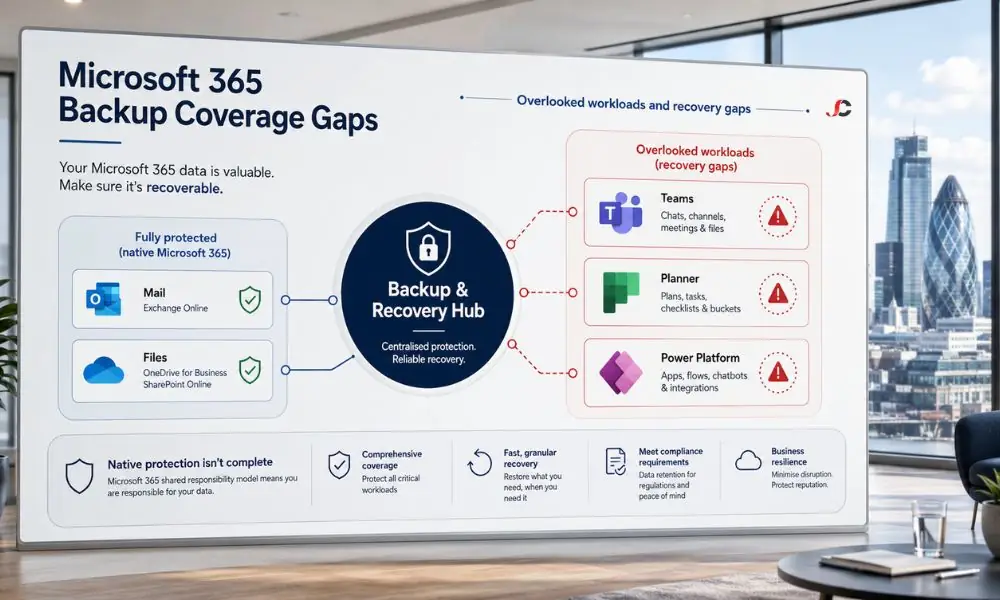
Finance, legal and recruitment firms run on Microsoft 365, yet most assume the platform protects everything inside it. It does not. Collaboration and low-code workloads sit in a blind spot, and a confident-sounding backup posture often unravels at the worst moment. A complete backup — Power Platform, Planner and Teams — belongs in your core data-protection plan, not on its margins. This guide examines the real gaps and how to close them before they affect disaster recovery readiness.
Key Takeaways
- Shared responsibility applies: Microsoft is responsible for ensuring the platform is available, whereas restoring your Teams, Planner, and Power Platform data is the customer’s responsibility.
- Retention is short: System-level backups in the Power Platform by default have seven-day retention in both production and non-production deployments, extendable up to 28 days in production Managed Environments only.
- Restores are constrained: You cannot restore a backup to a production Power Platform deployment; it must first be transformed to a sandbox.
- The ecosystem is fragmented: In protecting this workload, you need to consider protection for Dataverse, SharePoint Online, and Exchange Online, not just one area.
Why do teams assume Microsoft already backs up Teams, Planner and Power Platform?
Most organisations equate cloud availability with data protection. Microsoft guarantees service uptime and infrastructure resilience, not recovery of your individual content. Under the shared responsibility approach, data security depends on the customer; thus, protecting your Power Platform, Planner, and Teams is your responsibility, not Microsoft’s.
That may seem like a fair assumption, but it is incorrect. Microsoft 365 has an excellent recovery rate against hardware and geographical failures. The robustness of the system does not mean it can recover a deleted plan, an overwritten workflow, or a channel taken away by a departing employee.
The discrepancy grows even greater in cases where IT processes are lean. In many regulated SMEs, there is no assigned owner to facilitate cooperation and low-code workloads between the two teams. Microsoft documents this division in its retention policies guidance, which governs how long content is kept, not whether it can be restored.
What does Microsoft protect across these overlooked workloads?
Microsoft offers native retention and recycle bins, as well as limited point-in-time recovery for certain workloads. All three services are designed to address issues of governance and compliance, but not for granular restoration. There is a significant disparity among Microsoft Teams, Microsoft Planner, and Microsoft Power Platform in the availability of these capabilities.
The practical effect is uneven protection. A file deleted from a Microsoft Teams channel may sit recoverable in SharePoint Online for a period. In contrast, it could prove much more difficult, or even impossible, to retrieve a deleted Planner task or removed Power Apps environment when the window is closed.
How long does Microsoft retain deleted Planner and Teams data?
Retention will depend upon the quantity and type of work. Chats and channel messages will adhere to the Microsoft 365 retention policies and recycle bin windows. In the case of Planner, there is only a soft-deletion window during which content cannot be recovered natively.
The complexity is only multiplied when you consider that teams will have their data distributed. For instance, channel files are stored on SharePoint Online, private messages are routed via Exchange Online, and metadata is stored elsewhere.
Planner is even more difficult. Nothing in Planner lets you recover the entire plan from the start, including all buckets, labels, assignments, comments, and attachments. This data will not be saved via any manual export.
Does a Power Platform environment backup cover everything?
No. The Power Platform system backup will protect only those systems which are backed by Dataverse and will be performed continuously from Azure SQL Database. The default retention policy for both production and non-production environments is seven days. Only the application and flow inside a Dataverse solution can be backed up and restored.
Microsoft sets out these limits in its Power Platform backup and restore documentation. Some restrictions that were unexpected by the teams were.
- Restore targets: You cannot restore a backup directly to a production environment; convert it to a sandbox, restore it, then switch it back to production.
- Solution scope: Apps and flows that are not part of a Dataverse solution will be out of scope for your backup plan.
- Post-restore review: After restoring data, you should review apps, flows, and connections before working with the environment in production.
- No offline copy: Downloading a database backup for offline use is not supported.
Where are the real gaps in backup for Teams, Planner, and Power Apps?
Gaps exist in relation to granular recovery, structure, and timing. The shortcomings lie in the inability of native recovery options to recover a single message, a full Planner plan, or the actual status of the environment post-expiry or post-incident. To properly back up the Power Platform, Planner, and Teams, content should be recovered rather than governed.
For Power Apps backup and the wider Power Platform, the gap is structural. The limited default retention period, the restoration options confined to the sandbox environment, and the limited scope of solutions can make it impossible to restore a business application to its previous state.
The issue for the planning professional lies in completeness. The traditional approach misses attachments, revision history, comments and tasks. Where an employee owns a shared plan but leaves the organisation and is deprovisioned, all associated projects may be completely lost.
The difference for Teams is distribution and timing, since material distributed through several channels will need to be restored depending on its location, age, and whether it has entered hard delete status.
What is the business impact when a restore is missing?
The absence of a restore elevates an insignificant issue to one that can be quantified as a loss. Businesses subject to regulations may experience audit failures, violations of client commitments, and loss of project history. The impact occurs when a company tries to recreate its plan, programs, and communications from scratch.
“Cost of reputation” always overshadows “cost of money.” Law firms and recruiting agencies that fail to maintain their project records and candidate workflow documents, respectively, create a dent in client confidence, which lasts beyond the occurrence of such events.
| Scenario | Native outcome | Consequence |
| The Planner plan is deleted after the soft-delete expiry. | No full plan restores | Project history and assignments are lost |
| Power Apps environment corrupted after default retention | No in-window system backup | The business app is unrecoverable to the prior state |
| Leaver deprovisioned, owned Teams and Planner content | Partial or no recovery | Knowledge and continuity gap |
| Ransomware encrypts collaboration data. | Limited native rollback | Extended downtime, data loss |
How can finance, legal and recruitment firms close these gaps?
The regulated companies bridge their gaps by making collaboration and low-code workloads sensitive to business data rather than platform convenience. This is done by using an independent automated backup with long-term retention capability, along with granular restore. Additionally, cybersecurity measures can help minimise the occurrence of incidents.
Sector requirements back this up. Businesses subject to FCA, SRA, and UK GDPR requirements must ensure their business information is intact, available, and recoverable. The retention settings will aid the governance process; however, they are not meant to serve as a recovery solution and should therefore be kept distinct from backups.
- Independent backup: Keep copies separate from the platform, so a tenant-level incident does not affect them.
- Granular restore: Recover a single message, task, plan or environment without reverting everything.
- Extended retention: Align retention with legal and regulatory periods, beyond native defaults.
- Tested recovery: Verify restores on a schedule, because an untested backup is an assumption, not a control.
How should you build a backup plan for overlooked Microsoft 365 workloads?
First, determine where each workload stores its data, and assign owners and backups to each workload. Compliance needs should be determined in terms of document retention, which should be automated and regularly evaluated for recovery. Full backups will include the Power Platform, Planner, and Teams, all from Dataverse, SharePoint Online, and Exchange Online.
Begin with an inventory. Identify the Planner plans, Teams workspaces and Power Platform environments that hold business-critical data and record how native retention currently treats each.
Then close the loop with governance. Pair automated backup across these Microsoft 365 workloads with periodic restore testing and review the plan as collaboration patterns evolve. Protection that is never tested tends to fail precisely when it is needed.
Does Microsoft automatically back up Microsoft Teams chats and files?
Not as a separate backup solution. The retention policies and recycle bins that Microsoft implements are for SharePoint Online and Exchange Online, where Teams data is stored. They enable temporary recovery for a limited time, but they are implemented for governance purposes, not for granular, durable recovery.
Are deleted Planner tasks recoverable after the retention window closes?
No. Planner relies on short soft-delete periods, and there is no native function to restore an entire plan, including its buckets, labels, comments, and attachments. Once the soft-delete window expires, recovering deleted tasks through native tools alone becomes unreliable or impossible.
Does Microsoft back up Power Apps and Power Automate flows?
Only within limits. Power Platform system backups include apps and flows within a Dataverse solution. Apps and flows that are not part of a solution are outside that scope, and administrators should review apps, flows and connections after any restore before relying on the environment.
How long does Microsoft keep Power Platform environment backups?
By default, Power Platform retains system backups for seven days across production and non-production environments. For production Managed Environments, administrators can extend retention to 14, 21 or 28 days through the Power Platform admin centre or PowerShell. Trial-type environments are not backed up at all.
What happens to a shared Planner plan when a user is deleted?
Projects associated with a deprovisioned user may be lost. When the owning account is removed, shared plan elements associated with that account may disappear, and native tools provide no straightforward route to recover the complete plan structure afterwards. Independent backup is the reliable way to preserve and restore such plans.
Is a Microsoft 365 retention policy the same as a backup?
No. The retention process determines how long the content will be retained in accordance with the law. It cannot be used to quickly restore any data that may have been accidentally deleted or hacked.
Which overlooked workloads matter most for finance and legal firms?
Records related to planner projects, conversations and documents related to Teams clients, and Power Platform applications containing regulated data. All these types of workloads contain audit-relevant information but do not necessarily fall within the scope of security coverage that companies assume is already provided by the platform.
How often should an SME back up Teams, Planner and Power Platform?
Automated backups are used for such workloads in most organisations, with backup intervals varying depending on the speed and significance of data changes. The appropriate interval depends on the recovery point objective, recovery time objective, and data sensitivity, among other factors.