
The deployment of generative AI is not a toggle switch but an architectural decision. It is the organisation’s responsibility to ensure that the data stays within the boundaries. For most organisations, Copilot Chat in Microsoft 365 is the main interface for this new generation of productivity. This guide examines the technical requirements and administrative controls necessary for a secure rollout. Before beginning the deployment, it is vital to review the broader Microsoft Office 365 overview and services to ensure the underlying infrastructure is prepared.
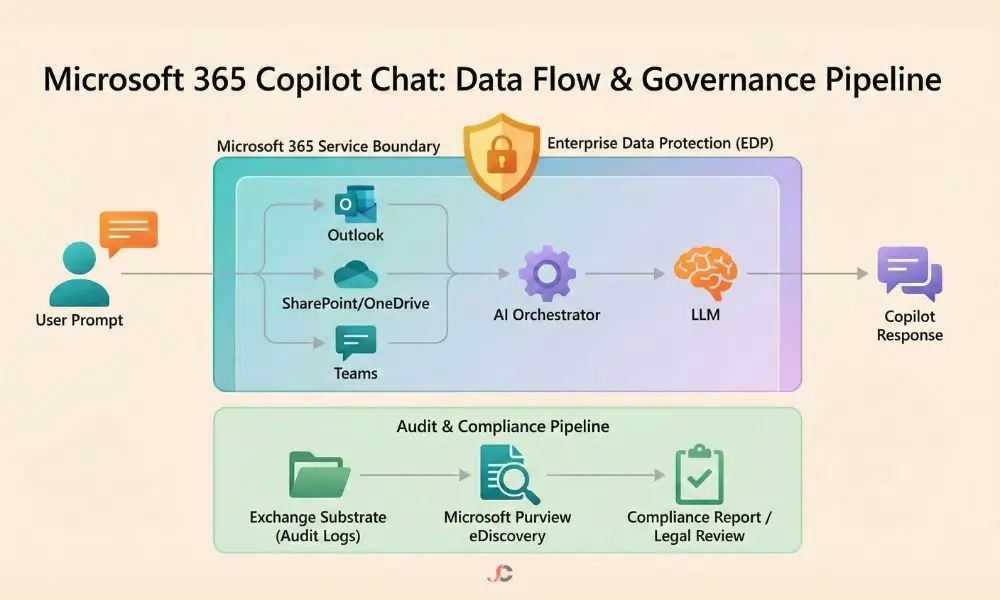
Copilot Chat in Microsoft 365
The interface is an advanced orchestration layer. It sits between the user and the Large Language Model (LLM). Unlike consumer-grade chatbots, this system runs with Enterprise Data Protection (EDP). It uses the Microsoft Graph to surface relevant information from emails, files, and chats.
The distinction between “Web” grounding and “Work” grounding is critical. Web grounding uses the Bing search engine to fetch real-time public data. Work grounding will limit the search to the internal tenant and any Microsoft Graph connectors that are integrated. Permissions define protection. Security is of utmost importance in this case.
Establishing a Governance Framework
Governance is the foundation of a successful AI strategy. Without it, the risk of data oversharing increases significantly. An organisation must define who can access the tool and what data it can process. This involves a comprehensive review of existing data silos and user permissions.
UK Data Boundary and Residency
UK Data Boundary: For a London-based financial services firm, data residency is not optional. It is a regulatory mandate. Microsoft 365 services for UK tenants are under the UK Data Boundary. This ensures that the prompts and resulting data stay within the regional data centres.
Administrators must verify their tenant location. Confirm that your residency settings align with local compliance laws. This prevents sensitive client information from crossing international borders during processing.
Permission Models and Just-Enough-Access
Copilot Chat respects existing SharePoint and OneDrive permissions. It cannot see what the user cannot see. However, many organisations suffer from “permission creep” where files are inadvertently shared with “Everyone except external users”.
Conduct a pre-deployment audit to map data flows. Use tools like Microsoft Purview to identify sensitive files that have been overshared. Rectifying these permissions prevents the AI from surfacing confidential payroll or strategy documents to the wrong employees. You may wish to consult with specialists regarding Microsoft 365 Copilot governance and use cases to build a more robust permission matrix.
Technical Setup and Rollout Controls
The deployment phase should be iterative. Start with a pilot group. This allows the IT team to monitor performance and user behaviour in a controlled setting. The configuration process involves several technical layers.
Configuring the Copilot Control System
The Microsoft 365 Admin Centre provides the primary controls for Copilot Chat in Microsoft 365. Here, administrators can assign licences and manage global settings.
| Governance Feature | Web Grounding (Public) | Work Grounding (Internal) |
| Data Source | Bing Search Engine | Microsoft Graph + Connectors |
| Privacy Tier | Enterprise Data Protection | Enterprise Data Protection |
| Data Training | No (Isolated) | No (Isolated) |
| Compliance Logging | Limited | Full eDiscovery (Substrate) |
Administrators must navigate to the ‘Settings’ menu and select ‘Copilot’ to access the global toggle. This menu enables granular feature enablement. It is here that an organisation can choose to turn on or off web-based chat for specific security groups. A phased rollout is often the most prudent path. Start by assigning licences to a ‘Pilot’ group consisting of IT and Compliance stakeholders. This group can stress-test the system against the organisation’s internal policies before a company-wide release.
Implementing Secure Connectivity
The availability of these services depends on a reliable, secure network path. This requires that firewalls do not restrict Microsoft 365 endpoints and that low-latency hardware integration be considered where necessary. Additional advanced cybersecurity support may be needed to verify encryption, resist external threats, and enable inspection of encrypted traffic to prevent data exfiltration via prompt manipulation.
Monitoring and Audit Compliance
Visibility is the enemy of risk. Every interaction within the chat interface is logged. These logs are captured via the Microsoft 365 Substrate and stored in a hidden folder within the user’s Exchange Online mailbox.
This storage mechanism allows legal teams to perform eDiscovery. If a compliance breach is suspected, administrators can search through prompts and responses. It provides a clear audit trail. It ensures accountability. It satisfies the requirements of internal auditors and external regulators alike.
Licensing After Upgrade
Moving from standard productivity tools to an AI-enhanced environment changes the licensing landscape. It is not merely an add-on. It is a fundamental shift in how seats are managed.
Organisations should examine their Microsoft 365 E3 or E5 foundations, including the price and SKU changes in July 2026. The deployment of Copilot requires assigning the Copilot license to the user account, which enables the chat experience in desktop and mobile apps. For cost and eligibility, refer to the Microsoft 365 subscription options.
Best Practices for London Businesses
Local businesses must keep pace with developments to stay competitive. The National Cyber Security Centre (NCSC) provides clear guidance on how Large Language Models should be used. Aligning your internal policy with these principles is highly recommended.
Focus on prompt engineering training. Teach staff how to use the tool without inputting sensitive personal identifiers. Develop an “Acceptable Use Policy” specifically for generative AI. This document should outline what the tool can and cannot be used for.
Reliable ongoing management is the final piece of the puzzle. Professional Microsoft 365 support for London businesses ensures that, as the platform evolves, your governance remains intact. Technology moves fast. Security needs to progress faster. London firms should conduct quarterly permission checks to help ensure the AI index is clean.
Summary of Governance Actions
Organisations that employ Copilot Chat in Microsoft 365 need to adopt a proactive strategy. Do not wait until a data breach occurs. Follow these protocols to tap into the benefits of AI while ensuring secure productivity:
- Assess settings for the Data Boundary in the UK.
- Organise permissions in SharePoint and OneDrive to minimise the risk of a breach.
- Activate audit logging in Purview for all licensed users to keep a Substrate-level audit trail.
- Schedule periodic AI-readiness checks with your IT partner.
- Evaluate NCSC security principles for the integration of generative AI.
By adhering to these protocols, your organisation can leverage the power of AI while ensuring the highest standards of data integrity. The road to an automated workplace is not simple. It demands eternal vigilance. It rewards you with efficiency. Good governance helps you reap the rewards of speed without compromising security.
Where is Copilot Chat data stored?
This is monitored through the Microsoft 365 Substrate and is recorded in a hidden folder on the user’s Exchange Online mailbox.
Does Copilot use my data to train public models?
No, Microsoft 365 Copilot does not use data to train the underlying Large Language Model.
Can I limit Copilot Chat to certain users?
Yes, you can control access via licence assignment and the Copilot Control System in the Microsoft 365 Admin Centre.
How is “Web Grounding” different from “Work Grounding”?
Web uses Bing for public results; Work searches tenant data via Microsoft Graph and connectors.
Does Copilot Chat respect SharePoint permissions?
Absolutely. Users will only view content for which they already have View permissions.
How can I audit Copilot Chat prompts?
Organisations can use the Microsoft Purview Audit and eDiscovery tools to search interaction logs stored in the mailbox substrate.