
Microsoft Office 365 has improved IT control for customers using OneDrive for Business. With this, your IT administrators now control how files are shared within and outside your organisation’s other features—making it possible for your organization to organisation tools over who views or edits their documents. Here are some of the areas in your IT department has more control.
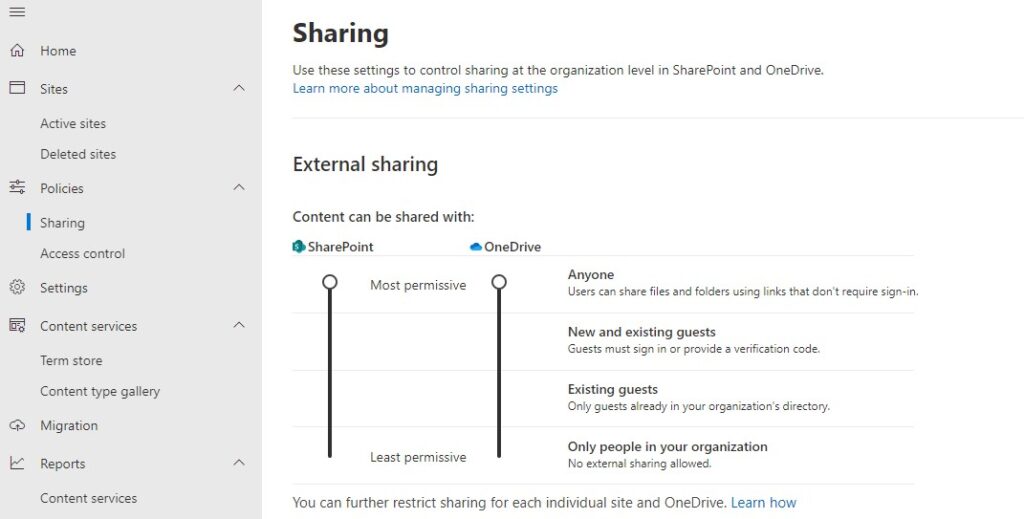
External Sharing Control For Business
External sharing is one of the areas Microsoft has improved on OneDrive for business in Microsoft Office 365, and it is enabled by default. The external sharing features make it easy for users at work to work in partnership with your clients and partners in other organizations’ organisations sleepless nights for fear of sharing with your competitors. Fear no more! Microsoft has given your IT department control to audit external sharing invitations, limit external sharing permissions to specific users, and limit the domains your users are allowed to share with.
Control to Audit External Sharing Invitations
It is usual for regulated industries to audit every conversation with external bodies. Be it an email or text, users add to any of their external sharing invitations. The ability to blind copy the full text of any invitation emails to a dedicated archive mailbox has been added to OneDrive for business. This is made possible by the SharePoint Online Management Shell. It allows you to specify the address to receive the bcc copy. This is done using the Set-SPOTTenant-BccExternalSharingInvitationsList command. Once you set this, a copy of every invitation by your users will be sent to the mailbox and will be available for later auditing or review.
Authority to Limit External Sharing Permissions for Specific Users
You may want to block specific organisations from sharing documents with people outside your company. For example, no organization organisationancial disclosures are shared with outsiders. So you may prefer to prevent people in that department from sharing documents outside your company. Now all OneDrive for Business users can disable external sharing permissions for specific users. The Set-Sharing Capability has been enabled to work for individual OneDrive for Business sites the same way it works for team sites. Every user affected is informed they cannot share externally once the admin disables sharing.
Managing External Sharing Domains
Microsoft announced they are working on a feature to give admins control over which external email domains can be invited to view and edit shared documents and files. With this external sharing tab, admins can allow or deny lists of emails to be added to sharing list. This really will be an excellent feature for IT Admins if added.
With these new features added to OneDrive for Business, Microsoft 365 subscription has moved further to give organizations more control over their files and data.
We will keep you posted whenever something new comes up on Microsoft’s OneDrive for Business. So keep a date with the IT Support company in London to ensure you don’t miss any updates.