
Microsoft Exchange Server licensing changed fundamentally in July 2025, when Exchange Server Subscription Edition (SE) replaced Exchange 2016 and 2019. For UK SMEs that still email on their own servers, the old buy-once model has gone, and every server and user now needs an active subscription. This guide explains how the model works, what it costs and how it fits with your wider software licensing and subscriptions.
Key Takeaways
- Model: Exchange Server SE needs a server licence for each running instance plus a Client Access Licence (CAL) for every user or device.
- Subscription: Server licences and CALs must be subscription licences or carry active Software Assurance, or the right to run updates ends.
- Prices: On-premises server licences rose by 10% from 1 July 2025, and Core and Enterprise CAL Suites later rose by 15% and 20%.
- Hybrid: A server used only for hybrid management can be licensed through the Hybrid Configuration Wizard.
How does Microsoft Exchange Server licensing work?
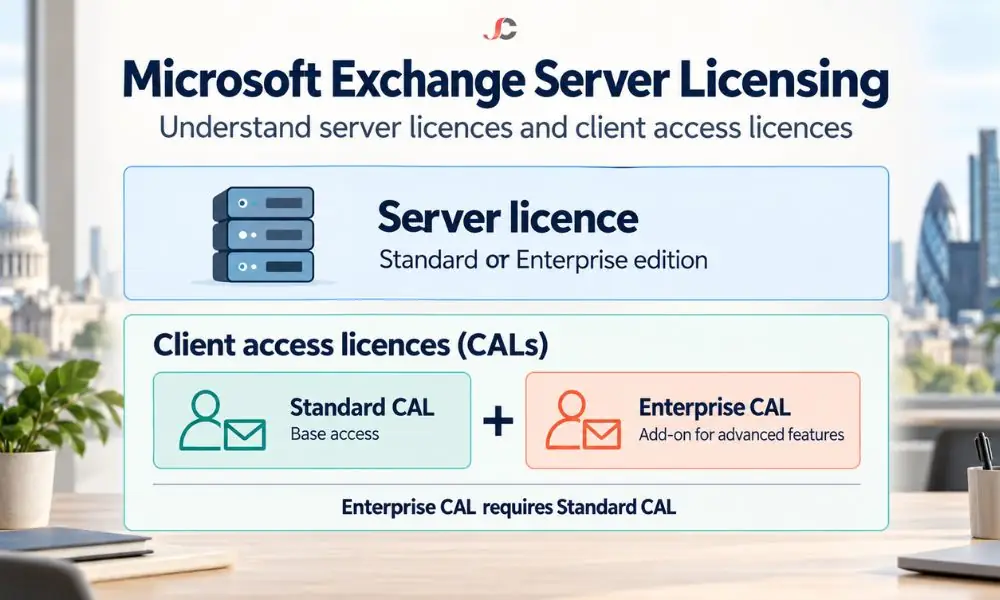
Microsoft Exchange Server licensing follows a server plus CAL model. You license each running instance of Exchange Server, physical or virtual, with a Standard or Enterprise server licence. You then license every user or device that accesses it with a CAL. You choose the server edition and CAL type independently.
The server edition depends on scale. Standard supports up to five mounted mailbox databases and suits most SMEs. Enterprise supports up to 100 databases and suits larger or multi-site deployments.
CALs come in user and device versions. A user CAL covers one person on any number of devices, which suits staff who use a laptop, phone and tablet. A device CAL covers one device used by several people, such as a shared reception terminal or shift workstation.
| Licence | What it covers | Typical SME choice |
| Standard server licence | One running instance, up to 5 mailbox databases | Most single-site SMEs |
| Enterprise server licence | One running instance, up to 100 mailbox databases | Larger or multi-site estates |
| User CAL | One named person on any number of devices | Office and hybrid staff |
| Device CAL | One device shared by several people | Shared terminals and shift work |
What is the difference between Standard and Enterprise CALs?
The Standard CAL covers core email, calendar, contacts and Outlook on the web. The Enterprise CAL is an add-on, not a replacement, so each Enterprise user needs a Standard CAL and an Enterprise CAL. It unlocks compliance features such as In-Place Archive, In-Place Hold, multi-mailbox search and per-user journaling.
Microsoft publishes the full feature split in its Exchange Server SE licensing overview. The table below summarises the features that matter most to SMEs.
| Feature | Standard CAL | Standard plus Enterprise CAL |
| Email, calendar, contacts and tasks | Yes | Yes |
| Outlook on the web | Yes | Yes |
| Journaling per database | Yes | Yes |
| Journaling per user or distribution list | No | Yes |
| In-Place Archive and In-Place Hold | No | Yes |
| Multi-mailbox search | No | Yes |
| Information protection and control rules | No | Yes |
This split matters for regulated firms. Legal holds, eDiscovery searches, and per-user journaling are routine in law firms and FCA-regulated businesses, and every in-scope user needs the Enterprise CAL.
What changed with Exchange Server Subscription Edition?
Exchange Server SE became generally available on 1 July 2025 and succeeded Exchange Server 2016 and 2019, which ended support on 14 October 2025. SE adheres to the Modern Lifecycle Policy, so it has no fixed end date. In return, Microsoft requires you to stay licensed and keep it up to date with updates.
The first release of SE has the same code as Exchange Server 2019 Cumulative Update 15. You can upgrade in place only from Exchange 2019 CU15 running on Windows Server 2022 or 2025. Older versions need a full migration to new servers.
Microsoft Exchange Server licensing for SE is otherwise familiar. You still buy server licences and CALs, and the Standard and Enterprise editions remain. The change is that perpetual rights alone no longer keep your servers supported, so licensing is now an ongoing cost rather than a one-off purchase.
Do you need Software Assurance or a subscription for Exchange Server SE?
Yes. Microsoft’s Product Terms for Exchange Server state that Exchange Server SE server licences and CALs must be subscription licences or have active Software Assurance. If the subscription or Software Assurance lapses, you lose the right to install updates, including security fixes, and to keep running the product.
There are three practical ways to meet this requirement. The right one for your firm depends on how you already buy Microsoft licences.
| Option | How it works | Best for |
| Licences with Software Assurance | Server licences and CALs bought with Software Assurance, which is renewed for as long as you run SE | Firms with existing volume licensing agreements |
| Subscription licences | Server and CAL subscriptions paid on a recurring term | Firms that prefer a predictable operating cost |
| Cloud CAL equivalents | Exchange Online Plan 1 counts as a Standard CAL, and Plan 2 counts as an Enterprise CAL. | Hybrid estates where users already hold cloud licences |
The third option is often overlooked. Many SMEs already pay for Microsoft 365 subscriptions that include Exchange Online, and the Product Terms list Exchange Online user licences as CAL equivalents. Check the current Product Terms for your exact plan before you rely on this, because eligibility depends on the specific licence.
Software Assurance also offers rights that matter for planning. License Mobility lets you use your server licences on a shared cloud infrastructure, while disaster recovery rights apply to a passive standby server.
How have Exchange Server prices changed?
Microsoft raised on-premises server prices from 1 July 2025. Server licences for Exchange Server SE, SharePoint Server and Skype for Business Server rose by 10%. From August 2025, the Core CAL Suite rose by 15% and the Enterprise CAL Suite by 20%. Combined with the subscription requirement, on-premises Exchange now costs noticeably more each year.
Microsoft does not publish a single UK price list for Exchange Server SE. Prices vary by agreement and reseller, so request quotes on the same basis and compare the total cost over three years, not only the first year.
When you model the cost of Microsoft Exchange Server licensing, include more than the licences. Count Windows Server licences for each Exchange host, hardware or hosting, backup, anti-spam filtering and the staff time spent on patching. Those costs often decide whether on-premises Exchange still makes sense for a 20- to 200-user business.
How is an Exchange hybrid server licensed?
A server kept on-premises only to manage a hybrid connection with Exchange Online can be licensed through the Hybrid Configuration Wizard. During setup, you can license the server and sign in to your Microsoft 365 account. Microsoft’s long-standing condition is that this server must not host user mailboxes.
Many SMEs that have already moved their mailboxes to the cloud keep one Exchange server for recipient management and directory synchronisation. That server must also run Exchange Server SE once older versions are removed, which is why the hybrid licence matters.
If even a single user mailbox is hosted on the server, you need a Standard or Enterprise edition licence for the server, plus CALs for every user or device that accesses it. Please check the hybrid licensing terms with Microsoft or your licensing partner.
Should UK SMEs license Exchange Server or move to the cloud?
Exchange Online is more appropriate for most UK SMEs, except where a specific need requires the mail to stay on-premises. Exchange Server SE comes with an ongoing licence fee, and you will still incur costs for the server, backups, security, and patching.
The comparison is as much a licensing decision as a technical one. With Exchange Online, the user licence covers the service, so you do not need to track server licences, CALs, or Software Assurance renewals. Compare the options against Exchange Online plans before you renew on-premises licences.
| Factor | Exchange Server SE | Exchange Online |
| Licences needed | Server licences, CALs, plus subscription or Software Assurance | One user subscription |
| Infrastructure | Your servers, Windows Server licences and backup | Hosted by Microsoft |
| Patching | Your responsibility, on Microsoft’s update cadence | Handled by Microsoft |
| Compliance features | Enterprise CAL for archiving and holds | Included in higher plans |
Regulated companies should consider this. The UK GDPR requires security for personal data, and an unpatched mail server is a common route to breaches. Record-keeping and confidentiality requirements of the FCA and SRA do not depend on where your mail server is located.
If you decide to move, a planned migration-as-a-service project can retire on-premises servers and their licence renewals in a single programme. Time the move before your next Software Assurance renewal to avoid paying for another term.
Microsoft Exchange Server licensing decisions are easier when server, CAL and cloud licences are reviewed together. Server Consultancy helps UK SMEs in finance, legal and recruitment compare on-premises and cloud options and plan the move. Speak to our Microsoft 365 consultancy team for a licensing review.
Can I still buy a perpetual Exchange Server licence?
Exchange Server SE licences must be subscription licences or carry active Software Assurance. A perpetual licence without Software Assurance does not give you the right to keep SE running and updated.
Do I need a CAL for every mailbox?
You need a CAL for every individual or device accessing the server, not per mailbox. Calculate the number of individuals or devices accessing the server, then select the appropriate CALs.
Can Exchange Online licences replace CALs?
Yes. The Product Terms list Exchange Online Plan 1 as a Standard CAL equivalent and Plan 2 as an Enterprise CAL equivalent. Check that your plan qualifies before you reduce your CAL count.
Is the hybrid server licence free?
A server used only for hybrid management can be licensed through the Hybrid Configuration Wizard at no extra cost. It must not host user mailboxes; otherwise, it needs a full server licence.
Do I need Enterprise CALs for legal hold?
Yes. In-Place Hold, In-Place Archive and multi-mailbox search require a Standard CAL plus an Enterprise CAL for each user in scope. Law firms and FCA-regulated businesses often need them.
Can I upgrade Exchange 2016 directly to SE?
No. In-place upgrades to SE work only from Exchange 2019 CU15 on Windows Server 2022 or 2025. Exchange 2016 needs a migration to new SE servers.
Does Exchange Server SE run without the internet?
Yes. Exchange Server SE does not require cloud connectivity to run. You still need a valid subscription or Software Assurance to stay licensed for updates.
Who should check our Exchange licensing position?
Your licensing or IT partner should review the number of servers, CAL types, and Software Assurance dates as a single unit. It is surprising how often an efficient review uncovers unnecessary CALs or users already covered by cloud licences.