
Microsoft 365 data protection is a critical yet often misunderstood area for small and medium-sized businesses in London. While the platform provides essential tools for communication and collaboration, many assume that Microsoft automatically backs up all their data. This assumption can leave businesses vulnerable to serious risks, particularly when facing cyber threats, accidental data loss, or compliance requirements.
The Misconception About Built-In Backups
Microsoft 365 includes features such as version history, recycle bin recovery, and limited data retention. However, these tools are not designed to serve as complete backup solutions. They offer short-term convenience, not long-term protection.
Many London SMBs believe their Microsoft 365 data protection is safe simply because it is stored in the cloud. In reality:
- Retention periods are short and can be easily exceeded without warning.
- Permanently deleted data is often unrecoverable through native tools.
- There is no point-in-time recovery option for restoring data after major incidents.
This misunderstanding can result in the loss of critical business data, with no viable recovery path.
What Is the Microsoft 365 Shared Responsibility Model?
Many businesses believe that once their Microsoft 365 data protection is in the cloud, Microsoft takes full responsibility for its safety. This is a common misunderstanding. The Microsoft 365 shared responsibility model outlines who is accountable for what when it comes to protecting your business data, and much of that responsibility falls on you.
Understanding this model is essential for any organisation looking to implement proper Microsoft 365 data protection.
Microsoft’s Role vs. Your Business’s Responsibility
Responsibility for cloud-level protection lies with Microsoft, which entails:
- Maintaining the uptime and availability of Microsoft 365 services.
- Ensuring the physical and digital security of its data centres.
- Applying security patches and maintaining the infrastructure.
However, your business is responsible for security in the cloud, which means:
- Managing who has access to your Microsoft 365 data protection and how it is used.
- Protecting against accidental deletion, insider threats, and malware.
- Ensuring data retention and recovery meet business and compliance needs.
This division makes it clear that Microsoft does not automatically protect your data from loss. Businesses must implement their strategies for backup, recovery, and access control within the Microsoft 365 data protection.
Examples Relevant to UK SMBs
Let us consider a few examples that show how this model affects London-based small and medium-sized businesses:
- Scenario 1: Accidental File Deletion. An employee mistakenly deletes a client folder in OneDrive. After the standard retention period ends, Microsoft cannot recover it. Without a third-party backup in place, the data is permanently lost.
- Scenario 2: Ransomware Attack. A phishing email compromises a user’s account, encrypting files across SharePoint and Teams. Microsoft ensures its services are running, but recovering the data is your responsibility. If you have no backup, the files may be unrecoverable.
- Scenario 3: Compliance Review. A financial services firm in London is required to provide email records for a regulatory audit. Microsoft 365 may not retain emails long enough to meet legal retention requirements. A proper Microsoft 365 data protection strategy ensures long-term archiving is in place.
These scenarios highlight that relying solely on Microsoft’s built-in tools leaves gaps in your protection. Understanding the balance of responsibilities helps UK businesses reinforce their IT systems with tailored security practices with Microsoft 365 data protection.
To stay secure and compliant, businesses must take active steps to ensure that Microsoft 365 data protection is not just assumed but fully implemented.
What Could Go Wrong Without a Backup Plan?
Even when businesses recognise the limits of Microsoft’s responsibility, many still fail to put a proper backup strategy in place. It is a common mistake to rely solely on Microsoft’s built-in features, assuming they will cover all recovery needs. In practice, this leaves many small and medium-sized businesses in London unprepared to handle real-world data loss scenarios.
Microsoft 365 data protection is not just about storing information securely—it is about ensuring you can recover it swiftly, thoroughly, and with confidence.
The True Cost of Not Having a Backup Strategy
Without a defined approach to backup and recovery, the consequences of disruption are often far worse than the cause itself.
Key issues include:
- Incomplete recovery: Without a backup, businesses cannot restore files to a precise moment in time, often resulting in partial or outdated data being retrieved.
- Delays in business operations: The time spent manually recovering lost content can result in extended downtime and reduced productivity.
- Compliance failures: When records are missing or inaccessible, businesses may be unable to demonstrate regulatory compliance.
- Loss of customer trust: Clients and partners may lose confidence if critical communications, files, or systems are disrupted without a clear recovery path.
Why Native Tools Fall Short in Real Scenarios
Microsoft 365 offers limited recovery options that are not designed for comprehensive Microsoft 365 data protection or long-term retention.
Common limitations include:
- Short retention windows: Items deleted beyond the 30–90-day threshold are often unrecoverable.
- Permanent data loss beyond limits: If no additional backup exists, deleted content is lost once it exits the retention period.
- No full-environment restore: Microsoft does not offer a one-click rollback to a clean state before an incident occurred.
- Manual, fragmented recovery: Retrieving lost data often requires manual steps across multiple admin centres, increasing complexity and the risk of errors.
These challenges underline a crucial point: storing data in the cloud is different from protecting it. Microsoft 365 data protection must be proactive, not reactive.
For London SMBs, having a structured backup plan in place is essential—not just for peace of mind, but for business continuity, compliance, and customer confidence.
Critical Workloads That Require Backup
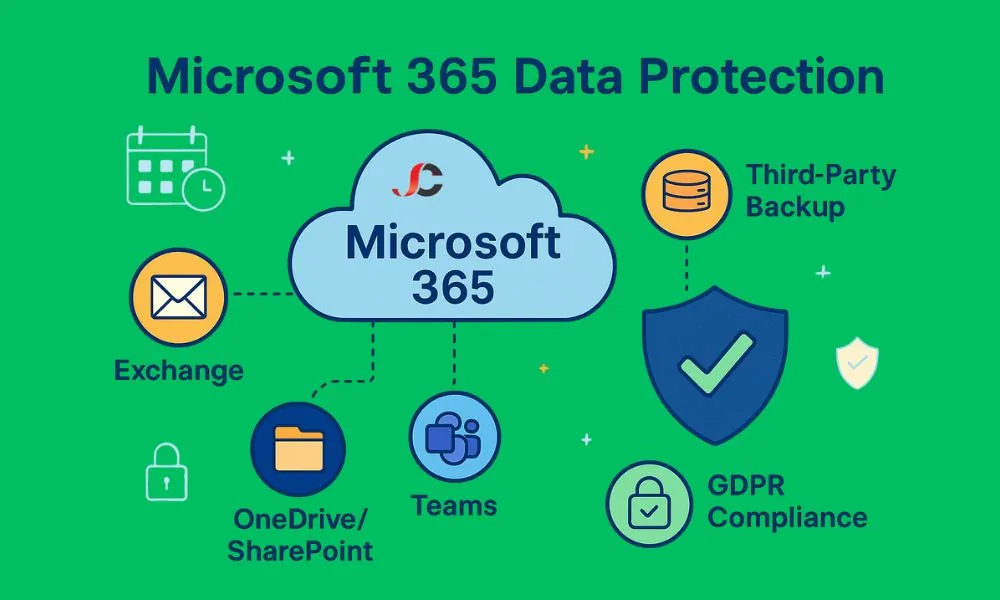
Not all data within Microsoft 365 data protection is equally visible or easily recoverable. While many businesses focus on file storage, there are several workloads—some less obvious than others—that are critical to daily operations and long-term compliance. Microsoft 365 data protection must cover all key services to ensure no essential information is overlooked or left exposed.
The following workloads hold most business-critical data for most London SMBs and should form the core of any Microsoft 365 data protection strategy.
Exchange Online – Emails, Calendars, and Contacts
Exchange Online remains the most heavily used service in Microsoft 365 and is essential for business communication, scheduling, and contact management.
- Email correspondence: Often required for audits of legal, regulatory, or client communications.
- Shared and archived mailboxes: Frequently overlooked but commonly needed after staff departures or role changes.
- Calendar events: Loss of scheduling data can disrupt operations, especially in service-led businesses.
- Contacts and distribution lists: Essential for client and internal coordination.
Accidental deletions, account resets, or cyber incidents can wipe out years of valuable data. Without backup, many of these items are unrecoverable after retention limits are exceeded.
SharePoint and OneDrive – Files and Document Libraries
File storage has shifted away from local servers and into the Microsoft cloud. While convenient, it assumes that all files are safe by default, which is not the case.
- Shared documents: Often edited collaboratively, which increases the risk of overwriting or accidental deletion.
- Departmental SharePoint sites: Contain structured content libraries that are hard to restore manually.
- Personal OneDrive folders: Hold working documents, proposals, and sensitive information tied to individual users.
Version history provides limited rollback options, but full recovery is only possible with a structured backup solution. Microsoft 365 data protection ensures that entire folders, sites, or individual files can be recovered as needed.
Microsoft Teams – Conversations, Shared Files, and Meeting Data
Teams is increasingly becoming the central hub for communication and collaboration. However, many businesses do not realise that their data is spread across multiple Microsoft 365 services, making recovery complex without dedicated tools.
- Chat messages and threads: Hold project context, internal decisions, and client communication history.
- Shared files: Stored in associated SharePoint and OneDrive locations but managed within Teams.
- Meeting recordings and notes: Often essential for compliance or follow-up actions.
Teams’ data is dynamic and constantly evolving. Without proper Microsoft 365 data protection in place, the loss of even a single channel or conversation can have operational consequences.
Microsoft 365 data protection must go beyond basic storage and address each of these critical workloads with the right backup coverage. For London SMBs, ensuring complete visibility and recoverability across Exchange, SharePoint, OneDrive, and Teams is vital for both productivity and compliance.
Third-Party Backup Solutions: Why Native Tools Are Not Enough
Relying solely on Microsoft’s built-in recovery options is a common but costly mistake. While Microsoft 365 includes basic tools for short-term recovery, these are not designed to meet the full backup and restore needs of small and medium-sized businesses. For complete Microsoft 365 data protection, a third-party backup solution is essential.
London SMBs face increasingly complex compliance requirements and rising cyber threats. Without proper backup, the risks to data availability, integrity, and continuity can escalate quickly.
Limitations of Built-In Microsoft 365 Recovery Options
Microsoft 365 offers limited data recovery features, but they were never intended to serve as a complete backup solution. These native tools provide temporary safety nets, not long-term protection.
Key limitations include:
- Short retention periods: Most deleted data is only recoverable for 30 to 90 days, depending on the service.
- No point-in-time restore: Businesses cannot roll back to a specific date and time across multiple workloads.
- Scattered recovery tools: Recovery must be managed through multiple admin centres, making the process slow and error-prone.
- Lack of custom backup policies: Native options do not allow for tailored retention schedules that match business or legal requirements.
These gaps leave businesses without a reliable way to recover from accidental deletion, ransomware attacks, or data corruption.
Cloud-to-Cloud Backup Solutions for SMBs
Third-party backup solutions work by copying Microsoft 365 data to a separate, secure cloud environment. This ensures that your information is stored independently from Microsoft’s infrastructure and remains accessible even during outages or account issues.
Benefits for SMBs include:
- Automated, regular backups: Data is backed up daily or in near real-time, eliminating the need for manual intervention.
- Granular restore options: Recover individual emails, files, or calendar events without restoring an entire mailbox or site.
- Long-term retention: Customise how long data is kept, meeting internal policies or external regulations.
- Centralised dashboard: Manage and monitor backup activity across all Microsoft 365 services from a unique location.
Cloud-to-cloud backup supports proper Microsoft 365 data protection by filling the gaps left by default tools.
What London Businesses Should Look for in a Provider
Choosing the right backup solution is more than just storage—it’s about reliability, security, and ease of use. London-based SMBs should prioritise providers who understand the local regulatory environment and offer tailored support.
Key considerations include:
- UK data centre options: For businesses handling sensitive information, UK-based storage may be preferable for compliance and performance.
- GDPR readiness: Ensure the provider helps you meet your obligations under the UK GDPR.
- Scalability and integration: The solution should grow with your business and integrate seamlessly with your existing Microsoft 365 environment.
- Support and recovery assurance: Look for providers that offer expert support and clearly defined recovery objectives.
Without third-party backup in place, Microsoft 365 data protection remains incomplete. For London SMBs, partnering with the right provider ensures business continuity and long-term peace of mind.
How to Align Microsoft 365 Data Protection with GDPR
Complying with the UK GDPR is a mandatory legal requirement for London-based small and medium-sized businesses. While Microsoft 365 provides tools to manage data, companies must still ensure that their own Microsoft 365 data protection measures meet regulatory standards.
Proper Microsoft 365 data protection plays a significant role in demonstrating accountability, safeguarding personal data, and ensuring access to records when needed.
Legal Obligations for Data Retention and Recovery
Under the UK GDPR, businesses are responsible for protecting personal data and ensuring it is available, accurate, and retrievable. This applies to any data stored within Microsoft 365, including emails, documents, chat records, and user details.
Key responsibilities include:
- Data retention: Businesses must retain personal data for as long as necessary to meet legal, regulatory, or contractual obligations.
- Right of access: Individuals have the right to request copies of their data at any time.
- Data availability: Businesses must ensure their data can be restored and accessed if lost due to user error, system faults, or corruption.
- Proof of control: Businesses must demonstrate how they manage and protect the data they hold.
Organisations that fall short of these expectations may face fines, public scrutiny, and potential legal action.
Demonstrating Compliance and Control with External Backups
While Microsoft hosts your data, it does not assume full responsibility for its retention or long-term availability. To comply with current regulations, businesses should have well-defined procedures and systems in place.
External backup solutions support GDPR alignment by enabling:
- Consistent, long-term data retention: Retain records for specific durations as required by law and business needs.
- Quick data restoration: Restore lost or deleted items promptly in response to data subject requests or internal incidents.
- Audit readiness: Provide unmistakable evidence of backup practices, retention policies, and access controls during compliance checks.
- Improved data governance: Gain greater visibility and control over stored data across Exchange, SharePoint, OneDrive, and Teams.
Microsoft 365 data protection, when supported by a reliable third-party backup solution, ensures that GDPR compliance is not only possible but practical. For London SMBs, this provides reassurance that they are meeting both legal obligations and customer expectations.
Building a Resilient Disaster Recovery Plan
Unexpected events—from cyber incidents to human error—can disrupt business operations in seconds. A well-prepared disaster recovery plan helps ensure that your business can continue to function, even when critical data is compromised or inaccessible. For London SMBs, incorporating Microsoft 365 data protection into this plan is essential for maintaining productivity, trust, and compliance.
Recovery Time Objectives (RTO) and Recovery Point Objectives (RPO)
Two key metrics define the effectiveness of any disaster recovery plan: how quickly you can recover and how much data you can afford to lose.
- Recovery Time Objective (RTO): This is the maximum amount of time your business can tolerate downtime before operations are significantly impacted. For example, if your RTO is four hours, your recovery plan must ensure services are restored within that time.
- Recovery Point Objective (RPO): This defines the amount of data loss that is acceptable, measured in terms of time. If your RPO is 30 minutes, your backups must run frequently enough to capture all critical changes within that window.
Clear RTO and RPO targets help shape the frequency of your backups, the technologies you use, and your broader Microsoft 365 data protection strategy. These targets should be defined according to your business’s size, sector, and risk profile.
Testing Backup and Recovery Processes
Having a disaster recovery plan on paper is not enough; it must also be implemented. To ensure it works when it matters most, you must test it regularly. This builds confidence in your systems and ensures all stakeholders understand their roles in an actual incident.
Key actions include:
- Schedule regular recovery drills: Simulate data loss scenarios to ensure recovery objectives can be met in practice.
- Validate data integrity: Confirm that backups contain accurate and complete data.
- Document roles and responsibilities: Assign clear ownership of tasks such as initiating recovery, communicating with teams, and validating restored data.
- Review and update the plan: After each test, assess what worked, identify gaps, and update the plan accordingly.
Testing is also a crucial component of compliance. Regulators and stakeholders may request evidence that not only do you have a disaster recovery plan in place, but that it is also routinely verified.
For Microsoft 365 data protection to be effective, it must be backed by a structured, tested, and up-to-date recovery strategy. London SMBs that invest in this preparation are far better placed to respond swiftly to incidents and maintain business continuity.
Best Practices for Microsoft 365 Backup and Security
Adequate Microsoft 365 data protection goes beyond having a reliable backup system. To truly safeguard your data and ensure long-term resilience, your business must also implement strong security measures and maintain proactive internal controls. This includes combining technical safeguards with employee awareness and ongoing monitoring.
For London SMBs, adopting the proper practices not only reduces the risk of data loss but also strengthens your ability to recover quickly if a problem arises.
Implementing MFA and Role-Based Access Control
Controlling access to your Microsoft 365 environment is fundamental to preventing unauthorised activity. Even with backups in place, prevention remains your first line of defence.
Key practices include:
- Multi-Factor Authentication (MFA): Adding an authentication step strengthens account security and lowers the risk of compromised credentials.
- Role-based access control: Assign permissions based on specific roles rather than giving users broad access across the system.
- Least privilege principle: Provide users with the least level of access required for their role to minimise potential risks.
These measures help limit entry points and minimise the risk of internal or external threats.
Staff Training and Phishing Prevention
Employees hold a key responsibility in ensuring company data remains secure. Mistakes made by staff are a top cause of security incidents, making continuous education vital.
Recommended actions:
- Run regular awareness sessions: Teach staff how to recognise phishing emails, suspicious links, and unusual system behaviour.
- Simulate phishing attacks: Conduct controlled exercises to assess employee readiness and provide feedback to enhance responses.
- Establish transparent reporting processes: Make it easy for users to flag potential security issues before they cause harm.
Building a culture of security awareness strengthens your overall Microsoft 365 data protection efforts and reduces avoidable risks.
Regular Audits and Monitoring Tools
Monitoring tools and audits give you visibility into how your data is used, accessed, and secured. They are also essential for ensuring that backup and security policies are followed consistently.
Best practices include:
- Conduct regular audits: Review access logs, permissions, and backup activity to detect any irregularities.
- Enable alerts and reporting: Utilise Microsoft 365 security tools or third-party solutions to monitor changes in real-time.
- Review backup logs: Confirm that all scheduled backups are completing successfully and without errors.
- Update policies periodically: Adjust your security and backup protocols in response to changes in technology, threats, or regulations.
By combining secure access controls, employee training, and consistent oversight, businesses can create a comprehensive Microsoft 365 data protection strategy that is both proactive and resilient.
Why Partnering with a London MSP Makes a Difference
Managing Microsoft 365 data protection internally can place a significant strain on limited resources, particularly for small and medium-sized businesses. Choosing a London MSP ensures businesses benefit from specialist advice, responsive local service, and strategies tailored to UK compliance frameworks.
An experienced MSP helps ensure that your Microsoft 365 environment remains secure, resilient, and optimised for long-term success.
Local Expertise and Faster Response Times
Choosing a London-based MSP offers immediate benefits, especially when time-sensitive issues arise. Local support teams understand the unique pressures and operational needs of UK businesses.
Key advantages include:
- Proximity and availability: On-site support or remote assistance is readily accessible when needed most.
- Time zone alignment: Working hours align with your team’s, which avoids unnecessary delays in responses.
- Familiarity with regional risks: Local providers understand the common cyber threats and regulatory expectations affecting London SMBs.
This local expertise translates into quicker problem-solving and more informed recommendations.
Customised Solutions Tailored to UK Compliance
Generic backup and security services often fail to meet local standards. A London MSP is better positioned to offer services that directly address the UK’s legal and operational frameworks.
Key benefits include:
- Alignment with UK GDPR: MSPs can assist in implementing retention, encryption, and recovery strategies that meet the data protection requirements of the UK GDPR.
- Industry-specific insights: Tailored advice for regulated sectors such as finance, legal, or healthcare.
- Adaptability to change: Local providers stay up to date with new legislation and compliance updates, ensuring your Microsoft 365 data protection remains current and compliant.
Tailored services mean your business receives solutions that are not only effective but also legally sound.
Ongoing Support, Monitoring, and Strategic Planning
Microsoft 365 environments evolve constantly, and so should your backup and security strategies. A reliable MSP provides more than just initial setup—they become an ongoing partner in maintaining and improving your IT environment.
Ongoing services may include:
- Continuous monitoring: Real-time tracking of backup performance and system security.
- Proactive issue resolution: Identifying and addressing potential risks before they impact your business.
- Strategic reviews: Regular meetings to align IT practices with your business growth and objectives.
- Staff Training and Documentation: Keeping Your Team Informed About Best Practices and Policy Changes.
With an MSP managing your Microsoft 365 data protection, your business benefits from expert guidance and peace of mind, freeing your team to focus on what they do best.
Conclusion: Take Control of Your Microsoft 365 Data Today
Data is one of your business’s most valuable assets, and it deserves protection that goes beyond assumption. While Microsoft provides reliable cloud infrastructure, the responsibility for securing, backing up, and restoring your data rests with your business. For London SMBs, understanding and addressing this responsibility is essential.
A proactive approach to Microsoft 365 data protection can help prevent costly disruptions, safeguard sensitive information, and ensure long-term compliance.
Key Takeaways and Recommended Next Steps
- Microsoft’s built-in tools are insufficient: native features offer limited retention and recovery options and are not designed as comprehensive backup solutions.
- Third-party solutions fill the gap: Cloud-to-cloud backups provide granular recovery, long-term retention, and compliance support.
- Critical workloads must be covered: Email, documents, Teams conversations, and user data all require targeted protection.
- Regular testing builds confidence: Your recovery plan is only as good as its last successful test—routine checks are essential.
- Local MSP support adds value: A London-based provider brings regional insight, faster support, and tailored compliance advice.
Encouraging London SMBs to Act Before Data Loss Occurs
Waiting until something goes wrong is not a strategy—it is a risk. Many businesses only realise the importance of proper data protection after suffering data loss, service downtime, or a regulatory issue.
Now is the time to:
- Review your current backup policies and identify gaps.
- Consult a trusted MSP with experience in Microsoft 365 data protection for London businesses.
- Develop or update your disaster recovery plan to reflect real-world risks and compliance needs.
- Educate your team about their role in maintaining data security and continuity.
Acting today can prevent disruption tomorrow. With the proper backup, security measures, and expert support in place, your business can move forward with confidence, knowing its Microsoft Office 365 data is protected.
Why is Microsoft 365 data protection necessary if Microsoft handles the cloud?
Microsoft is responsible for securing the infrastructure, but the data protection Microsoft 365 environment—emails, files, and chats—is your responsibility. This is part of the shared responsibility model. If data is accidentally deleted, lost due to malware, or altered maliciously, Microsoft’s native tools may not provide sufficient recovery. That’s why Microsoft 365 data protection is critical for London SMBs.
What exactly is the shared responsibility model, and how does it apply to Microsoft 365?
In simple terms, Microsoft keeps the cloud services running and secure, but you’re responsible for protecting the enterprise data protection within them. That includes backing up emails, OneDrive files, SharePoint sites, and Teams messages.
Server Consultancy, the leading IT support company in London, helps businesses understand and implement this model by establishing robust data protection strategies.
What parts of Microsoft 365 should be included in a backup strategy?
Adequate Microsoft 365 data protection should cover:
–Exchange Online: Emails, calendars, contacts.
–OneDrive & SharePoint: Files, folders, shared libraries.
–Teams: Conversations, shared documents, meetings.
These are business-critical workloads that need dedicated backup, especially for SMBs operating under UK compliance regulations.