
Configure How to Reset Passwords in Office 365
As a Microsoft Office 365 admin, many users might have asked you to reset their passwords. But, you don’t need to reset the password for users again and again. You can request users to reset their passwords on their own by using the self-service password reset tool.
Self-Service Password Reset Tool – How to Reset Passwords in Office 365
The self-service password reset tool allows users to reset their domain password remotely in the window’s active directory from a web browser without taking help from the administration. The self-service password reset tool will not only help reduce the number of help desk password tickets, but it will also improve the productivity of end users by avoiding unnecessary and extended waits.
Resetting the forgotten login password of Office 365 users is essential for an organisation, and the help desk technician must handle this task responsibly. The tickets raised to reset passwords or IT Support Engineers must resolve a forgotten login password in minimum time to avoid employee downtime and productivity loss. According to a report, over 40 per cent of help desk tickets are generated for a password reset. So, if we assume this percentage, it’ll take around 20 minutes for an administrator to address these tickets while preventing them from focusing on more critical issues. So, allowing users to reset passwords in Office 365 accounts can save time and resources.
Things to Know Before Proceeding for Password Reset – How to Reset Passwords in Office 365
- A self-service password reset facility is accessible for cloud users with any Office 365 subscription. But, it doesn’t work with the trial version of Office 365.
- In Azure, you will get this feature for free automatically if you follow the below steps. Also, if you’re not using any other Azure features, it will cost you nothing to use the self-service password reset service.
- However, if you use an on-premises Active Directory, then the above points don’t apply. Though you can set it up, you’ll have to buy a paid subscription to Azure AD Premium.
Resetting Your Password in Office 365 – How to Reset Passwords in Office 365
Follow these steps to understand better how to reset passwords in Office 365 using the self-service password reset tool.
1. Log in to your Office 365 account and go to the Admin Centre.
2. Click Settings, and then select Security & Privacy.
3. Click the link Azure AD admin centre. The Azure subscription will be free for you.

4. Select Users and Groups, and then click Password Reset.

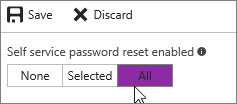
5. The Properties Page will appear on the screen, select All to enable it for every user in the organisation, and then click Save.
6. When the users sign in to Office 365, they will be asked to enter additional contact details so that they can reset their password in the future.
This way, users can easilyreset their passwordswithout raising a ticket to the Office 365 admin. However, as an admin, you can set the password expiry date for the user’s account for a specific period or set it never to expire.
Conclusion – How to Reset Passwords in Office 365
Microsoft Office 365 has become a crucial platform for organisations to manage their day-to-day activities, and almost every user in the organisation uses a Microsoft Office 365 account. But, resetting the user’s password again and again for an admin can be very frustrating. Therefore, in this blog, we have talked about how to configure and educate users on how to reset passwords in Office 365 without generating any tickets. Contact Office 365 Support company for any further assistance.