
The modern workplace has changed considerably. It is no longer sufficient to rely solely on cloud-based tools for document creation and communication. Organisations now require a higher level of integrated intelligence to manage the sheer volume of data generated daily. Copilot in Microsoft 365 represents the next phase of this evolution. It is not a standalone chatbot. It is a sophisticated engine embedded directly into the applications that London businesses use every hour.
Before we explore the functional mechanics, it is vital to understand where this technology sits within your broader infrastructure. For those seeking a comprehensive Microsoft 365 Copilot overview, our primary hub provides a deep dive into specific implementation services. This article focuses strictly on the “what” and the “how” of the user experience.
Copilot in Microsoft 365: What It Does
The core utility of this technology lies in its ability to understand context. It does not simply scan a document for keywords. It processes relationships among your emails, calendar invites, and files stored in SharePoint and OneDrive. This is achieved through the Microsoft Graph.
When a user interacts with the system, the request is grounded in their business data. This means the response is specific to your organisation. It is private. It is secure. It does not leak into the public domain.
The Semantic Index and Data Grounding
Every piece of information within your tenancy is indexed. The system understands that “Project Alpha” in an email is the same “Project Alpha” mentioned in a spreadsheet from last Tuesday. It creates a map of your data. This map enables the AI to provide factually relevant answers for your specific business operations.
Cross-App Intelligence
Intelligence is not siloed. You can ask the system to generate a meeting summary in Teams, then immediately request a draft follow-up email in Outlook based on those notes. It moves with you. The workflow is fluid.
Core Functional Capabilities by Application
The impact of Copilot in Microsoft 365 is best observed within the individual applications of the suite. Each integration serves a distinct purpose.
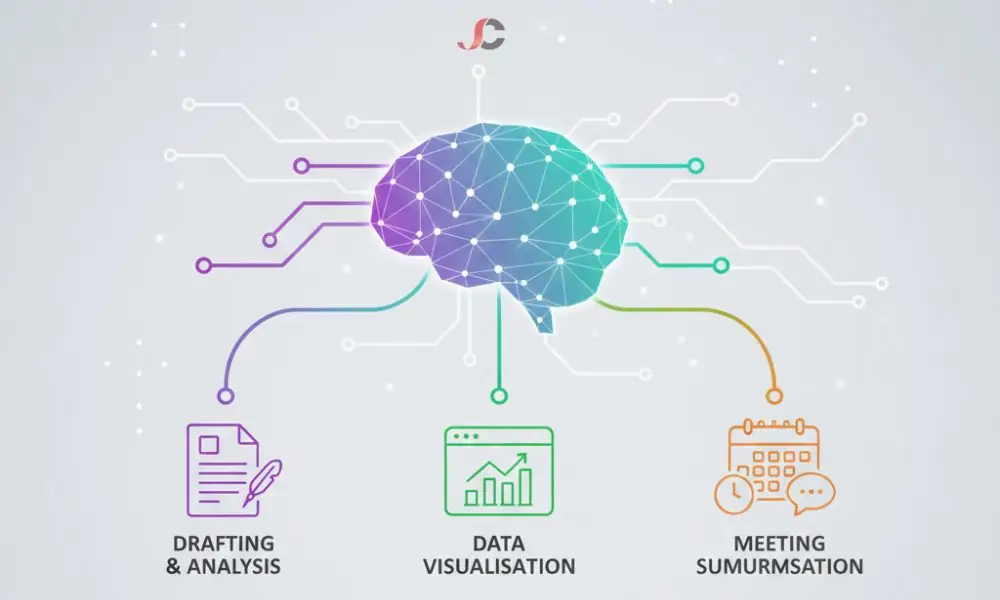
Draft and Iterate in Word
Writing a first draft is often the most time-consuming part of any project. The system can generate a complete outline based on a short prompt. It can also rewrite existing paragraphs to change the tone or length. You remain the editor. It provides the raw material.
Visualise Data and Formulae in Excel
Analysing large datasets requires an elevated level of technical skill. The Excel integration allows users to ask questions about their data in plain English. You can request a trend analysis or ask the system to highlight the top-performing products of the quarter. It writes the complex formulae for you.
Summarise Meetings in Teams
Meetings often result in long recordings that no one has time to watch. The system can provide a real-time summary of the discussion. It identifies who said what. It lists the agreed-upon action items. This ensures that no detail is lost, even if you could not attend the session.
Capability Comparison Matrix
| Feature Category | Standard Microsoft 365 | With Copilot Integration |
| Document Creation | Manual typing and formatting | Prompt-based drafting and styling |
| Data Analysis | Manual formula entry and pivot tables | Natural language queries and automated insights |
| Email Management | Search by keyword and manual sorting | Thread summarisation and draft generation |
| Meetings | Manual note-taking and transcriptions | Real-time highlights and action item tracking |
| Slide Design | Template selection and manual layout | Slide generation from text documents |
Practical Examples for London Businesses
To understand their value, we must examine how these tools function in a professional environment.
A London financial services firm must produce monthly compliance reports. Historically, this required gathering data from multiple spreadsheets and legacy emails. Now, the team uses the system to pull the relevant data points into a single Word document. They save hours of manual data entry. Accuracy is ensured.
A legal practice in the City often deals with lengthy email threads involving multiple stakeholders. A solicitor can ask for a summary of the last five emails to understand the status of a negotiation. This prevents the need to read hundreds of messages. The focus remains on the legal strategy.
Advanced Data Orchestration and the Microsoft Graph
The underlying power of this integration resides in the Microsoft Graph. This is a gateway to data and intelligence in Microsoft 365. It provides a unified programmability model for accessing the vast amount of data across Microsoft 365, Windows, and Enterprise Mobility + Security. When you prompt the assistant, it does not just look at your current document. It looks across your entire digital footprint.
The system uses a process called Retrieval-Augmented Generation (RAG). This ensures that the AI responses are tailored to your specific corporate context. It combines the reasoning power of Large Language Models with the specific facts of your business. This combination provides a competitive edge for London firms dealing with complex regulatory environments.
Licensing After Upgrade: What You Need to Know
It is important to understand that this functionality is an enhancement to your existing environment. It is not a replacement for your core tools. To access these features, your organisation must already possess a qualifying base subscription.
The qualifying prerequisite plans include:
- Microsoft 365 Business Basic, Standard, or Premium
- Microsoft 365 E3, E5, F1, or F3
- Office 365 E1, E3, or E5
You can view the specific details of these underlying Microsoft 365 subscriptions to ensure your tenancy is ready. Once the base licence is active, the AI capability is added as an individual user licence. This allows organisations to roll out the technology to specific departments rather than the entire company at once.
For a broader view of the ecosystem, see our Microsoft Office 365 overview. This helps in understanding how the productivity suite has evolved into a unified AI platform.
Security and Data Residency in the UK
For many UK organisations, data location is a critical concern. Microsoft ensures that AI processing follows the same residency rules as your data. If your data is stored in the UK South or UK West regions, the processing remains compliant with those standards.
Microsoft does not use your data to train the underlying Large Language Models (LLMs). Your intellectual property is yours. This is a huge differentiator from consumer-grade AI tools. It is designed for enterprise use and is compliant with Enterprise Data Protection (EDP) standards. Consult the official documentation on Data, Privacy, and Security for Microsoft 365 Copilot via Microsoft Learn.
Supporting the Modern Infrastructure
Adopting innovative technology requires a stable foundation. While the AI provides the brain, your IT infrastructure provides the body. If your underlying systems are not optimised, the user experience will suffer.
Professional Microsoft 365 support ensures that your environment remains healthy. This includes managing identities, ensuring applications are up to date, and monitoring performance.
Integrated AI introduces new considerations for your perimeter. You must ensure that only the right people have access to the right data before the AI starts indexing it. Our cybersecurity solutions provide the guardrails you need to protect your digital assets as you innovate.
AI Evolution in the London Professional Sector
The impact on the London legal and financial sectors is profound. Information density in these industries is high. Professionals spend a substantial portion of their day synthesising documents. The ability to query a repository of case files or financial audits using natural language accelerates business processes.
We see firms moving away from manual template management toward dynamic document generation. This reduces the risk of human error. It ensures compliance with standards across all generated outputs. The focus shifts from the creation process to the value of the insights.
Summary of the Integration
The transition to Copilot in Microsoft 365 is about more than just novelty. It is about reclaiming time. By removing the burden of repetitive administrative tasks, professionals can focus on high-value work. The system empowers rather than replaces the human worker.
It is a tool for the curious. It is a tool for the efficient. Most importantly, it is a tool ready for today’s London business. The modern office, redefined.
Is Copilot in Microsoft 365 available for small businesses?
Yes. It is available to businesses of all sizes, provided they have a qualifying Microsoft 365 subscription.
Does Copilot use my data to train public AI models?
No. Your data stays within your organisation’s boundary. It is never used to train the public models that other companies use.
Can I use Copilot in Microsoft 365 on a mobile device?
Yes. The functionality is integrated into iOS and Android mobile applications, enabling on-the-go productivity.
Which Microsoft 365 apps include Copilot?
The core apps include Word, Excel, PowerPoint, Outlook, Teams, and OneNote, along with the Chat interface and new 2026 features like Copilot Pages.
Does Copilot support English (UK)?
Yes. It fully supports British English spelling and grammar conventions for all drafting and summarisation tasks.
Do I need a specific subscription to access Copilot?
You must have a base licence, such as Business Standard, Business Premium, or Enterprise E3/E5, to enable AI functionality.
Can Copilot summarise Teams meetings if I joined late?
Yes. You can ask it to recap the portion of the meeting you missed while it is still in progress.
How does Copilot manage UK data residency?
It adheres to the same data residency and compliance commitments as your existing Microsoft 365 tenancy, including in-country processing for the UK.