
The Microsoft SMS MFA retirement is one of the most significant authentication changes in years. Microsoft is removing SMS and voice as built-in authentication methods from its cloud identity platform. Passkeys become the default sign-in experience from September 2026, and native SMS and voice delivery ends entirely on 1st February 2027. Businesses that rely on text-message codes to verify staff sign-ins have a shrinking window to act.
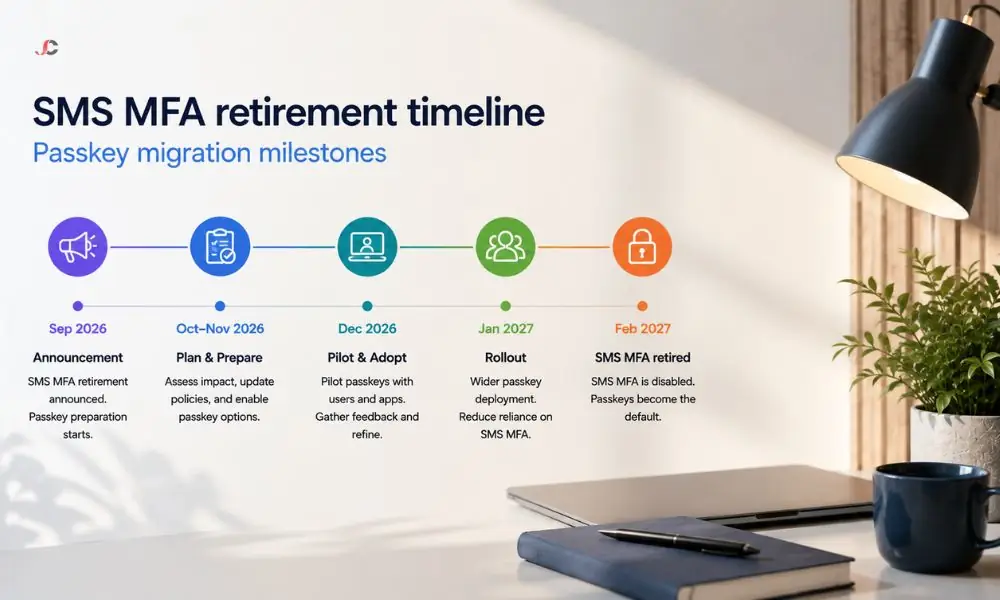
The guide describes what will change, the deadlines, what will happen if your organisation does not act, and how you can prepare your team before the deadline.
Key Takeaways
- Passkeys are auto-enabled for all SMS and voice users from 1st September 2026.
- SMS and voice MFA fully retired on 1st February 2027 with no opt-out.
- Blocking sign-in prompt after February 2027 for users whose only MFA method is SMS or voice – they cannot sign in until they register a passkey.
- Self-service password reset (SSPR) is also affected by this retirement.
- No cost to migrate to passkeys. Keeping SMS or voice after retirement requires a paid third-party telecom provider.
What Is Changing with SMS and Voice Authentication?
Passkeys will become the default sign-in experience, while SMS and voice delivery will be retired from Microsoft. As of 1st September 2026, users with SMS or voice delivery enabled will be eligible for Passkeys and prompted to set up a passkey on their next sign-in attempt. Microsoft will drop SMS and voice delivery services on 1st February 2027, with no choice to opt out for any tenant. Businesses that manage enterprise mobility security through an external IT partner should confirm their provider has a migration plan in place.
This is not a gradual deprecation with an extension choice. The Microsoft SMS MFA retirement enforcement date of February 2027 applies to every tenant in the public cloud, regardless of size or sector. Organisations that still need SMS or voice after retirement must contract with a third-party telecom provider through the Microsoft Security Store, at their own cost. Full details are published in the official retirement guidance on Microsoft Learn.
Why Is Microsoft Retiring SMS and Voice MFA?
SMS and voice codes can be compromised through phishing, SIM swapping, and interception attacks, making them far less secure than cryptographic approaches such as passkeys. According to Microsoft, AI-powered phishing campaigns can achieve click-through rates of up to 54 per cent, while regular phishing campaigns achieve 12 per cent. The Microsoft Security Blog announcement confirms that retiring these methods will shift the baseline toward phishing-resistant authentication across all tenants.
This reflects the general trend within the industry. Regulatory schemes such as NIS2 in the EU are beginning to compel organisations to employ phishing-proof authentication. For British companies, aligning with this trend is beneficial not only for compliance with ICO and NCSC Cyber Essentials requirements but also for security. Passkey migration should sit within a wider cyber security solutions strategy rather than being treated as an isolated task.
What Happens If Your Business Does Nothing?
From 1st February 2027, any user whose only available MFA method SMS or voice is will receive a blocking registration prompt when they try to sign in. They will not be able to skip this prompt or access their account until they register a passkey. There is no opt-out, no grace period, and no extension. This enforcement applies to every tenant.
The practical impact of the Microsoft SMS MFA retirement is immediate. In a company of 30 people, having five individuals locked out right from the start of the working week can be considered a major disruption. The help desk will be overloaded, client work will halt, and employees who do not understand passkeys will require help.
What Are Passkeys and How Do They Work?
The passkeys use a public-key cryptosystem, which is bound to either a device or a credential manager, replacing shared secrets such as SMS authentication with an asymmetric encryption scheme in which both keys stay on the device. The passkeys are verified using either biometric credentials or a device PIN, which makes them immune to phishing, credential theft, SIM-swaps, and replay attacks. There is no extra license cost.
After enrolling the passkey on their device, the device creates a private key that is kept local while the public key is enrolled on the identity provider. When logging in, the user’s device proves ownership of the private key without ever revealing it. The attacker learns nothing from this interaction because there is nothing for him to steal.
Synced Passkeys vs Device-Bound Passkeys
Synchronised passkeys are stored in a credential store provided by the platform, such as iCloud Keychain or Google Password Manager, and are automatically synchronised across all the user’s devices. The passkeys that are bound to the device would be saved to one device, such as a FIDO2 hardware security key or an authenticator app; the first choice suits individuals with multiple personal devices who often switch between them.
| Type | Where Stored | Roams Across Devices | Best For |
| Synced passkey | iCloud Keychain, Google Password Manager | Yes | Users with personal Apple or Android devices who sign in from multiple endpoints |
| Device-bound passkey | FIDO2 security key, Authenticator app, Windows Hello | No | Regulated industries, shared-device environments, organisations requiring hardware-level assurance |
For most London SMBs in the 10- to 150-user range, synced passkeys offer the simplest rollout path because staff can register on a device they already carry. Organisations that manage company devices through an endpoint manager can also deploy device-bound passkeys centrally for tighter control.
How Should Your Business Prepare for the SMS MFA Retirement?
Identify every user in your tenant who is still enabled for SMS or voice, enable passkeys in the authentication methods policy, run a registration campaign to prompt staff to register a passkey at their next sign-in, and clearly communicate the change before September 2026. This four-step sequence avoids sign-in disruption caused by the Microsoft SMS MFA retirement and ends the need for emergency support after the deadline.
Step 1 – Find Affected Users
Microsoft provides a PowerShell script that queries the tenant for users enabled for SMS or voice. For businesses without an in-house administrator, a managed IT partner can run this audit and produce a report showing exactly who is affected.
Step 2 – Enable Passkeys and Run a Registration Campaign
Passkeys must be enabled as a form of authentication in the tenant for the campaign to proceed successfully. Once enabled, the campaign prompts affected users to register the passkey during their next MFA sign-on. Users can snooze notifications indefinitely by default. Reducing the snooze limit ensures that the registration is done before the deadline.
Step 3 – Communicate to Staff
Those employees who now receive a text message notification upon signing in should know what the change is, why it is needed, and what they are expected to do. For example, Microsoft has communication templates for e-mail and Teams. What works best is using the templates alongside a brief internal presentation.
Does This Affect Self-Service Password Reset?
Yes. This retirement policy applies to the entire identity platform, including SSPR. Any user who resets their password via SMS will need to use another method after February 2027. Microsoft has announced that changing passwords via passwordless sign-in is under consideration, though no details have been released yet.
This issue is not addressed in any guidance. Organisations that move their MFA to passkeys and neglect SSPR will find that employees cannot reset their passwords without going through the help desk. Review your tenant’s infrastructure security settings to confirm which recovery methods are registered for each user.
Can You Still Use SMS or Voice After the Retirement?
Yes, but only via the customer-controlled telecommunications supplier set up through the Microsoft Security Store. This will not be a free add-on to the existing solution. Instead, it will involve a new contract with a suitable supplier, incur message-based fees depending on both the supplier and the geography, and require new configuration and testing. Details about which suppliers are supported and at what prices will be made available on 18th September 2026, with configuration possible from 30th October 2026 onwards.
This route is available to organisations with a documented regulatory or operational requirement for an out-of-band SMS channel. For most London SMBs, passkeys are the simpler and more cost-effective choice.
What Is the Full Retirement Timeline?
Three key dates make up the transition: automatic passkey activation in September 2026, full SMS and voice phase-out in February 2027, and blocking of any leftover SMS-only users thereafter. Each phase of Microsoft SMS MFA phase-out creates an ever-tightening window, with the final deadline having no opt-outs.
| Date | What Happens | What Your Business Should Do |
| 1st September 2026 | Users enabled for SMS or voice are automatically enabled for passkeys and prompted to register at the next MFA sign-in. | Notify staff, run the registration campaign, and tighten snooze limits. |
| 18th September 2026 | Microsoft publishes supported telecom providers, pricing, and commercial terms via the Security Store. | Review if your organisation has a regulatory need for SMS or voice. |
| 30th October 2026 | Telecom provider configuration becomes available in the Security Store. | If needed, contract with a provider and test with a pilot group. |
| 1st February 2027 | Microsoft-provided SMS and voice delivery is fully retired. No opt-out. | Confirm every user has a passkey or other phishing-resistant method registered. |
| After 1st February 2027 | Users whose only MFA method is SMS or voice hit a blocking prompt. They cannot sign in until they register a passkey. | Provide hands-on support for any remaining users who did not register in time. |
How Server Consultancy Helps with Passkey Migration
Server Consultancy audits your tenant, identifies any users still on SMS or voice, configures passkey policies, runs the registration campaign, and supports your team through the transition. For businesses without an in-house IT administrator, this removes the need to learn PowerShell, navigate the authentication methods policy, or manage the rollout timeline internally.
The Microsoft SMS MFA retirement affects every organisation using text-message or voice-call verification in the cloud identity platform. Businesses in finance, legal, and recruitment – sectors where sign-in disruption directly affects client service – benefit most from completing the migration well ahead of the February 2027 deadline.
If your organisation still relies on SMS or voice for MFA or password resets, contact our managed IT services team to schedule a tenant audit. We will find your affected users, plan the migration, and manage the rollout, so your team is ready before the deadline.
What is changing with SMS and voice authentication?
Microsoft is rolling out passkeys as the default authentication experience while dropping its SMS and voice services. Starting from 1st September 2026, users who are set up to receive SMS and voice will automatically be set up for passkeys as well and encouraged to enrol in passkeys. By 1st February 2027, Microsoft will stop all SMS and voice services.
Why is Microsoft retiring SMS and voice MFA?
Phishing attacks can target both SMS-based and voice code-based authentication systems, making them considerably less secure than cryptographic authentication mechanisms such as passkeys. Microsoft has found that AI-based phishing attacks can achieve a click-through rate of up to 54%. With this move, phishing-resistant authentication becomes a necessity.
What happens if your business does nothing?
From 1st February 2027, any user whose only available MFA method SMS or voice is will receive a blocking registration prompt when they attempt to sign in. They will not be able to skip this prompt or access their account until they register a passkey. There is no opt-out, no grace period, and no extension.
What are passkeys and how do they work?
The passkey is based on public-key encryption, which is tied to either a device or credential management software. Instead of the previously used secret (such as an SMS code), a key pair is used, which never leaves the user’s device. Biometric methods or the device PIN can authenticate the passkey, thus making it resistant to phishing
Does this affect self-service password reset?
Yes. The retirement applies to all aspects of the identity platform, including SSPR. Individuals who currently rely on SMS to reset their passwords will need to find an alternative once the February 2027 deadline passes.
Can you still use SMS or voice after the retirement?
Yes, but using a telecom service provider controlled by the customer via the Microsoft Security Store. That involves signing a separate agreement with an approved service provider and charges based on the cost per message. Further information about the approved providers and their cost structures will be provided on 18th September 2026, with configurations becoming available from 30th October 2026.
What is the full retirement timeline?
There are three major stages in this process: the automatic activation of passkeys on 1st September 2026, the complete removal of SMS and voice channels on 1st February 2027 and blocking for all those users who have not been switched to passkeys by that day. There is no exception to the final deadline date.