
Many organisations experience a sudden operational shock when their Microsoft 365 environments hit tenant storage limits. These escalating capacity issues often stem from redundant files and abandoned collaboration workspaces rather than active business requirements. Implementing a robust SharePoint Online infrastructure requires an equally robust strategy for managing the expanding data footprint.
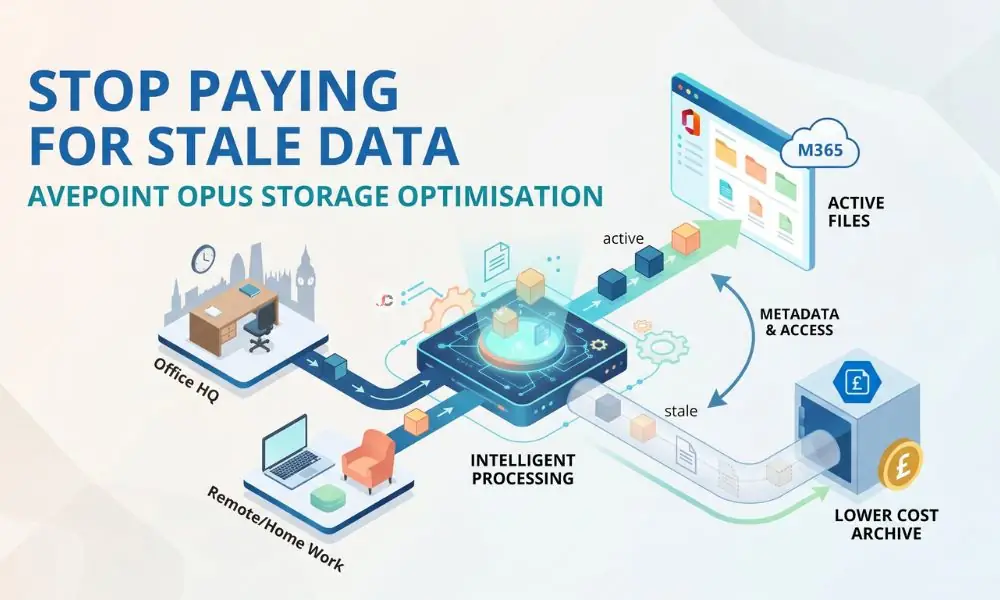
Businesses must stop penalising their IT budgets to house inactive documents on premium tiers. Leveraging AvePoint Opus storage optimisation provides a precise, automated mechanism to regain financial control over your cloud environment. This method lets admins store old data without compromising on transparency and reduces the risk of continuous overage charges.
The Hidden Cost of Stale Data in Microsoft 365
The old project documents, obsolete client documents, and duplicate versions of documents continue to occupy valuable tenant allocation space unknowingly. Upon reaching their limit, Microsoft will not bill for additional storage space or allow any uploads to read-only websites. Administrators must then manually purchase premium add-on storage to restore functionality, as detailed in the official Microsoft storage limits documentation.
Without an automatic lifecycle management system, IT managers must choose between buying costly add-on packages and manually removing historical data. Neither approach is feasible for today’s corporations seeking efficient tiered archiving. Proper data management allows you to allocate top resources only to your fast-paced everyday operations.
Why Hybrid SMEs Pay the Highest Price
Firms operating a hybrid system in the United Kingdom face their own risks associated with out-of-control digital sprawl. Employees who work collaboratively from the firm’s headquarters in London and remote home offices tend to copy many large assets. Consequently, the challenge of scaling OneDrive for Business becomes severely complicated by disorganised file duplication.
This dynamic of a scattered workforce accelerates tenant bloat significantly faster than traditional on-premises models. Companies must implement strict automated rules to intercept this sprawl before it triggers crippling business disruptions and storage invoices.
Lowering Cloud Storage Costs Without Losing Metadata
Transferring historical data into less costly storage involved removing context, permissions, and timestamps. But today, all three components must be preserved to maintain compliance with regulations. The best strategy in this situation is to ensure that any effort to lower your SharePoint storage costs does not put your position in jeopardy.
Effective AvePoint Opus storage optimisation archives records while retaining complete metadata fidelity across the tenant. This ensures legal teams can still execute accurate eDiscovery searches across inactive data exactly as they would with live files.
Archiving Inactive OneDrive Data and SharePoint Sites
Administrators can create advanced lifecycle policies that detect inactivity on specific content items for specified durations. The organisation does not rely on end users to manage their own folders; instead, it places those dormant items in highly secure, low-cost storage facilities.
Targeted sweeps can be used to target legacy project sites and old employee accounts. In this way, it is possible to prevent mass migrations that could negatively affect ongoing business operations.
Native M365 Overages vs AvePoint Opus Archiving
Paying native premium overage rates for gigabytes of untouched data represents a severe misallocation of corporate technology budgets. Tiered archiving models allow organisations to shift this dormant weight onto far cheaper Bring Your Own Storage (BYOS) options, such as Azure Storage Blobs. Engaging with proactive managed cloud services can help you map out these precise financial comparisons.
Crucially, AvePoint Opus handles the complex tiering logic seamlessly, meaning administrators do not need to manage the raw Azure blob containers manually. An objective analysis reveals that the cost per gigabyte drops sharply when transitioning from Microsoft’s default penalties to dedicated archive solutions.
Implementing AvePoint Opus Storage Optimisation Without Disrupting Workflows
The first hurdle faced when implementing archiving is the fear of losing access to historical information. In cases where remote workers are unable to access prior contractual agreements and historic designs, productivity comes to a standstill, and IT helpdesk tickets skyrocket. Information Lifecycle Management in M365 should therefore aim at providing easy retrieval for all remote workers within the UK.
Current solutions work around this problem by replacing the large file with a small link placed directly inside the original directory. The user’s experience remains unchanged, preserving the integrity of their routine.
Self-Service Restores for the End User
Whenever the hybrid employee selects an archived document stub, the software automatically retrieves the resource from the deep storage repository. The instant nature of this service enables full automation, ensuring that the central IT helpdesk is entirely excluded from information retrieval.
Measuring the ROI of AvePoint Opus Storage Optimisation
The ROI computation also involves more than the initial stoppage of forced overages from Microsoft. Businesses need to consider the time savings from recovering their administrative staff from the previous manual file migration process. Integrating these savings into broader cloud cost optimisation strategies provides a holistic view of your financial improvements.
True AvePoint Opus storage optimisation delivers dual dividends by slashing monthly expenditure and recapturing valuable technical engineering time. This allows your IT personnel to focus on revenue-generating infrastructure improvements rather than policing storage quotas.
Next Steps for Securing Your Cloud Budget
Without intervention, the growing capabilities of clouds will consistently take away money that you could have invested in business development. Creating automated policies for data lifecycles helps ensure protection against unforeseen increases in invoices. To complete your infrastructure resilience, this archiving strategy should operate alongside reliable backup and disaster recovery protocols.
Start by auditing your current data footprint to identify the precise ratio of active versus dormant files. Once you visualise this disparity, deploying AvePoint Opus storage optimisation becomes the obvious and necessary financial remedy.
What exactly is AvePoint Opus storage optimisation?
It is a lifecycle and archiving solution that intelligently moves inactive data from premium Microsoft 365 storage to lower-cost tiers. This deployment drastically reduces overage fees while preserving seamless user access.
How does archiving inactive OneDrive data save money?
Microsoft restricts your environment when you exceed your allocated tenant storage, forcing you to buy expensive add-on storage packs. Automatically archiving inactive OneDrive data frees up your primary storage quota, allowing you to avoid these premium purchases entirely.
Will archiving data disrupt my remote team’s workflow?
No, because the software enables rapid self-service restores. When a hybrid worker requires a document from the archive, they select a link in the original folder to retrieve it without IT intervention.
Does the platform preserve metadata during the archiving process?
Yes, indeed, the platform automatically maintains all important metadata. The platform maintains permissions, authors, timestamps, and your overall compliance posture.
Why should we not just buy more Microsoft 365 storage?
Purchasing native storage is a recurring premium expense that scales infinitely as your data footprint grows. Dedicated archiving reduces the total volume of data sitting in premium tiers, offering a vastly superior long-term return on investment.
Can we target specific SharePoint sites for storage optimisation?
Administrators can configure highly precise rules to target specific environments. You can easily isolate legacy project sites, former employee accounts, or files untouched for years while leaving active workflows completely unhindered.