
The SharePoint Add-In retirement scheduled for April 2026 is a major milestone. If you are dependent upon legacy customisations, your operations are at risk. To prevent operational disruption, businesses must audit their existing architecture and proactively modernise their SharePoint Online environment. The time is running out to migrate your critical workflows onto a new platform before a hard cutoff.
Understanding the 2026 Deprecation Timeline
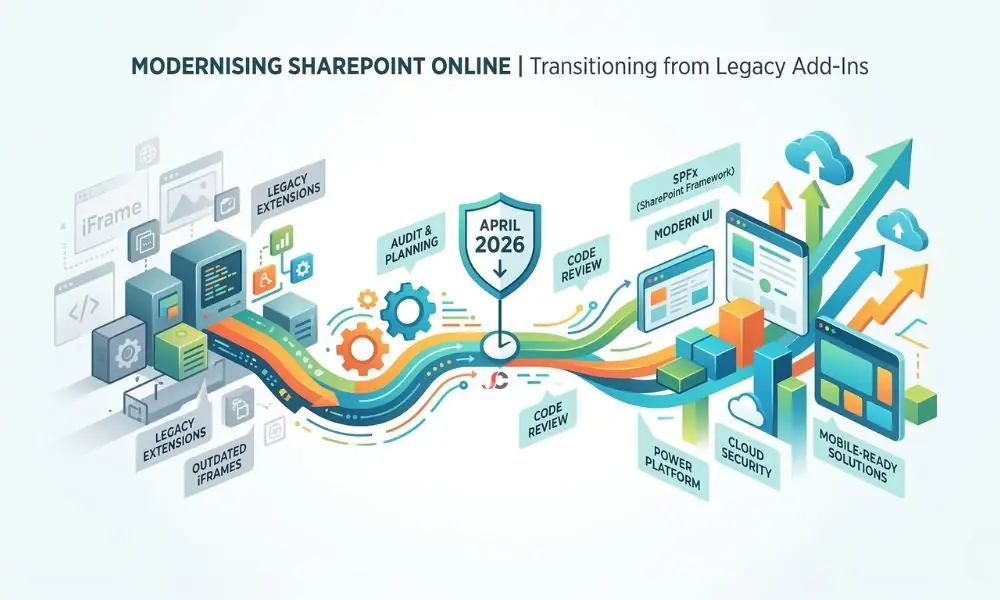
Microsoft has made it clear that there will be no room for compromise. As outlined in the official transition documentation, from 2 April 2026, legacy SharePoint Add-Ins will permanently stop functioning across all Microsoft 365 tenants globally. This is not a soft deprecation phase. It is a hard shutdown of outdated architecture that requires immediate attention from IT administrators and business leaders alike.
Organisations currently utilise two main types of these legacy extensions. SharePoint-hosted Add-Ins run entirely within the platform boundary, while provider-hosted Add-Ins rely on external web servers to execute code.
Both models will cease to operate entirely. If your business relies on these outdated tools for daily document management, data processing, or custom visual web parts, those processes will break abruptly upon the deadline. The infrastructure powering them will cease to exist within the Microsoft ecosystem.
Why Microsoft is Deprecating Legacy Extensions
The underlying architecture of legacy extensions relies heavily on iFrames. Such an approach limits performance, creates security issues, and heavily limits responsiveness on mobile devices. Microsoft must ensure a unified, secure approach across its entire cloud ecosystem.
Legacy code often circumvents modern governance policies, creating blind spots for IT security teams. The fact that they use iFrames means the applications open a separate window in your browser. This means that the application cannot inherit the overarching security context of Microsoft 365. It becomes incredibly difficult to enforce zero-trust security when the legacy system is operating outside the primary authentication loop.
The primary replacement technology is the SharePoint Framework (SPFx).
SPFx enables developers to build client-side web parts that integrate directly into the modern user experience. The resulting applications load much faster, inherently support mobile scaling, and operate within strict Microsoft 365 security perimeters without relying on isolated, outdated iFrame technology. The shift to a modern framework eliminates these security gaps permanently and provides a native, seamless experience for the end user.
Assessing the Business Impact for London SMBs
Do not underestimate the operational risk of this transition. Many small and medium-sized businesses have legacy code running silently in the background. When the 2 April 2026 SharePoint Add-Ins end date arrives, affected custom forms, third-party integrations, and automated workflows will vanish from the user interface.
Consider a London financial services firm that uses a provider-hosted tool for compliance-critical document approvals. The day after retirement, staff will lose the capability to route, approve, and/or sign off on regulated files. Halt in operations happens at once. If a failure occurs in critical workflows, financial penalties, service-level agreement breaches, and damage to business reputation will occur simultaneously. For a legal practice with stringent compliance requirements, the inability to use custom case-management tracking tools for even a single day would be unacceptable.
Beyond the financial and legal sectors, consider the impact on a private healthcare clinic operating in central London. Such an organisation might rely heavily on a legacy SharePoint-hosted tool to manage patient intake forms and securely route sensitive medical records to the correct specialist departments. If this system were to suddenly fail due to the administration’s failure to meet the deadline, the clinic would face a twofold crisis. First and foremost, the quality of care would be compromised due to delayed or missing information. Second, the clinic would also face serious consequences for data compliance failure if the staff resort to unsafe workarounds, such as emailing the files.
This affects the whole business, from admin teams and medical staff to clients. It is not just an IT issue but a serious threat to business continuity. No organisation should assume its systems are fully protected. You must actively audit and verify the underlying architecture of every single customisation your staff use daily.
Conducting a SharePoint Customisation Audit
Visibility is your primary defence against business disruption. You cannot replace what you cannot see, and manually clicking through hundreds of site collections is an inefficient use of administrative time.
Identify Active and Inactive Customisations
Administrators should deploy the Microsoft 365 Assessment tool immediately. This utility scans the entire tenant to locate all legacy applications currently installed. The tool generates an extensive export detailing application identities, permission scopes, and usage frequency. This automated discovery phase is the only reliable method to capture a complete inventory of your vulnerable assets.
IT administrators must cross-reference this data with departmental leaders. Discovery frequently reveals applications that employees abandoned years ago. We often uncover redundant systems during complex data transitions, such as during file server to SharePoint Online migration projects. Filtering out inactive tools reduces the overall migration burden significantly and cleans up your digital workspace.
Categorise by Business Criticality
Once you isolate the active customisations, you must score them. Not every legacy tool warrants an identical replacement strategy. Use a structured matrix to determine your exact path forward. If you lack internal resources to perform this triage, engaging a comprehensive Office 365 consultancy ensures you can accurately evaluate complex technical dependencies without exhausting internal IT bandwidth.
Audit Priority Matrix: Evaluating Legacy Replacements
| Application Function | Business Criticality | Replacement Effort | Risk of Inaction | Recommended Action Path |
| Compliance Document Routing | High (Stops daily revenue) | High (Complex external APIs) | Severe Compliance Breach | Custom SPFx Development |
| Client Onboarding Forms | High (Stops client acquisition) | Medium (Moderate logic) | Loss of New Business | Power Apps Canvas App |
| Department Leave Requests | Medium (Causes HR delays) | Low (Simple form data) | Internal Administrative Backlog | Power Apps & Power Automate |
| Office Seating Planner | Low (Minor inconvenience) | High (Heavy visual mapping) | Minimal Operational Impact | Deprecate or use standard List |
| Legacy Weather Widget | Low (No operational impact) | Low (Standard web part) | None | Deprecate & remove |
Replacement Paths: Modernise with SPFx and Power Apps
The audit matrix determines the specific destination for your legacy code. Two primary Microsoft avenues exist for modernisation, each serving a distinct technical requirement.
Transitioning to the SharePoint Framework (SPFx)
SPFx is the direct successor for complex, code-heavy requirements. If your current application demands custom user interface elements, interacts deeply with the Microsoft Graph API, or executes heavy data processing, SPFx is mandatory.
Rebuilding in SPFx requires specialist developer knowledge. It is not a simple automated conversion. Teams must rewrite the underlying logic using modern web technologies like TypeScript and React. This represents a paradigm shift from old server-side models. The new client-side execution means your applications utilise the user’s browser’s computing power, thereby vastly reducing server latency and improving overall responsiveness.
Organisations should also think about long-term code governance. SPFx packages are hosted within the tenant app catalogue. This means that administrators have complete visibility and control over versions, permissions, and security. Updates can be rolled out centrally without server-side management headaches that come with provider-hosted apps. By moving to SPFx, you are choosing a far more resilient, scalable, and manageable enterprise architecture.
Leveraging Microsoft Power Platform
Many legacy customisations were originally built to collect form data or route approval emails. Today, you do not need custom code for these basic tasks.
Microsoft Power Platform provides a robust, low-code alternative. Businesses can rapidly recreate basic forms and workflows to replace outdated systems. Transitioning simple tasks here reduces long-term maintenance costs and reliance on developers. The ecosystem separates the user interface from the logic, allowing for highly tailored visual experiences.
For example, a legacy helpdesk tool can be moved to a Power Apps Canvas app linked to a SharePoint list, with Power Automate managing notifications. This allows power users to make small updates themselves, while IT staff focus on more critical infrastructure work. Departments can iterate on their own processes rapidly without submitting a lengthy development ticket to the core IT team.
Preparing for the SharePoint Add-In retirement in April 2026
Success requires a strict, phased programme. You must work backwards from the strict Microsoft cutoff date to ensure continuous operation. A rushed deployment directly risks data integrity and user adoption.
- Discovery Phase (Months 1-2): Run the Microsoft 365 Assessment tool. Map every dependency and generate the priority matrix. Define user journeys precisely to understand better how users interact with the tool. Avoid assuming that existing documentation is representative of current user patterns.
- Architecture and Design (Months 3-4): Determine which applications will be migrated to SPFx, which to Power Platform, and which will be deleted. Create a data migration plan if the new application requires a different data backend.
- Active Development (Months 5-8): Develop the SPFx code or Power Apps workflow to meet internal security standards, with strict control over versions and API access.
- Rigorous Testing (Months 9-10): Conduct intensive user acceptance testing (UAT). It is not feasible to ask the staff members to click around and report whether the new application looks right. Project managers need to develop comprehensive test scripts that simulate exact day-to-day business operations. UAT in the context of an SPFx deployment requires a very structured approach:
- Cross-Browser and Device Testing: Testers must verify that the new SPFx web parts load correctly across different desktop browsers and scale accurately on mobile devices via the SharePoint mobile application.
- Exception Handling: The staff should intentionally trigger errors. For instance, when a new application replaces an invoicing tool, incorrect multi-currency conversions should be entered in the new application to test whether it handles errors without crashing.
- Backend Data Validation: Database administrators must ensure that when a user submits data through the new interface, the information is stored in the correct SharePoint lists with the precise metadata tags required for downstream reporting.
- Final Deployment and Training (Month 11): Roll out the new solutions. Conduct thorough staff training on the updated interfaces. Permanently turn off the legacy applications well before the official deadline strikes to guarantee a safe buffer period.
Securing Professional Technical Assistance
Rebuilding business-critical infrastructure demands precision. The transition involves complex code refactoring, data mapping, and rigorous testing phases that often exceed internal IT capabilities. Attempting this transition without specialised knowledge increases the risk of prolonged operational downtime.
If your organisation lacks dedicated SPFx developers, you must secure external expertise early. Specialists can efficiently map your legacy architecture and integrate Microsoft Power Apps to quickly resolve straightforward workflow requirements. They can also architect the heavy, code-intensive solutions required to keep your business fully operational.
Preparing for the SharePoint Add-In retirement in April 2026 is non-negotiable. Proactive planning mitigates risks, secures your data, and modernises your operational capabilities. Securing ongoing Office 365 support guarantees your newly built frameworks remain compliant, secure, and fully functional long after the legacy systems power down.
What happens to my legacy SharePoint customisations after 2 April 2026?
They will stop functioning entirely. Microsoft is having a hard time retiring the infrastructure, meaning any forms, web parts, or workflows that rely on the legacy architecture will be removed from your tenant and will stop processing data.
How do I know if my business currently uses legacy extensions?
Administrators should run the official Microsoft 365 Assessment tool. This software scans your entire cloud environment and generates a detailed report of all installed legacy applications.
What is the primary difference between legacy models and SPFx?
Older models rely on outdated, isolated iFrame technology, which leads to performance and security issues. SPFx (SharePoint Framework) applications run natively in the browser, ensuring faster load times, improved security, and native mobile responsiveness.
Can we migrate directly to SPFx without rewriting code?
No. There is no automated conversion tool. Developers must rework the entire back-end logic using up-to-date web technologies, including React and TypeScript, to ensure proper integration with SPFx.
Are both hosted models retiring simultaneously?
Yes. Microsoft is permanently ending support and functionality for both SharePoint-hosted and provider-hosted architectural models globally on the same date.
Is there an official tool to scan our tenant?
Yes. The Microsoft 365 Assessment tool is the official, supported method for discovering and inventorying your legacy customisations.
Should we replace old code with SPFx or Power Apps?
It depends on the complexity of the application. Heavy, code-intensive customisations require SPFx. Simple data collection forms, leave requests, and document approval routing are better suited for the low-code Microsoft Power Platform.