
For London business leaders, a complete cloud migration can introduce downtime and data loss. A phased Azure migration strategy for London SMBs to divide the process into smaller steps rather than a “big bang” switch-over. By partnering with experts who provide managed IT services for cloud-enabled businesses, organisations can validate performance at every stage and ensure business continuity.
Why a Phased Approach Suits London Businesses
Shifting all workloads at once is neither necessary nor prudent. With a phased approach, the migration is divided into controlled stages, so any issues are contained to a small portion of users or specific applications rather than disrupting the whole organisation. At the same time, the rest of the business remains up and running as normal. As a result, the expense is spread over months or quarters, and a substantial capital expenditure is now treated as an operating expense, which is advantageous for businesses in London that are dealing with fluctuating real estate and labour costs.
Addressing Compliance and Data Sovereignty
Data residency remains a high priority. By performing the workload migration in waves, you need to check that the correct region has been assigned to each dataset, usually either UK South or UK West. By doing this, you will ensure that GDPR and industry-specific regulations are strictly followed throughout the migration process. Unlike mass migration, which is often rushed, a wave migration process enables the compliance team to audit each wave before deployment, ensuring that no personal data is exposed or migrated to a non-compliant region.
Comparison: Big Bang vs Phased Migration
| Feature | Big Bang Migration | Phased Migration (Recommended) |
| Risk Level | High. Failure impacts the whole organisation. | Low. Problems are contained within individual waves. |
| Downtime | Substantial cutover time required (typically over a weekend). | Minimal. Services are migrated incrementally. |
| Staff Impact | Overwhelming. All employees are trained on the new systems simultaneously. | Manageable. Training is conducted in small groups. |
| Rollback Capability | Difficult and complex. | Simple. Only the failed wave needs to be reversed. |
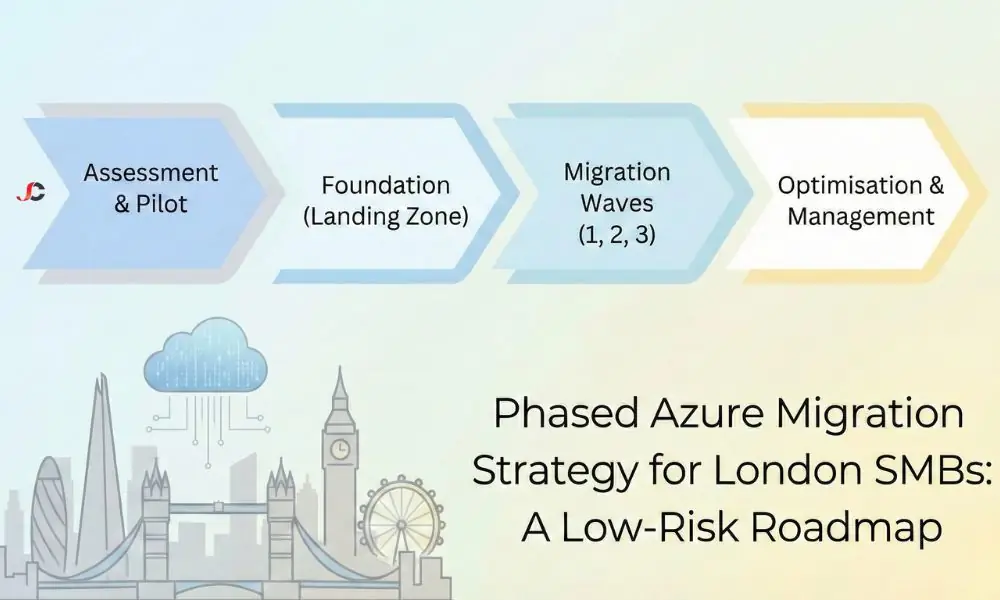
Phase 1: Assessment and Pilot Group Selection
Before you start moving any files, you must understand precisely what you are working with. You must perform a complete audit of applications, servers, and databases because you cannot migrate a database without understanding which servers are dependent on it. This process also helps to identify “zombie” servers that are running but not in use, which you can then decommission instead of paying to relocate.
Once the inventory is complete, it is necessary to identify a pilot group. The pilot group should be a low-risk and high-value target. The best candidates for the pilot group are the backup archives or non-critical file servers. If you begin the migration with backup and DR planning, your team can practise using Azure interfaces without risking downtime to live production systems.
Identifying Low-Risk Workloads
- Internal Tools: HR portals or intranet services that are kept hidden from clients.
- Test/Dev Environments: Test and development servers for developers that do not impact revenue.
- Archives: Cold data that is stored for long-term keeping, even though it is seldom used.
Phase 2: Establishing the Azure Landing Zone
In a cloud environment, the Landing Zone is where the virtual data centre begins. Just as one cannot construct a house without a foundation, it is not possible to install servers without a Landing Zone. The Landing Zone establishes the set of rules for resource organisation, security, and service integration.
Connectivity Options: VPN vs. ExpressRoute
One of the critical considerations during this stage is how your London office will be connected to the Azure data centre. In smaller migration projects or pilot waves, a Site-to-Site VPN is typically sufficient and cost-effective, operating over the public internet, although throughput may be inconsistent. In cases where an SMB is migrating large amounts of data, Azure ExpressRoute may be a better choice because it provides a private, dedicated connection with guaranteed bandwidth and lower latency for hybrid workloads, where employees access cloud databases.
Identity and Access Management
Security starts with identity. Syncing your on-premises Active Directory with Azure Active Directory (Entra ID) enables seamless single sign-on for your users. This is also where you should apply Conditional Access policies. For instance, you can allow access to sensitive financial information only on company-managed, compliant devices located in the UK.
Governance and Policy Enforcement
Before you migrate, you need to set up “Guardrails” with Azure Policy. These policies will ensure your team does not make costly or hazardous errors.
- Region Restrictions: Prevent accidental server launches in US regions to ensure compliance with UK data sovereignty regulations.
- SKU Restrictions: Prevent creating large virtual machine SKUs (e.g., G-series) that are unnecessary for typical workloads.
- Tagging Enforcement: Enforce a policy requiring all resources to be labelled with a Cost Centre or Owner tag to ensure monthly billing is transparent and traceable.
Phase 3: Executing Migration Waves
With the foundation laid and the pilot successful, you can begin the primary migration waves. Grouping workloads correctly is vital. You must group dependent applications to prevent latency issues caused by “chatty” applications that communicate with on-premises databases.
Wave 1: Utility Services
Move services that support the infrastructure first. Domain controllers, DNS, and print servers are among the services in this category. By extending your Active Directory to the cloud early, you can be sure that when other applications come along, their authentication methods will already be local. This will ensure that there are no login delays and will improve the user experience.
Wave 2: Production Workloads
This is the core move. It includes your primary line-of-business applications, such as CRM or ERP systems. This wave often uses a “Rehost” (Lift-and-Shift) or “Refactor” (Minor updates) strategy.
- Rehost: Moving a virtual machine exactly as it is. This is fast but does not fully use cloud features.
- Refactor: Moving an application to Azure App Service or Azure SQL Managed Instance. This removes the need to patch the underlying OS.
In complex environments with multi-tier applications, this often requires specialised Azure infrastructure support to ensure that databases and application layers migrate synchronously.
Wave 3: Legacy & Complex Systems
The final wave is where the toughest items are addressed. These could be legacy applications that need to be refactored or replaced. By doing them last, your team can build confidence and experience in the earlier, easier waves. Legacy applications are often reliant on hard-coded IP addresses or hardware dongles (standard in legal and construction software). By isolating these in the final wave, you delay the adoption of cloud-native alternatives or the configuration of specialised emulation environments without stalling the rest of the migration project.
Testing Protocols for Each Wave
Simply moving the servers is not the end of the wave. Each phase must conclude with rigorous User Acceptance Testing (UAT). Find “super users” in your organisation to test the migrated applications for performance and functionality. Are reports generated as quickly as they were in the on-premises environment? Are third-party integrations still syncing properly? Only after these users log off should you retire the on-premises hardware for that wave.
Managing Hybrid Operations and Common Pitfalls
You will operate in a hybrid state for weeks or months. Some data sits in the cloud; some remains in your server room. This “messy middle” requires vigilant monitoring. Latency can kill productivity. Ensure your network bandwidth is sufficient to manage the traffic between your office and the Azure data centre. Users should not notice a difference in speed when opening a file from a local server or a cloud resource.
Bandwidth Bottlenecks
While London has excellent fibre availability, many office buildings still rely on asymmetric connections, with upload speeds significantly slower than download speeds. During a migration, you are uploading terabytes of data. Without a dedicated leased line or a connection upgrade, your link can saturate, halting regular email and web browsing. We recommend performing large data syncs outside of GMT business hours to mitigate this risk.
Application Latency
Some legacy applications were written decades ago, assuming that the server is just down the hall (low latency). When you move that server to a data centre in London or Cardiff, the slight increase in latency can cause the application to freeze or crash. Testing these “chatty” apps during the Pilot Phase is non-negotiable. If they fail the latency test, they may need to be accessed via virtual desktop infrastructure rather than a direct connection.
Change Management and Staff Communication
Migration is a human process as much as a technical one. If staff do not know how to access their new tools, the project fails. A robust change management plan includes clear communication about when services will move and how access methods will change.
For example, a London-based law firm might shift from remote desktop connections to Azure Virtual Desktop to support remote teams. This means that training sessions need to be organised well in advance of the cutover. Employees need to be assured that their desktop experience is being enhanced, not simply transformed. This can be achieved through user guides and a “Migration Helpdesk” channel on Microsoft Teams to ease staff concerns on “Go Live” days.
Post-Migration Optimisation
The job is not complete when the final server is turned off. The immediate period following the migration is the best time to analyse resource utilisation. Cloud resources are often more efficient than their on-premises counterparts, which means you may have over-provisioned based on the specs of your old hardware.
Review your monthly spend. Identify idle resources. Look for opportunities to apply reserved instances or start leveraging Azure Hybrid Benefit for cost efficiency, which allows you to use existing on-premise Windows Server and SQL Server licences in the cloud. This alone can reduce infrastructure operating costs by up to 40% compared to pay-as-you-go rates.
Conclusion: Adopting a Phased Azure Migration Strategy for London SMBs
An upgrade in IT infrastructure does not need to be a gamble. Phased Azure migration strategy helps London SMBs remain secure, cost-effective, and untethered from disruption. By determining what you have, contributing to a strong Landing Zone, and delivering a series of waves of workload movement, you can innovate while the business continues as usual. It is time to stop worrying about the cloud and start mapping out a clear roadmap.
What is a phased Azure migration strategy?
It is a method for migrating workloads to the cloud in batches, or “waves,” over time rather than migrating everything at once.
How long does a phased migration typically take for a London SMB?
Timelines vary by level of complexity, but most SMB migrations take 2-6 months. This means all waves are assessed, planned, and executed within this timeframe.
Can we keep some servers on-premises while migrating others to Azure?
Yes. This is called a hybrid cloud approach. It is common to keep print servers or legacy hardware on-site while moving core apps to the cloud.
What is the best workload to move to Azure first?
Backup archives, test/development environments, and non-critical internal applications are good targets for a pilot, as they are unlikely to cause significant problems if issues arise.
How do we manage software licensing during the migration waves?
Microsoft offers the Azure Hybrid Benefit, which lets you migrate your existing on-premises Windows and SQL Server licences to Azure to reduce costs.
Does a phased migration cost more than a lift-and-shift?
It may have slightly higher management costs due to the more extended period, but it avoids costly downtime and errors, which are more expensive in the long run.
How does a phased strategy reduce downtime risks?
This limits potential problems, as moving small groups of servers at a time means only those services are at risk. If a wave fails, you can roll back quickly and not affect the rest of the company.
Do we need to retrain staff for a phased Azure migration?
Training is usually required, especially if their access method changes (e.g., switching to Azure Virtual Desktop). However, the phased approach allows you to train staff in small groups.