
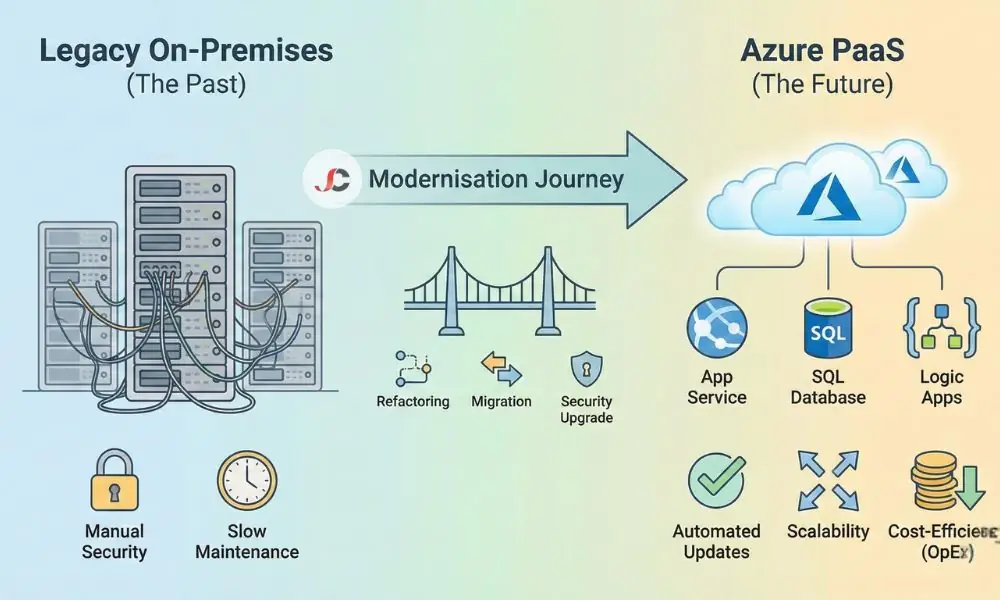
Organisations across London and the UK frequently find themselves tethered to ageing software that requires significant effort to maintain. Many engage our IT Consultancy Services to assess the viability of their current on-premises infrastructure before committing to a cloud transition. Modernising legacy business apps with Azure PaaS offers a pathway to escape the cycle of hardware refreshes and focus on innovation rather than maintenance.
Why Traditional “Lift and Shift” Often Fails for Legacy Apps
Moving a legacy application to the cloud often starts with a simple “lift and shift” approach, technically known as Infrastructure as a Service (IaaS). You take your virtual machine from your server room and run it on someone else’s hardware. While this evacuates the on-premises data centre, it rarely solves the underlying issues.
Moving a Windows Server 2012 instance to the cloud still leaves you with Windows Server 2012, so you must continue patching the operating system, managing antivirus definitions, and monitoring disk space. The truth is, you are merely shifting the tech debt, but this frequently fails to deliver the anticipated return on investment for UK businesses with strict compliance needs because operational costs remain the same.
Resource efficiency is another concern. The RAM and CPU capacity allocated to the dedicated virtual machine is reserved even when the application is not in use. The company will then have to pay for that capacity all day, even though employees work from 9 am to 5 pm.
The Case for PaaS: Speed, Scalability, and Cost-Efficiency
Platform-as-a-Service (PaaS) marks a shift in the basic assumptions about how we deploy applications. Instead of renting a virtual computer, you now lease a runtime environment. The cloud service provider handles the operating system, the patching, and the underlying infrastructure.
Reducing Operational Overheads
Microsoft Azure delivers scalability to handle varying workloads, even without human intervention. By removing server management, internal IT teams can move beyond “keeping the lights on” and focus on improving the application, without needing to schedule downtime for OS updates because the platform manages them automatically in the background. This is particularly valuable given the current skills shortage in UK IT, where hiring staff to manage physical servers or virtualisation stacks is becoming prohibitive. PaaS enables complex applications to run with leaner teams by outsourcing infrastructure management to Microsoft.
Enhancing Security and Compliance
Legacy apps running on local servers tend to lack modern security features, whereas Azure PaaS provides top-tier security. With Microsoft Entra ID (formerly Azure Active Directory), identity management and multi-factor authentication are enabled, even for apps that did not support them before.
For London firms complying with GDPR, default encryption protects data at rest and in transit. The PaaS offering from Microsoft includes built-in threat protection that identifies suspicious attempts at SQL injection or traffic anomalies, all before any actual security breach, a level of security that cannot be easily achieved on-premises.
Key Azure PaaS Components for Modernisation
You will need to map your components to their PaaS counterparts to recreate your on-prem applications in the cloud correctly.
Azure App Service for Web Hosting
Azure App Service allows developers to deploy code without worrying about the infrastructure required to run Internet Information Services (IIS) and supports .NET, Java, Node.js, and Python for various web LOB apps. The feature that shines here is Deployment Slots, which enable a new code build to be deployed to a staging slot for testing before switching over to production if everything looks good, or failing back just as quickly if a bug has been introduced for business-critical apps.
Azure SQL Database
Regarding the database layer, Azure SQL Database provides a fully managed SQL engine with high availability and automated backups, without the need for a dedicated database administrator to manage clustering. The serverless compute tier is most suitable for SMBs because it stops when the database is idle. The compute scale depends on the complexity of queries executed.
Azure Logic Apps for Integration
Many existing solutions use Windows Services or tasks to move data from file storage to databases. Azure Logic Apps enables the automation of these tasks with a more flexible solution than hardcoding. You can visually design a workflow that triggers whenever a file arrives in a SharePoint folder, or an email hits an inbox, processing the data and inserting it into your database without writing a single line of infrastructure code.
Comparison: On-Premises vs. Azure PaaS
| Feature | Legacy On-Premises Server | Azure PaaS (App Service / SQL) |
| Primary Cost Model | CapEx (Hardware, Licences) | OpEx (Pay-as-you-go / Reserved) |
| OS Maintenance | Manual (Patching, Upgrades) | Automated by Microsoft |
| Scalability | Limited by physical hardware | Auto-scale based on demand |
| High Availability | Expensive (Requires redundant hardware) | Built-in (99.95%+ SLA) |
| Security | Firewall & physical perimeter | Identity-based (Zero Trust) |
| Disaster Recovery | Manual backups / Offsite tape | Geo-redundant replication |
A Phased Approach to Modernising Legacy Business Apps with Azure PaaS
Modernisation does not require a “big bang” release that changes everything overnight. A phased strategy minimises risk.
Phase 1: Assessment and Discovery
First, there should be an internal review of the existing app to point out the IP addresses embedded in the code, the local file paths (for instance, C:\temp\uploads) used in the app, and the external libraries Before you migrate any code, there are tools such as the App Service Migration Assistant that can examine your local IIS web server and point out possible incompatibility issues.
Phase 2: Strategy Selection and Code Remediation
Decide whether to refactor for PaaS or rebuild into microservices, although most SMBs pragmatically refactor. Update the connection string to use Azure SQL Database instead of the on-premises server, and file uploads to Azure Blob Storage instead of file storage, since PaaS environments have containers that reset after each restart and do not maintain local files.
Phase 3: Data Migration
Migrate data to Azure SQL using Azure Database Migration Service. This tool helps assess your on-premises SQL Server for compatibility-blocking issues. It can then perform an online migration, synchronising data continuously so that the cutover involves minimal downtime. This is critical for businesses that cannot afford to be offline for more than a few minutes.
Phase 4: Testing and Cutover
After the application is live in Azure, perform a load test to confirm that the selected pricing tier can manage the expected traffic. Next, update your DNS records to point to the Azure App Service URL, keeping the previous environment in a read-only state for a brief period of weeks.
Real-World Scenarios for London Businesses
Financial Services Compliance
A financial services company in London operated a custom CRM on a local server that required a secure, fast remote connection for its brokers, without a slow VPN. Their server had reached the end of its life, so replacing it would be unfeasible; they separated the web frontend. They moved the web frontend to Azure App Service, providing a secure way to access the internet over the public network via Entra ID, and set up the Conditional Access feature to allow only approved, corporate-managed devices to sign on.
Logistics and Field Operations
A Midlands logistics firm depended on a legacy desktop application to book deliveries, but keeping it running meant installing the software on every new PC, which became a logistical nightmare for a workforce that was continually on the road. By moving the application logic to an Azure-hosted web application, they eliminated the need for client-side installations, enabling drivers to access the booking system on tablets or smartphones. They used Azure SQL Database to manage the high volume of transaction data, relying on automatic backups to a secondary region for disaster protection.
Overcoming Common Migration Challenges
Moving legacy line-of-business apps to Azure is not without hurdles. One common issue is latency. If your application chatters back and forth to a database hundreds of times per request, moving that database to the cloud while keeping the app on premises (or vice versa) will result in poor performance. It is vital to ensure your app logic and database sit in the same Azure region (e.g., UK South) to minimise network distance.
Authentication is another obstacle: legacy apps often depend on Windows Authentication (Kerberos), which does not work natively over the internet. Modernisation typically requires updating the code to support OpenID Connect or OAuth 2.0, which takes development effort but futureproofs the application against security threats. In some instances, using an Azure Software-as-a-Service alternative to custom authentication code could be less expensive than rebuilding from scratch. Another aspect that helps protect the system from attacks is outsourcing authentication to a dedicated service.
Conclusion: Futureproofing Your Business Infrastructure
Sticking with outdated software is a risk that grows daily. Modernising legacy business apps with Azure PaaS provides a robust framework for growth, security, and cost control. It transforms IT from a cost centre into a strategic asset, allowing you to pay only for the resources you consume while benefiting from world-class security.
We specialise in Azure-based services designed to integrate established legacy systems with modern cloud environments. If you are ready to secure the future of your critical applications, the time to plan your migration is now.
What is the difference between IaaS and PaaS?
IaaS (Infrastructure as a Service) replaces your physical hardware with virtual machines that you still must manage. With PaaS (Platform as a Service), you receive a fully managed environment in which the provider takes responsibility for the operating system and middleware, enabling you to focus only on your application development and code.
Can I modernise my legacy app without rewriting all the code?
Yes. Strategies like “refactoring” involve making minor changes to the code so it can run on a PaaS environment. You do not always need to rewrite the application from scratch.
Is Azure PaaS secure for sensitive data?
Yes. The security offered by Azure PaaS includes encryption, backup, and threat analysis, and Microsoft invests significantly in the certifications required by UK oversight bodies.
How does moving to Azure PaaS affect costs?
Now the costs will be shifted from Capital Expenditure, costs associated with buying server equipment, to Operating Expenditure, things like subscription fees per month. Even though the monthly cost changes, there is potential for cost savings in electricity and in the time server administrators spend.
What will happen if my internet connection stops working?
With the application running on cloud infrastructure, it remains reachable for anyone connected to the internet. If your office internet fails, staff can still access the system securely from home or via 4G/5G connections.
Do I need a dedicated DevOps team to manage Azure PaaS?
Not necessarily in smaller-scale implementations. Nevertheless, implementing DevOps methods automates the update process. It ensures a stable environment, and it is standard for an SMB team to partner with an outsourced consultancy to handle this aspect.