
Every small to medium-sized business in London relies on its IT. When systems fail or security threats arise, a clear, repeatable plan is essential for continuity and compliance. This guide walks your team through five key stages of IT incident management for London SMBs, helping them move quickly from detection to resolution and review while keeping downtime and monetary impact to a minimum with comprehensive IT support services.
What is IT Incident Management and Why is it Essential for London SMBs?
IT Incident Management for London SMBs is the process an organisation uses to respond to unexpected events that disrupt or threaten to disrupt IT services and business operations. The goal is to restore regular service operation as quickly as possible with the least possible impact on the business.
Effective IT incident management for London SMBs is critical given the concentrated digital and financial risks in the capital. The speed of response directly correlates with the cost of an outage. Incidents encompass everything from a single user unable to print to a full-scale network outage or a ransomware attack.
Key Benefits of a Structured Workflow:
- Minimised Downtime: A straightforward IT incident management for London SMBs reduces confusion and speeds up service recovery.
- Improved Compliance: Accurate logs and records are vital for UK compliance, especially for data and security incidents.
- Enhanced Reputation: Quick, explicit action protects the company’s reputation with staff, clients, and partners.
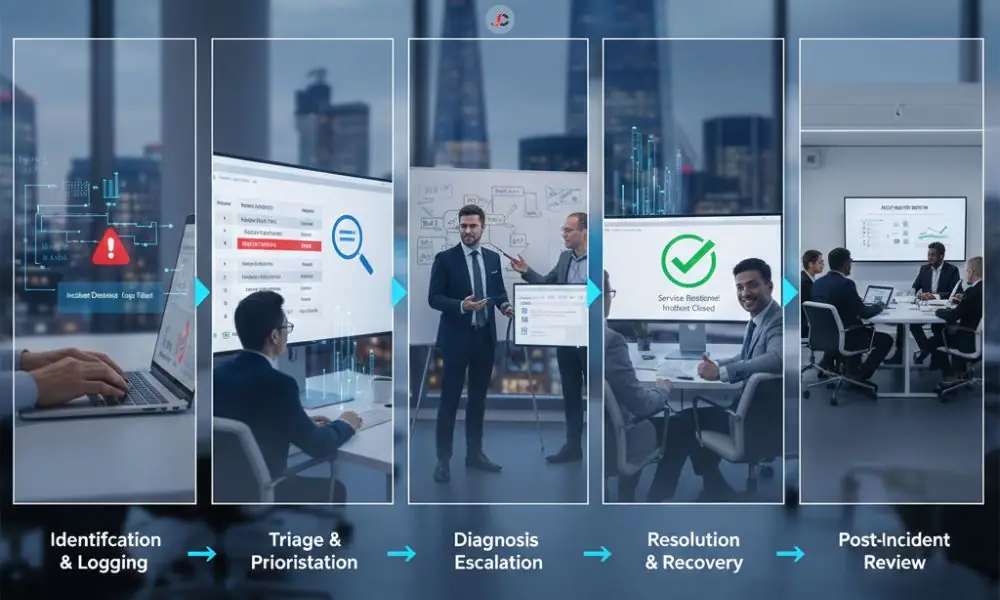
Stage 1: Identification and Logging (The Foundation of the Workflow)
The IT incident management for London SMBs begins the moment an issue is identified. This identification can come from automated monitoring systems (proactive) or from an end-user report (reactive).
Incident Logging Best Practice: From Phone Call to Ticket System
Effective IT incident logging best practice dictates that all incidents, regardless of their perceived severity, must be recorded in a central system—a ticket management platform. You should never rely solely on shared spreadsheets, email inboxes, or verbal reports.
A good incident record must capture the following foundational data points:
- Unique ID: A reference number for tracking.
- Reporter Details: Who reported the issue and how they can be contacted.
- Time Stamp: The exact time the incident was logged and the time it was first noticed.
- Description: A clear, non-technical summary of the issue and the resulting business impact.
- Symptoms: What the affected user or system is currently experiencing.
- CI Affected: The specific Configuration Item (server, application, workstation) impacted.
Defining an Incident versus a Request for Service
Staff must be trained to distinguish between incidents and service requests. An incident occurs when a service is unexpectedly interrupted, or its quality drops below the level users expect. A service request, however, is a user’s request for information, advice, or a minor change. Treating a service request (e.g., “Please install new software”) as an incident only clogs the system and diverts resources from genuine emergencies.
Stage 2: Triage and Prioritisation
Once an incident is logged, the immediate next step is triage—a rapid assessment to assign ownership and priority. This stage is where IT ticket prioritisation for small business teams is determined, shaping the resources allocated and the speed of response.
The Critical Factors: Impact, Urgency, and Business Function
The priority of an incident is determined by two main factors: Impact and Urgency.
- Impact: The measure of potential damage or disruption the incident will cause to the business (e.g., monetary loss, reputational damage, number of users affected).
- Urgency: The degree of urgency of the resolution (e.g., an issue with payroll processing software on the day of payment is highly urgent).
Combining these two factors results in the incident’s Severity Level. The matrix below illustrates how to use these dimensions to achieve rapid, objective classification.
| Severity Level (Priority) | Impact (Business Effect) | Urgency (Time Sensitivity) | Example Incident | Target Response Time (SLA) |
| P1 – Critical | Catastrophic (All critical services down; major data breach) | Immediate (Cannot perform business function) | Loss of all public-facing services | 15 minutes |
| P2 – High | Significant (Key department or critical function impaired) | High (Immediate attention required to prevent escalation) | Major application failure affecting 20+ users | 1 hour |
| P3 – Medium | Moderate (Single user or non-critical application affected) | Medium (Issue must be resolved within the day) | Slow performance on a database server | 4 hours |
| P4 – Low | Minor (Single user inconvenience; cosmetic error) | Low (Workaround available; can be fixed next business day) | Minor interface bug on one workstation | One business day |
The process for determining incident severity levels used by IT support teams is essential for efficient resource allocation, particularly when dealing with complex or business-critical components such as dedicated server support.
Stage 3: Diagnosis and Escalation
With the incident logged and prioritised, the diagnosis begins. The assigned team member investigates the issue to determine the root cause and identify a potential fix or workaround.
The Incident Escalation Process: When to Engage Tier 2/3
The incident escalation process outlines when an issue should be escalated and to whom. Escalation can be functional (to a more skilled technical team) or hierarchical (to senior management).
Escalation is triggered by:
- Time: The elapsed time exceeds the target resolution time for the assigned severity level (e.g., a P2 issue is not resolved within 1 hour).
- Knowledge/Complexity: The assigned technician lacks the necessary expertise or access to resolve the issue. For instance, a fundamental security system issue may need escalation to the specialised critical network support team.
- Resource Requirements: The incident needs resources or approvals beyond the technician’s authority, such as involving a senior vendor or approving significant spend.
The process must be transparent to prevent “passing the buck.” Record each escalation and have the next team confirm they have taken responsibility.
Stage 4: Resolution and Recovery
Resolution is the stage in which the technical fix is applied, verified, and the system is returned to an operational state. The goal is the successful restoration of the affected IT service.
The Importance of IT Outage Communication to Staff and Stakeholders
While technicians focus on the fix, the incident manager must focus on communicating the IT outage to staff. Communication must be clear, transparent, and frequent. It is better to speak about a minor update every 30 minutes than to leave stakeholders waiting for hours.
The communication should adhere to a strict structure:
- Acknowledgement: Confirm that the incident has been clearly identified straight after it is logged.
- Update: Share what is happening now, what parts of the business are affected, and, if you can, when you expect the issue to be fixed.
- Resolution/Closure: Let everyone affected know that the service is back up and running, and that the incident is now closed.
In the event of a security incident, you may be legally required to notify regulators and other external parties, so specialist advice is essential. For practical guidance on IT incident management for London SMBs, refer to Microsoft Learn material for large enterprises and adapt it for SMB use.
Stage 5: Post-Incident Review (The Continuous Improvement Cycle)
The accurate measure of a professional incident management framework is not merely the speed of resolution, but the quality of the post-incident review (PIR). This IT incident management for London SMBs prevents recurrence.
The PIR should be a ‘blameless’ process, focusing on systems and processes rather than individuals. It is mandatory for all P1 and P2 incidents, as well as for incidents that cause significant operational disruption.
Key questions for the PIR:
- What exactly happened?
- What was the timeline of the incident (detection, triage, resolution)?
- What was the root cause of the incident?
- Why did the existing controls/processes fail to prevent it?
- What can we change to stop this from happening again (problem management)?
The PIR output is a set of actionable tasks that lead to service improvement, whether that involves updating robust IT infrastructure support documentation, investing in new monitoring tools, or refining the escalation matrix. A continuous cycle of improvement is the ultimate purpose of IT incident management for London SMBs.
Next Steps for Optimising IT Incident Management for London SMBs
Implementing a world-class IT incident management for London SMBs process is a project that yields continuous returns. It enhances resilience, protects your reputation, and ensures the continued smooth operation of your business, particularly when dealing with complex systems, including specialist cloud support solutions.
We advise all SMB owners and Operations Managers to:
- Formally Document your Incident Severity Matrix.
- Train all staff on the reporting process and on the expected IT outage communication to improve IT incident management for London SMBs.
- Conduct regular tabletop exercises to evaluate your response plan, particularly for cyber incidents, a topic on which the NCSC provides excellent guidance.
By taking these IT incident management for London SMBs, you move from simply reacting to IT failures to professionally managing your technology risk.
What is the difference between an Incident and a Problem in IT?
An Incident is an unplanned interruption of a service that needs quick restoration. A Problem is the deeper root cause behind one or more incidents that needs to be investigated so it does not keep happening.
How should a small business define incident severity levels?
Severity levels should be determined by combining the factors of Impact (the extent of business damage) and Urgency (the speed of resolution needed).
What is the best practice for IT incident logging?
Best practice is to log every incident immediately in a centralised ticketing system, ensuring all essential details, such as the reporter, time, and affected service, are captured.
Should we use email or a dedicated tool for IT incident reporting?
A dedicated tool is strongly recommended over email, as it ensures proper tracking, clear prioritisation, specific assignment, and accurate historical reporting.
What are the five main steps of an IT incident response workflow?
The five steps are: Identification and Logging; Triage and Prioritisation; Diagnosis and Escalation; Resolution and Recovery; and Post-Incident Review.
How often should an SMB review its incident management process?
The review of IT incident management for London SMBs must be conducted at least annually and must include a detailed Post-Incident Review (PIR) after any critical incident (P1/P2).