
Microsoft Inspire is the annual event where the tech behemoth showcases its latest innovations, strategic insights, and cutting-edge solutions. This year was no exception, with several announcements that left attendees abuzz. Unlock the full potential of Microsoft 365 Data Management with innovative backup and archive solutions, revolutionising business data security and efficiency. One of the most anticipated revelations was the introduction of Microsoft 365 Backup and Microsoft 365 Archive. This article delves into what these offerings mean for businesses and the broader Microsoft 365 ecosystem.
Microsoft 365 Backup and Microsoft 365 Archive are two new services announced at Microsoft Inspire 2023. These Microsoft 365 Data Management services are designed to help organisations protect their data in Microsoft 365.
What’s the Big Deal with Microsoft 365 Backup?
Historically, while Microsoft 365 (previously Office 365) has always provided robust availability and uptime, the responsibility for data protection, backup, and recovery largely rested on the user’s shoulders. This led to an array of third-party backup solutions filling the gap. Now, Microsoft’s enhanced Microsoft 365 Data Management offers:
With the introduction of Microsoft 365 Backup, the game has changed. Here’s what you need to know:
- Comprehensive Protection: Microsoft 365 Backup is designed to protect against accidental deletions, security threats, and other data loss incidents.
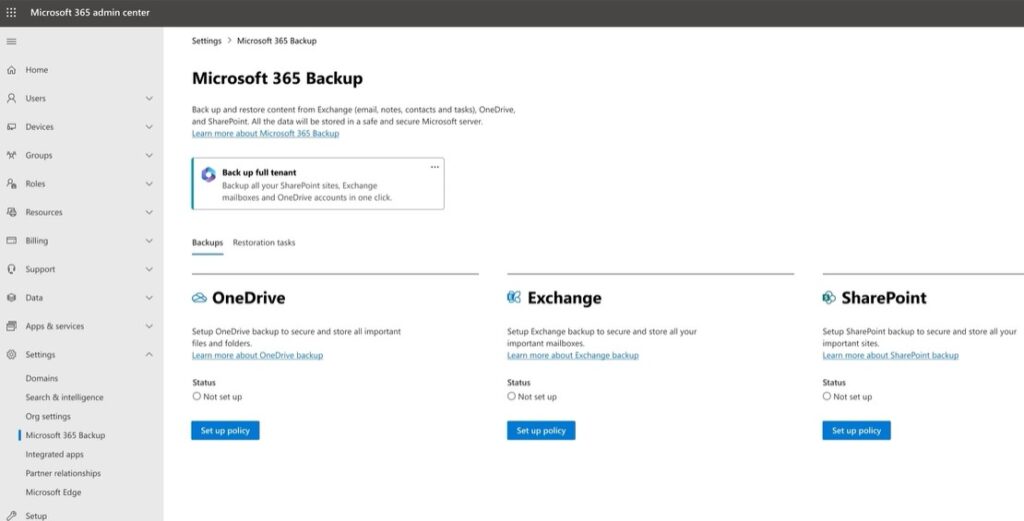
- Streamlined Process: Users can easily back up Microsoft Teams, OneDrive, SharePoint Online, and Exchange Online data, providing a holistic safeguarding approach.
- Flexible Retention: Tailored to meet the needs of diverse organisations, it offers customisable retention policies.
Unlocking Value with Microsoft 365 Archive
In the age of data-driven decisions, having an efficient and secure archiving solution is pivotal. Microsoft 365 Archive is more than just a digital storage vault; it’s a tool that empowers businesses to manage and retrieve data seamlessly. Microsoft 365 Archive, a key pillar of Microsoft 365 Data Management, allows companies to retrieve and manipulate data seamlessly. Here are its standout features:
- Efficient Data Management: Businesses can maintain a clutter-free environment with capabilities such as automatic archiving of old emails and documents.
- Compliance Ready: Given the stringent data regulations, especially in Europe with GDPR, the archiving solution is designed to assist with compliance requirements.
- Seamless Integration: Microsoft 365 Archive integrates smoothly with other 365 apps, ensuring a unified user experience.
Microsoft 365 Subscriptions are available in various plans so that organisations can choose the best option. Plans include options for email, productivity apps, cloud storage, and more.
Why do Microsoft 365 Data Management Offerings Matter?
- Data Sovereignty: With the increasing emphasis on data regulations and residency requirements, these solutions offer businesses peace of mind, knowing their data is handled with the utmost care. With a focus on data regulations, Microsoft 365 Data Management gives businesses peace of mind.
- Reduced Complexity: By reducing the number of third-party solutions deployed, businesses can achieve less complexity and potentially realise cost savings with the Microsoft data management software.
- Future-Proofing: The continuous evolution of cyber threats requires forward-thinking solutions. Microsoft’s commitment to integrating backup and archiving directly into the Microsoft 365 data residency suites indicates its dedication to ensuring that businesses are prepared for the future.
Real-World Impacts: A Look into Potential Scenarios
With improved Microsoft 365 Data Management, imagine an enterprise swiftly recovering from a cyber-attack or simplifying audits in sectors like finance and healthcare.
- Business Continuity in the Face of Disasters: Imagine a large enterprise that faces a massive cyber-attack, rendering a significant portion of its data inaccessible or corrupted. With Microsoft 365 Backup, such a catastrophe can be significantly mitigated. This tool ensures that, regardless of the scale of data disruption, recovery will be swift, minimising downtime.
- Simplifying Audits and Legal Discovery: Audits and legal discovery requests can be frequent for businesses in sectors with stringent regulatory oversight, such as finance and healthcare. Microsoft 365 Archive simplifies this process. Instead of trawling through mountains of data, relevant communications and documents can be easily located and retrieved, saving time and resources.
Beyond Just Features: Transformative Benefits
Microsoft 365 Data Management supports the hybrid work model, offers long-term cost efficiency, and reinforces brand trust in this digital age.
- Evolving with the Hybrid Work Model: As organisations globally adopt a mix of remote and in-office work models, it becomes paramount to ensure that data is consistently backed up regardless of where it originates. Microsoft 365 Backup is geared to cater to this hybrid model seamlessly.
- Cost-Efficiency in the Long Run: While these solutions might be associated with upfront costs, long-term savings must be addressed. Consider the costs associated with data breaches, lost productivity due to data loss, or hefty fines from non-compliance – the Microsoft 365 Backup and Archive solutions can help avert these financial pitfalls.
- Reinforcing Brand Trust: In a digital age where data breaches frequently make headlines, consumers are increasingly vigilant about whom they trust with their data. Implementing top-notch backup and archive solutions signals to clients and partners alike that an organisation prioritises data security and integrity.
Conclusion
The advancements announced at Microsoft Inspire underscore a critical tenet of our data-centric world: proactive management and data protection are paramount. Microsoft 365 Data Management, with its Backup and Archive solutions, isn’t just a toolset; it’s a transformative asset that redefines how businesses approach data security and archiving. As we navigate an increasingly interconnected digital landscape, this enhanced approach to Microsoft 365 Data Management is set to become the gold standard in ensuring data protection and operational efficiency.
Microsoft 365 Backup provides point-in-time snapshots of your data, so you can restore it if lost or corrupted. Microsoft 365 Archive provides a long-term retention solution for your data so that you can keep it for compliance or historical purposes.
Both services are integrated with Microsoft 365, so you can manage them from the same place. They also use AI to help you find and recover your data more efficiently.
Microsoft 365 Backup and Microsoft 365 Archive will be available in public preview later in 2023.
Here are some additional details from the Microsoft 365 Data Management article:
- Microsoft 365 Backup takes snapshots of your data every 30 minutes so that you can restore it at any point in time.
- Microsoft 365 Archive can store your data for up to 10 years.
- Both services use AI to help you find and recover your data more efficiently.
- You can manage both services from the Microsoft 365 Admin Centre.
How does Office 365 protect data?
Office 365 uses a variety of security measures to protect data, including:
Encryption: Strong encryption protocols encrypt data at rest and in transit.
Multi-factor authentication: Users must provide two or more forms of authentication to access their accounts, making it more difficult for unauthorised users to gain access.
Threat protection: Office 365 includes various threat protection features, such as anti-phishing, anti-spam, and anti-malware, to help protect users from malicious emails and attachments.
Data loss prevention (DLP): DLP policies can prevent users from sending or sharing sensitive data outside the organisation.
Backup and recovery: Office 365 includes a built-in backup and recovery service, so users can restore their data if it is lost or corrupted.
In addition to these security measures, Microsoft 365 Data Management has several security certifications, such as ISO 27001 and SOC 2, demonstrating its commitment to data security.