
A problem faced continually by partners and practice managers at UK accountancy firms is chargeable hours eaten up by client administration. Emails, meeting notes, monthly reports, and document searches all take time away from providing advice. Microsoft Copilot for accountants resolves this problem by running within the applications your employees use daily.
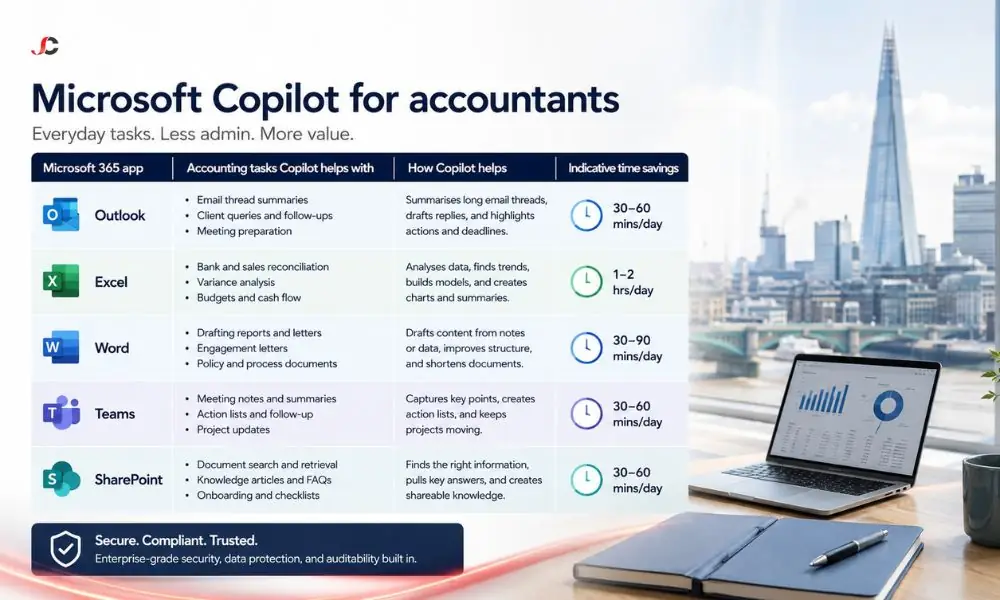
This guide maps Microsoft 365 Copilot to five specific accounting tasks across Outlook, Excel, Word, Teams, and SharePoint. Each section shows the task, an example prompt, and the admin it removes, so you can judge whether the assistant justifies its place in your practice.
Key Takeaways
- Outlook: Copilot summarises extensive email exchanges between clients and drafts responses to save you time during the busy self-assessment period.
- Excel: Copilot analyses exported bookkeeping data using simple English prompts, offering suggestions for formulas and flagging differences that would require a manual check for each accounting entry.
- Word and Teams: Your monthly reports, VAT checklist, and meeting minutes go from needing to be written from scratch to being review items, with Copilot writing the first drafts and the action list.
- Data safety: Copilot only accesses content that each user is authorised to access, making the review of permissions an absolute prerequisite for a system-wide implementation.
| Copilot surface | Accounting task | Indicative manual time | With Copilot | Who benefits |
| Outlook | Summarising client email threads, drafting replies | 30–60 min daily | 10–15 min daily | Partners, client managers |
| Excel | Bookkeeping analysis, anomaly spotting, formula building | 2–4 hrs per client review | 45–90 min | Bookkeepers, seniors |
| Word | Monthly client reports, VAT checklist templates | 1–2 hrs per report | 20–40 min | Practice managers |
| Teams | Client meeting recaps and action tracking | 30 min per meeting | 5 min review | All fee earners |
| SharePoint | Locating client process documents | 15–30 min per search | Under 2 min | Whole practice |
How Can Copilot in Outlook Summarise Client Email Threads for Accountants?
Copilot in Outlook analyses the entire email thread and produces a summarised report on decisions made, pending questions, and deadlines. Accountants can now direct Copilot to draft replies to the mail, depending on the thread’s content. Copilot can help reduce 30 minutes of scrolling to just 2 minutes of reviewing.
There is a sharp rise in client communication in a UK firm in January when there are deadlines for self-assessment, quarterly VAT filing via Making Tax Digital, and annual packs. An associate returning from two days of client meetings could ask Copilot to summarise every unread thread for that client, and it would be done instantly.
Drafting works the same way. Highlight a thread and use a prompt such as:
“Provide a summary of the thread and then write a response which assures that we will submit the VAT return on time, with the names of the two documents which we require from the client.”
The draft is presented in the structure you requested for human assessment. Microsoft documents these capabilities in its official Copilot documentation on Microsoft Learn.
How Does Copilot in Excel Support Bookkeeping Analysis?
Copilot in Excel analyses data within tables through natural language input. An accountant can request Copilot to summarise the bookkeeping export, suggest formulas, create calculated columns, or even make charts without having to code any syntax. Copilot works well on tables in Excel, so a clean client export becomes an interactive dataset rather than rows and rows of data.
Bookkeeping review is one of the most time-consuming recurring tasks in any practice. A senior reviewing a client’s nominal ledger export typically filters, pivots and cross-checks manually. Copilot compresses these steps into instructions such as:
“Show total spend by expense category for each quarter and add a column flagging any month where a category exceeds its twelve-month average by more than 20 per cent.”
The result is a starting point for professional review, not a replacement for it. The accountant still validates the output against source records, but the mechanical assembly work disappears.
Can Copilot in Excel Spot Anomalies in Client Ledgers?
Yes, Copilot can mark outliers, duplicates, and abnormal variations in an Excel table. Copilot will detect abnormalities, including duplicate postings of a supplier invoice or a sudden increase in a particular expense category that deviates from its normal trend.
Anomalies are flagged based on prompts and not by automation. Prompts like “find any transactions which occur more than once on the same day with the same value” or “find the five biggest month-to-month changes” convert the linear inspection process to an exceptions-based one. When there are several SMEs to handle for a business, this is how time is saved.
How Do You Draft Client Reports with Copilot in Word?
Copilot in Word generates a structured first draft from a plain-English instruction, a referenced document or both. An accountant can point it to a management accounts summary and ask for a client-friendly monthly update, then refine the headings, figures, and commentary. The blank-page stage of report writing is removed entirely.
Client update reports usually follow a predictable format: Performance overview, key movements, and activities for the next month. Copilot is good at handling predictable formats. A practice manager could instruct:
“Write a one-page report for a retail client using the attached performance summary. Include separate headings for performance, cash position, and activities. Use simple language without jargon.”
The Copilot can also refer to existing documents in your tenant, making the previous month’s report the style guide for the current one.
Can Copilot in Word Create Reusable VAT Checklist Templates?
Yes. Copilot in Microsoft Word can create a structured checklist for VAT returns that covers evidence collection, reconciliation procedures, and validation checks, all organised in a reusable template. The company can create the basic checklist once, customise it according to its internal process, and then use it consistently for all clients.
A well-built checklist reduces review errors and speeds up staff onboarding. Copilot produces the scaffold sections for turnover reconciliation, input VAT evidence, partial exemption checks and submission sign-off, and your senior team adds the firm-specific detail. The template then lives in your document library, where every team member works from the current version.
How Does Copilot in Teams Capture Client Meeting Notes and Actions?
Copilot in Teams produces meeting recaps that include a summary of discussion points, decisions taken and actions assigned to named attendees. For accountants running client calls, this removes manual minute-taking and gives every participant a consistent record within minutes of the meeting ending, provided recording or transcription is enabled.
Client interactions lead to follow-ups, but these are lost due to inconsistent notetaking. After concluding a quarterly review phone call, the fee earner can quickly ask Copilot to compare all actions assigned to the firm with the client’s actions and copy them into the engagement management tool.
Copilot can also brief a latecomer on what has been discussed without interrupting the call. Firms already using Microsoft Teams support from a managed provider can centrally enable transcription policies, ensuring recaps behave consistently across every client-facing team.
One governance note: recording client calls requires client awareness. Set a firm-wide policy on when transcription is used and state it at the start of client meetings.
How Can Accountants Search Client Documents in SharePoint with Copilot?
Copilot searches SharePoint Online content using natural language rather than exact file names. An accountant can ask for the latest engagement letter template, the client onboarding process document or last year’s fee proposal for a named client, and Copilot returns the relevant files with a summary of their contents.
Traditional search depends on remembering a file’s name. Natural-language search depends only on knowing what you need. Prompts such as “find our anti-money laundering onboarding checklist and summarise the identity evidence it requires” retrieve and digest the document in one step.
Microsoft Copilot for Accountants makes a difference in how institutional knowledge is accessed in practices where many clients’ files have been gathered over the years, because new hires do not need to ask their colleagues for them.
Is Client Data Safe When Accountancy Firms Use Copilot?
Copilot operates inside your Microsoft 365 tenant and inherits your existing permissions model. It only surfaces content that the signed-in user already has permission to access, and Microsoft states that prompts and responses are not used to train its foundation models. Client data does not leave your tenant boundary during normal use.
This is the critical distinction between Copilot and public AI chatbots. Staff pasting client financials into a consumer tool creates an immediate breach of confidentiality; Copilot, working on the same data within your tenant, does not.
The inherited-permissions model does carry one risk: oversharing. If your SharePoint permissions are loose, client folders open to the whole practice, for example, Copilot will faithfully surface that overshared content to anyone who asks. The tool does not create the exposure, but it makes existing exposure far easier to find.
Microsoft sets out these commitments in its privacy documentation for Microsoft 365 Copilot, including compliance with GDPR obligations. A permissions audit aligned with your broader cyber security solutions should still precede any rollout of Microsoft Copilot for accountants.
What Should a UK Firm Have in Place Before Rolling Out Microsoft Copilot for Accountants?
A firm needs three prerequisites before launch: a permission check to ensure Copilot does not expose any overshared client information; organised, properly labelled SharePoint document libraries to enable relevant searches; and pilot users with clear use cases. Companies that fail to maintain data hygiene have poor results and confidentiality issues.
Preparation defines success. The Copilot relies on existing material in your tenant, and duplicates, outdated templates, and inconsistencies in naming will negatively affect the results you get. Running an organised pilot with five participants, three tasks, and four weeks provides you with data your partner group can act on.
In most SME settings, there are no internal Microsoft specialists available to conduct the above preparation. Working with an Office 365 consultancy gives firms a structured path: permissions audit, data cleanup, pilot design, and measured rollout, so that Copilot delivers recovered hours rather than governance headaches.
What is the difference between Copilot in Excel and the formulas an accountant already uses?
The formulas necessitate that the accountant be aware of the syntax and construct the analysis from scratch. Copilot takes English language commands and automatically constructs formulas, columns, or graphs. The engine for the calculation is the same; Copilot eliminates the construction process but not the output.
Can Copilot in Outlook draft replies to HMRC or client queries automatically?
Copilot drafts a reply on instruction; it does not send anything automatically. Every draft requires human review before sending, which is essential for regulated correspondence. Treat Copilot output as a first draft for the responsible accountant to check against the facts of the engagement.
Does Copilot in Teams record and transcribe client meetings by default?
No. Meeting recaps depend on transcription or recording being enabled for the meeting, which is controlled by your organisation’s Teams policies. Firms should set a deliberate policy and inform clients when calls are transcribed.
Can Copilot see client files that a staff member does not have permission to open?
No. It uses the Microsoft 365 permissions already set by the user and does not provide any information that the user does not have access to. Rather, the danger lies in the opposite scenario – where the permissions are too loose.
Is Copilot suitable for a small accountancy practice with fewer than ten staff?
Yes. These productivity boosts are per user; therefore, the productivity boost for a five-person practice will be proportional across emailing, report administration, and meeting administration. Smaller organisations need to undertake all the necessary security measures before activating this feature.
Does Copilot work with accounting software such as Xero or Sage?
Not natively, although Microsoft’s connector and agent ecosystem is expanding what Copilot can access; for most firms today, the practical bridge is a clean CSV or Excel export from Xero or Sage, which Copilot then analyses in Excel.
How accurate is Copilot when summarising financial data in Excel?
Copilot is reliable at mechanical tasks such as totals, groupings, and variance flags on well-structured tables, but it can misread poorly formatted data and occasionally produces confident errors. Professional review of outputs against source records remains mandatory, exactly as it would for work delegated to a junior.
What Microsoft 365 subscription does an accountancy firm need before adding Copilot?
Copilot is an add-on to qualifying Microsoft 365 business plans, not a standalone product. Requirements and options vary by plan, so review the Microsoft 365 Copilot service page linked at the start of this article or speak to your provider about the right fit for your practice.