
The shift from hardware purchases to desktop subscriptions is reshaping IT budgets, and most firms must balance the flexibility of remote work with higher monthly costs. Understanding the pricing and plans for Windows 365 Cloud PC is the first step toward a sustainable budget that protects margins. This guide offers practical Windows 365 Cloud PC cost optimisation strategies that London SMBs can apply immediately to maximise value.
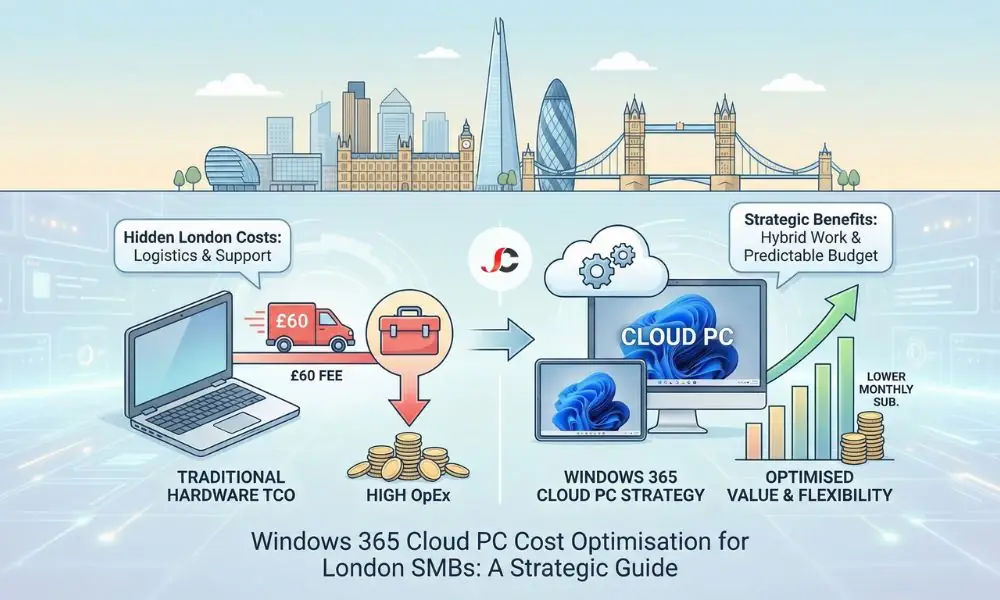
Comparing Laptop TCO vs Windows 365 Cloud PC
Cloud computing is most associated with OpEx costs. Still, a laptop’s purchase price does not factor in the underlying costs of managing and logistics in a hybrid London, specifically in Zone 4. If a computer fails, productivity can come to a halt. With Windows 365, older devices can act as thin clients while the workload runs securely in the Microsoft Cloud.
Physical Laptop vs. Cloud PC Cost Analysis (3-Year Cycle)
| Cost Category | Physical Laptop Model (CapEx) | Cloud PC + Legacy Hardware (OpEx) |
| Hardware Procurement | £800 – £1,200 (upfront) | £0 (reuse existing device) |
| Logistics (Courier/Returns) | £50 – £100 per incident | £0 (instant provisioning) |
| Maintenance & Repairs | High (battery, screen, keyboard) | Low (device is interchangeable) |
| Electricity/Energy | Variable | Lower (older devices run efficiently) |
| Software Management | Requires manual or expensive RMM | Centralised in the Cloud |
| Risk of Theft/Loss | High (data on disk) | Zero (data stays in cloud) |
Hidden Hardware Costs in the London Market
Except for the cost of the laptops themselves, there are operational costs that London involves, but are not incurred with Windows 365. These operational costs are easy to overlook when budgeting, but can be pretty costly when considering remote work. By factoring in delivery and support expenses, you can achieve genuine Windows 365 cost optimisation across your entire IT estate.
Logistics and Courier Fees
For businesses in The City or Canary Wharf with home workers across Greater London, moving hardware is costly. A secure courier to deliver a new starter laptop to Ealing or Croydon typically costs £30 to £60 per trip. With the recent removal of the electric vehicle exemption for the Congestion Charge (Jan 2026), these delivery costs are set to rise further. Cloud PCs let users log in instantly from their own device, avoiding same-day hardware shipment entirely.
On-Site Support and ULEZ Charges
Physical failure may require an IT engineer to come to the site or for the user to go to the office. London’s Ultra Low Emission Zone (ULEZ) (£12.50/day) and the increased Congestion Charge (£18.00/day) add high daily costs to every vehicle-based support visit. With the desktop in the cloud, on-site work is eliminated. If the equipment fails, the user can switch to their tablet or a second laptop and pick up right where they left off, without incurring downtime.
Selecting the Correct Windows 365 Edition: Business vs. Enterprise
Microsoft offers two main options: Windows 365 Business and Windows 365 Enterprise. Choosing the wrong one is a common cause of inflated costs.
- Windows 365 Business is built for organisations with fewer than 300 users. It is simpler to deploy because it does not require a complex Intune environment or an on-premises network connection.
- Windows 365 Enterprise is required for advanced device management, custom images, or direct integration with on-premises networks. Note that this edition mandates Microsoft Intune, Microsoft Entra ID P1, and Windows Enterprise E3 licences.
Avoid reverting straight to Enterprise; you could end up paying for management capabilities or licensing requirements you do not really need. A critical part of successful Windows 365 cost optimisation is selecting the licence tier that aligns perfectly with your management requirements.
Windows 365 Cloud PC Cost Optimisation for: Sizing for Specific Roles
Over-provisioning is a subtle contributor to costs, as few consumers will be utilising 8 vCPUs and 32 GB of RAM. Right-size Windows 365 Cloud PC cost optimisation based on real-world usage.
The Task Worker Profile
People in roles such as receptionists, admin assistants, or call centre operators, using browser applications and a simple CRM, require only two vCPU and 4 GB RAM for Microsoft Teams meetings, Microsoft Outlook communications, or browser interaction. “Just in case” increases are unnecessary expenses.
The Power User Profile
Finance teams with large Excel files or marketing teams with Adobe Creative Cloud may require 4 vCPU/16 GB RAM or 8 vCPU/32 GB RAM. Cloud PC configuration requirements for employees may be misguided.
Connectivity and Bandwidth Considerations
A key cost-saving benefit is offloading data usage: with a traditional VPN, opening large files pulls data from the server to the user’s laptop, consuming significant bandwidth.
With Windows 365, the file opens in the Microsoft data centre. The only data transmitted to the user is a desktop video stream. For employees working from shared flats with limited broadband or using metered 4G/5G connections while travelling, this reduces the strain on their internet connection. It allows businesses to maintain high productivity without subsidising expensive fibre upgrades for every remote employee’s home office.
Reducing Costs for Seasonal Staff and Contractors
London businesses frequently rely on contractors, seasonal interns, or temporary consultants. Purchasing a new laptop for a three-month contract is inefficient.
Windows 365 allows you to provision a desktop for the exact duration of the contract. You pay for the months the user is active. When a contract ends, ensure de-provisioning of the Cloud PC and that billing for the Cloud PC services ceases the following month. This makes Cloud PCs cost-effective for seasonal employees by preventing outdated hardware from remaining idle for prolonged periods.
Leveraging the Windows Hybrid Benefit
If your business already owns valid Windows 10 Pro or Windows 11 Pro licences for the devices accessing the Cloud PC, you are eligible for the Windows Hybrid Benefit.
By verifying that your primary users have a valid Pro licence on their local device, you can receive a discount on the Windows 365 subscription (typically saving up to 16%). For a company with 50 users, this saving adds up significantly over a fiscal year. This is like the strategies used to optimise Microsoft 365 subscriptions for maximum value: minor adjustments to licensing configurations yield substantial long-term savings.
Monitoring Utilisation to Prevent Zombie Subscriptions
The ease of provisioning a Cloud PC can also be a liability if lifecycle management is lax. A “zombie subscription” occurs when an employee leaves, or a project concludes, but the Cloud PC remains active and billing.
Regular auditing is essential. IT administrators must review active subscriptions against the current HR roster monthly. If a user has not logged in for 30 days, the licence should be questioned or reassigned. For general oversight, engaging professional IT consultancy services can help establish these governance protocols permanently.
Does Windows 365 save money compared to buying laptops?
It can save money when you factor in the Total Cost of Ownership (TCO). While the monthly fee is perpetual, you save significantly on courier fees, hardware repairs, lost device insurance, and IT support time. It also allows you to extend the lifespan of your existing laptops substantially.
Can I downgrade my Windows 365 plan if it is too expensive?
Yes, you can resize a Cloud PC. Microsoft updated this feature (as of mid-2024) to allow Windows 365 Business users to use the “Resize” remote action. This upgrades or downgrades RAM and CPU while preserving user data (though disk storage cannot be downsized). The process typically takes 15–20 minutes.
What is the Windows Hybrid Benefit for Windows 365?
The Windows Hybrid Benefit is a discount applied to your Windows 365 subscription if the user accesses the service from a device that already has a valid Windows 10 or 11 Pro licence. It prevents you from paying for the Windows OS component twice.
Is Windows 365 Business cheaper than Enterprise?
The base compute cost is often similar, but Windows 365 Enterprise requires additional licensing components, such as Microsoft Intune, Microsoft Entra ID P1, and Windows Enterprise E3. For small businesses that do not need these advanced management tools, the Business edition is the more cost-effective route.
Do I need to pay for Windows 365 for seasonal staff?
No, you only pay for the months the subscription is active. This makes it ideal for seasonal staff or contractors in London. You can provision the desktop for 3 months and cancel it immediately upon the contract’s end.
How does Windows 365 impact my internet data usage costs?
The heavy processing occurs in the Microsoft Cloud, not on your device. Bandwidth usage is primarily due to a video stream. It is efficient for standard broadband connections, but ensure your remote staff have a stable internet connection for the best experience.