
A London small- to mid-sized business has to deal not only with technology but also with strict UK GDPR guidelines on personal data. Microsoft 365 and Azure offer a robust platform on which to build a strong safety net, but it all has to do with how you use it.
This document explains how to use Microsoft Cloud Services UK data protection features and Microsoft Azure UK regions to strengthen data governance and support legal compliance.
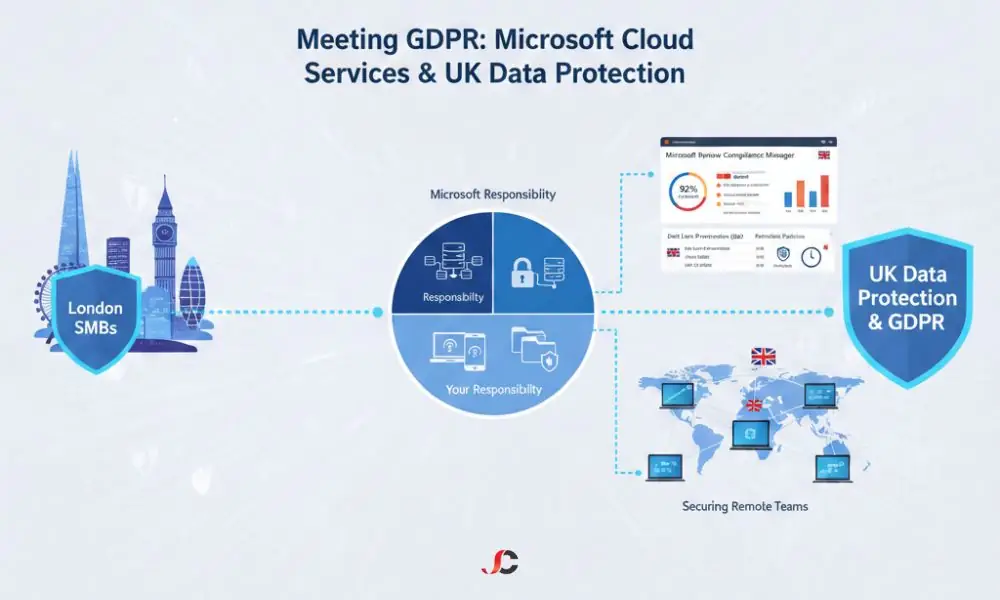
Understanding the UK GDPR Framework for Microsoft Cloud Users
Under the UK GDPR, data controllers and processors must have a lawful basis for processing personal data. Although Microsoft offers data and security compliance tools, protecting and controlling data access and ensuring its lawful processing are the customer’s responsibility. This is non-negotiable and underscores the need for a strategy, not a mere purchase.
The Data Residency Question: UK Data Centres and Compliance
Data residency is the geographic location where data is stored. Many SMBs in London are required, or are actually mandated by law, to store data in the United Kingdom.
Microsoft tackles this problem by providing cloud-based facilities, specifically UK-based data centres, for its Azure cloud platform and Microsoft 365 online solution.
- With Microsoft 365, Customer information will be provisioned in the UK if your tenant was created with the UK country code. Email content in Exchange Online mailboxes and files in SharePoint or OneDrive sites will also be provisioned in the UK.
- For Azure, your control lies in your decision to host services such as Virtual Machine instances, Storage services, and SQL Database instances in the UK South and UK West regions.
While the location of data is essential, true Microsoft cloud GDPR compliance in the UK relies more on the security controls and policies you implement than on geographical location alone.
The Microsoft Shared Responsibility Model and Your UK GDPR Duties
The Shared Responsibility Model is the key idea for understanding UK data protection in Microsoft 365 and Azure. It clearly sets out where Microsoft’s responsibilities end, and yours begin, and misunderstandings here are one of the main reasons SMBs run into cloud compliance gaps.
Microsoft’s Responsibility: Contracts, Security, and Data Processing
Microsoft secures the cloud, including physical infrastructure, host operating systems, network controls, and SaaS applications such as Microsoft 365. Microsoft also provides contractual warranties:
- Contractual Compliance: Microsoft’s legal terms, especially the DPA, define their role as a data processor and set out how they help protect your data and support GDPR. You can find the technical demarcation of these duties in the official Shared responsibility in the cloud documentation.
- Availability and Resilience: Microsoft ensures the platform is always up and working, and your data is protected from disasters and system failures, sometimes even replicating it within your region of choice, utilising secure Azure Storage.
Your Responsibility: Configuration, Identity, and Access
As a customer, you are responsible for security from user sign-in to data classification and retention. The UK GDPR and Shared Responsibility Model state that customer responsibility includes:
- Identity and Access Management (IAM): Implement Multi-Factor Authentication and Role-Based Permissions so that access to sensitive data is granted only to authorised staff members in their business roles.
- Data Classification and Labelling: Determine which data is personal, sensitive, or high-risk, mark it accordingly, and encrypt it.
- Data Retention Policies: Establish policies to remove the information as soon as it is deemed unnecessary, as is required under GDPR.
- Configuration and Audit: Regularly review user activity and security settings to catch errors or malicious behaviour.
Essential Microsoft cloud services UK data protection features, and tools
Microsoft cloud compliance features are delivered primarily through the Microsoft Purview suite, which brings together governance, risk, and compliance tools. These features allow London SMBs to translate the abstract principles of the UK GDPR into technical controls.
Using Compliance Manager as a UK GDPR Checklist
Microsoft Purview Compliance Manager is a critical tool. It offers pre-built templates for various regulations, including the UK GDPR. It provides a centralised dashboard that breaks down your compliance efforts into actionable improvement actions.
| GDPR Principle | Compliance Manager Action | Microsoft Cloud Feature | Your Responsibility |
| Lawfulness & Fairness | Document data processing activities | Records of Processing Activities (RoPA) template | Documenting and mapping your internal processes. |
| Storage Limitation | Implement data retention and deletion policies | Retention Labels and Policies (Data Lifecycle Management) | Defining the retention period for specific data types. |
| Integrity & Confidentiality | Enable strong access controls | Conditional Access Policies, MFA | Enforce the policies across all user accounts. |
| Accountability | Monitor user activity and audit logs | Audit (Standard/Premium) in Microsoft Purview | Reviewing logs to demonstrate regulatory adherence. |
Data Loss Prevention (DLP) and Retention Policies
The security of processing under the UK GDPR entails taking measures to protect personal data from accidental loss, destruction, or unauthorised disclosure.
- Data Loss Prevention (DLP): This Microsoft Purview feature lets you define, find, and monitor sensitive information (such as National Insurance numbers, passport details, or bank data) across Microsoft 365. DLP policies can then block users from sending documents with UK personal data outside the business.
- Retention Policies: Using retention policies ensures that data is kept for the mandatory UK legal period and then permanently and defensibly deleted when that period expires. This directly supports the GDPR’s ‘storage limitation’ principle.
Securing Endpoints and Data Access for Remote London Teams
As many London-based SMBs operate with hybrid or remote working models, the point of access—the user’s device, or endpoint—is often the weakest link in their security. Personal data stored in the cloud is only as secure as the device used to access it.
Auditing and eDiscovery for Subject Access Requests (SARs)
Under the UK GDPR, individuals can request access to their personal data through a Subject Access Request and, in some instances, request erasure under the “right to be forgotten”.
Microsoft Cloud features help you respond efficiently:
- Content Search and eDiscovery: These Purview tools allow you to search across Microsoft 365 services (Exchange, SharePoint, Teams) using specific keywords or identifiers to locate all personal data belonging to an individual, which is essential for fulfilling a SAR within the one-month legal deadline.
- Azure Site Recovery: Equally important is Azure Site Recovery for compliance, which ensures that even your data repositories remain accessible and compliant after a high-impact service disruption.
Maintaining Security for Hybrid Workers
Endpoint security is one of the Shared Responsibility Model’s responsibilities. You are required to confirm that the personal or unmanaged devices accessing business information utilise the same security standards. To fully protect the devices used, it would be advisable to implement a robust endpoint management system that supports GDPR compliance.
Next Steps for London SMBs: Achieving and Maintaining Compliance
Achieving UK GDPR compliance with Microsoft cloud services and UK data protection is an ongoing process, not a one-time project. It requires consistent monitoring and an initiative-taking strategy.
Your Actionable Compliance Checklist
To close the loop and ensure continuous compliance, we recommend the following steps:
- Define Accountability: Make sure it is clear who in your business is responsible for cloud security and data protection.
- Audit Data: Identify and classify all personal data you hold within Microsoft 365 and Azure.
- Harden Identities: Implement mandatory MFA and enforce the principle of least privilege using Conditional Access policies.
- Implement Governance: Use Microsoft Purview to set up DLP and retention policies, guided by Compliance Manager.
- Seek Expertise: Partner with a specialist to review your setup and check that it is secure and in line with the UK GDPR’s technical requirements. Reviewing our comprehensive cybersecurity solutions can help you determine where your internal skills may need external support.
The power of the Microsoft Cloud lies in its world-class security infrastructure. Your success hinges on correctly configuring and managing this infrastructure to meet your specific UK data protection obligations.
What is the UK GDPR, and how does it affect London SMBs using Microsoft Cloud?
It is the legal framework that dictates how UK organisations must process and protect individuals’ personal data.
Does Microsoft guarantee full compliance with the UK GDPR for my business?
No, Microsoft guarantees cloud security, but the customer is responsible for configuring and processing data to achieve full compliance.
Is my data guaranteed to be stored in a British data centre when using Microsoft 365 or Azure?
It provisions core data for Microsoft 365 in the UK if your tenant is UK-based, whereas in Azure, deployments must be done in a UK region, such as UK South.
What is the Microsoft Shared Responsibility Model, and why is it crucial for GDPR accountability?
The model defines the demarcation point between Microsoft’s security duties (the cloud infrastructure) and the customer’s duties (the data and configuration in the cloud).
Which specific Microsoft 365 features assist with Data Loss Prevention (DLP) and eDiscovery?
The Microsoft Purview suite, specifically DLP policies and Content Search/eDiscovery tools, is used for these tasks.
How can I use Microsoft Compliance Manager to monitor my compliance with the UK GDPR?
You can use the Compliance Manager’s UK GDPR template to receive an actionable checklist and track your compliance progress through a measurable score.
How should an SMB handle a Data Subject Access Request (SAR) using Microsoft Cloud services?
The eDiscovery and Content Search tools within Microsoft Purview should be used to efficiently locate and extract all relevant personal data for the request.
What is the most common GDPR compliance failure point for SMBs using the Microsoft Cloud?
The most common failure is the customer’s inadequate configuration and management of identity, access, and data retention policies.
How does endpoint management help maintain GDPR compliance for remote workers?
It also ensures that any devices attempting to access cloud data are protected against unauthorised access through authentication processes.