
Azure Infrastructure as Code helps you define cloud infrastructure as code so deployments are fast, consistent, and easy to repeat, reducing human error and speeding recovery when things go wrong. This page explains what infrastructure as code is, clarifies the meaning of IAC, compares the Azure IAC tool, and sets out a practical workflow for UK businesses, all in plain British English. If you need expert design and build support that aligns with your roadmap, explore our Microsoft Azure services to integrate your plan with day-to-day operations. Azure IAC also strengthens audits and compliance by making every change traceable in source control, enabling teams to move quickly without losing control.
What Is Azure IAC And Why Does It Matter?
Azure IAC means you define your cloud resources in files and keep them in version control so every change is reviewed, tested, and deployed through a pipeline. Deployments become consistent across development, test, and production, reducing risk and shortening project timelines for UK SMBs. Because the same code drives every environment, you can track change history, prove compliance, and roll back safely when required. If your identity or data services connect to Microsoft 365, our Microsoft 365 support in London can help you integrate policies and naming standards across tenants. In short, IAC in Azure turns infrastructure into something you can ship reliably.
Bicep, ARM, Or Terraform: Which Should You Use?
The IAC (Infrastructure as Code) concept is straightforward: select the right tool for your targets and team, with Azure-native Bicep offering clean syntax and rapid onboarding, ARM JSON providing full compatibility and Template Specs, and Terraform enabling cross-cloud estates with mature modules and a robust ecosystem. If you are Azure-only, Bicep is an excellent default; if you span multiple clouds, Terraform can bring consistency, provided you manage state carefully and keep modules focused. For a clear primer, refer to the Microsoft Learn overview of Bicep, which explains how it compiles to ARM and integrates into governance and CI/CD workflows. Where your adoption path includes device standards and tagging strategy, our Endpoint management in London guidance ensures your resource conventions match your endpoint and identity policies. Azure Infrastructure as Code excels when tools, repositories, and reviews align.
| Tool | What It Is | Good For | Watch-Outs |
| Bicep | Azure’s DSL on top of ARM | Clear syntax, tight Azure fit, and learning speed | Cross-cloud is limited |
| ARM JSON | Native template format | Compatibility, Template Specs, fine control | Verbose, harder to read |
| Terraform | Cross-cloud tool | Hybrid, multi-cloud, mature modules | Manage state, extra tooling |
A Simple Azure Infrastructure as Code Workflow That Works
A practical flow keeps changes small and controlled while enabling quick rollbacks and approvals through your chosen CI/CD service.
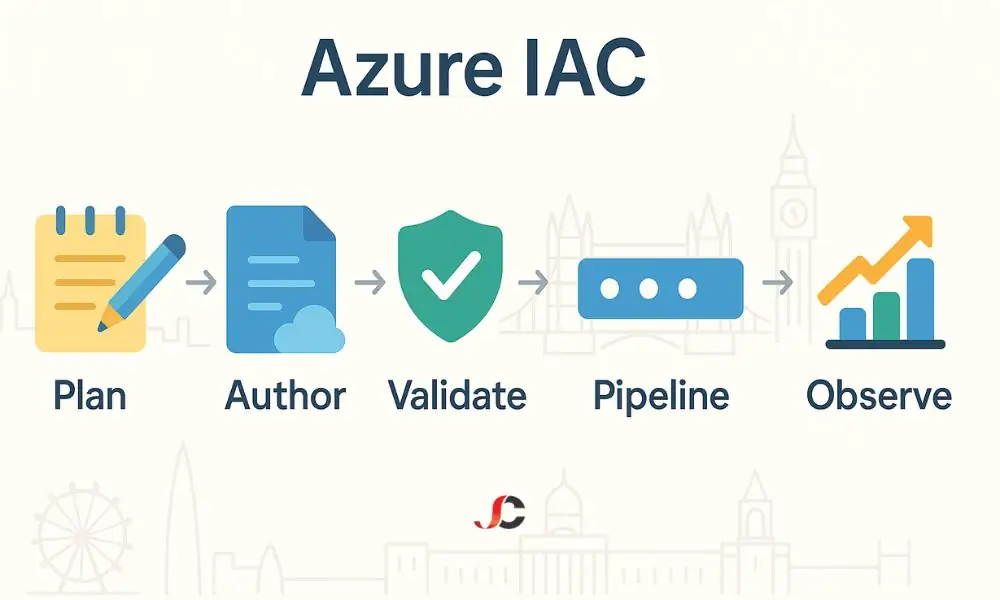
- Plan: define naming, tags, resource groups, and environment boundaries.
- Author: Write Bicep or Terraform with parameters for dev, test, and prod.
- Validate: run template validation and lightweight unit checks in pull requests.
- Pipeline: automate with Azure DevOps or GitHub Actions and protect the main with policies.
- Govern: enforce standards using Azure Policy, Template Specs, and Deployment Stacks.
- Observe: track health and budgets with Azure Monitor, alerts, and cost dashboards.
Governance In 2025: Deployment Stacks, Not Blueprints
Azure Blueprints have given way to patterns built on Template Specs and Deployment Stacks, which manage related resources as a single unit for cleaner updates and removals. By grouping resources in a stack, you reduce drift, enforce tags, and apply consistent structure across projects without brittle manual clean-ups. Template Specs enable you to package standard modules for reuse and versioning, speeding up safe rollouts and simplifying reviews across teams. To align governance with your broader compliance and data-handling rules, our endpoint guidance for GDPR compliance helps you connect tagging, logging, and access control to policy. With careful design, Azure Infrastructure as Code makes governance a guardrail rather than a roadblock.
Security And Compliance Baked In
Security should be part of every pull request, including those with secrets in Key Vault, policy evaluations that gate deployments, and Defender for Cloud recommendations that inform continuous improvement. Use Azure Monitor for logs and metrics so every change is observable, searchable, and attributable, which supports GDPR and audit duties for UK businesses. Maintain approvals for sensitive operations and ensure least-privilege access to pipelines and subscriptions. Then document these controls in the repository to make reviews more predictable. If you need an operational wrap for incident response and BAU improvements, our Managed IT support in London can help you embed alert handling and change windows. With these controls in place, Azure Infrastructure as Code turns security from a gate into a habit.
Cost And Reliability For UK Teams
IAC locks in naming, tags, and sizes to prevent waste while budgets and alerts warn you before spend spikes, which is vital during busy trading periods. Standard templates make it easy to right-size common stacks for web, data, and virtual machines, and health checks run on every deployment, so issues are caught early. This stable routine reduces manual fixes and weekend emergencies, thereby improving service levels without requiring additional headcount. If your migration roadmap includes email or collaboration workloads, our Office 365 migration services help coordinate the lifecycle of identity, policy, and resources. Done well, Azure IAC keeps operations predictable as your estate grows.
How We Deliver Azure IAC For London Businesses
We follow a clear engagement model that teaches your team while we build foundations that you can own and extend.
- Discovery: confirm goals, risks, and measurable outcomes, noting any quick wins.
- Design: propose a simple module layout, repo model, and branching strategy.
- Build: create Bicep or Terraform foundations with policy, tags, and Template Specs.
- Pipeline: Add CI/CD, validation, and approvals to gate and audit changes.
- Pilot: deploy to a safe test area, gather feedback, and refine guardrails.
- Rollout: Scale to production with thorough training and a clear handover plan for your team.
Case Study: From Manual Setup To Repeatable Builds
A London retailer relied on hand-built resource groups and ad hoc settings, resulting in slow, inconsistent deployments and causing drift from standards over time. We introduced Azure IAC with Bicep modules, Azure Policy, and a gated pipeline, and we paired this with clear tags, budget alerts, and Key Vault-backed secrets. Build time fell to under an hour, rollbacks became routine, and costs stabilised thanks to consistent sizes, naming, and automated checks. If you want a consistent, steady rhythm across apps and devices, our Microsoft Azure services can help you plan a phased rollout that aligns with your existing lifecycles. This is where Azure IAC proves its value beyond the initial project.
Azure IAC Best Practices For London SMBs
Azure IAC works best when you keep modules small, reuse Template Specs for standards, and maintain a single tagging scheme across all subscriptions and environments. Add policy exemptions sparingly, providing clear justifications, and rotate secrets automatically. Monitor drift to ensure fixes are deliberate rather than reactive. Keep your main branch protected, require reviews on every pull request, and run validation on all templates before merging. Then, publish simple runbooks so operations and development follow the same playbook. Where identity, devices, and workloads intersect, our Microsoft 365 support in London helps align conditional access, naming, and RBAC with the same conventions. With these habits, Azure IAC scales smoothly from pilot to portfolio.
Quick Checklist: Ready To Adopt IAC?
- A single repository with branches for dev, test, and prod.
- Bicep or Terraform modules for shared patterns and Template Specs.
- CI/CD with validation, policy checks, and approvals before release.
- Key Vault for secrets and a tagging standard applied everywhere.
- Dashboards for cost and health in Azure Monitor are tied to alerts.
What Is Infrastructure As Code?
Infrastructure as code defines and manages cloud resources in versioned files that are reviewed, tested, and deployed through pipelines for speed, safety, and auditability.
IAC Meaning: What Does IAC Stand For?
IAC stands for Infrastructure as Code, which treats infrastructure the same way as software so that you can write, review, test, and deploy it consistently.
Which Azure IAC Tools Should We Start With?
Choose Bicep for Azure-only work or Terraform for multi-cloud environments. Keep modules small and add DevOps automation early to establish good habits from day one.
Can We Mix Bicep And Terraform?
Yes, but keep modules separate, agree on state and parameters, standardise tagging and pipelines, and document ownership to reduce drift and confusion.
How Do Deployment Stacks Help Governance?
Deployment Stacks manage related resources together, ensuring updates, clean-ups, tags, and structure remain consistent across projects, with simpler rollbacks.