
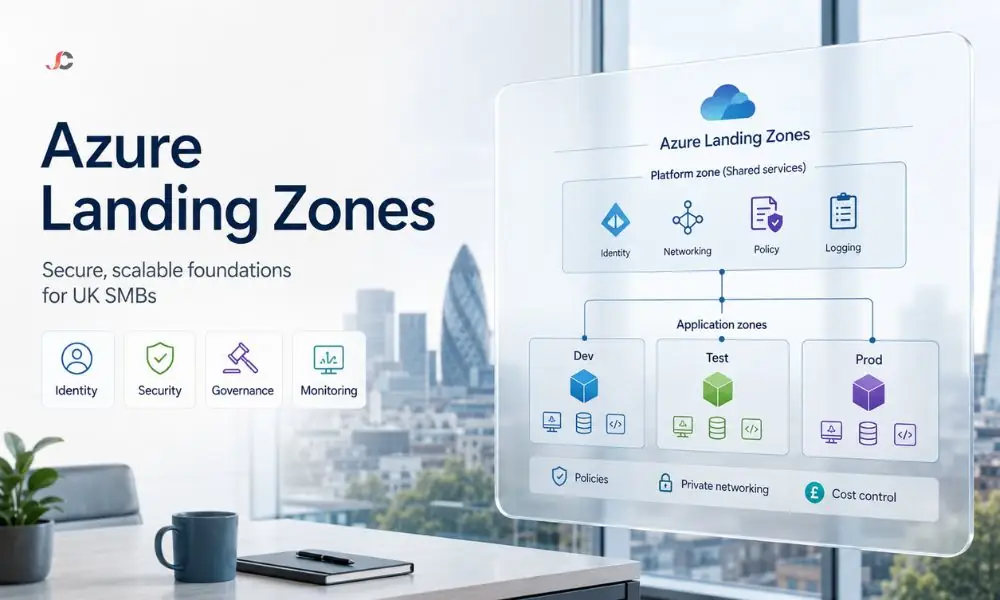
Azure Landing Zones are ready-made foundations for safe, governed workloads in Azure. They establish guardrails for identity, networking, security, governance, and monitoring from the outset. Think of them as a scale model you can extend with confidence. We keep the design clear and opinionated, using a simple cloud drawing and sample space diagram to guide choices.
Why Azure Landing Zones Matter for UK SMBs
Azure Landing Zones help UK businesses balance compliance, cost, and speed by standardising decisions upfront. Separation of dev, test, and prod reduces risk and makes changes safer. Strong identity, logging, and policies simplify audits and incident response. Ownership of resources and budgets becomes clear, while consistent templates reduce errors.
Platform vs Application Landing Zones—Which Do You Need?
A platform zone hosts shared services, such as identity, networking, and logging, so that every workload benefits from the same secure base. An application zone hosts a specific app with focused permissions, policies, and network rules. Most teams start with one platform zone and one application zone, then add app zones for dev, test, and prod. This keeps environments tidy and reduces blast radius. Azure Landing Zones support phased migrations, including moves from providers such as A2 Hosting.
Core Design Areas Explained in Simple Terms
- Identity and Access: Centred on Microsoft Entra ID with least-privilege roles and break-glass accounts; multi-factor authentication and conditional access reduce risk without slowing work. If your users rely on Microsoft 365, aligning identity with this model complements collaboration and governance in practice via Microsoft Azure.
- Networking: Use hub-and-spoke or Azure Virtual WAN to segment traffic with private endpoints by default, and control exposure through Azure Application Gateway and Web Application Firewall. For London sites, site-to-site VPN is standard, while ExpressRoute is considered when predictable performance is required.
- Governance and Policy: Azure Policy enforces naming, tagging, allowed locations, and backup rules, ensuring new subscriptions inherit guardrails automatically with transparent compliance reporting and controlled change. If GDPR is a priority, align device posture and access with the approach in GDPR Compliance with Endpoint.
- Security: Baselines draw on Microsoft Defender for Cloud, with secrets in Key Vault, just-in-time access for virtual machines, private links to reduce exposure, and alerts for unusual activity. These safeguards fold neatly into Azure Landing Zones to keep protection consistent.
- Management and Monitoring: Centralise logs in Log Analytics with plain-English alerts tied to action owners, plan backups and recovery points to match business needs, and maintain lifecycle hygiene to prevent drift. These controls remain clear and operable within Azure Landing Zones.
Subscription and Environment Strategy
We separate development, testing, and production into distinct subscriptions, ensuring that permissions, costs, and approvals align with the associated risks. Shared services stay in the platform subscription to avoid duplication and keep policies consistent. This pattern scales neatly as teams grow. Chargeback and budget alerts become simpler because tags and subscriptions mirror how the business is organised. Azure Landing Zones make that structure repeatable.
Cost Control and Billing
Budgets and alerts prevent surprises, while rightsizing ensures spending stays aligned with actual usage. Tags drive clean reports for projects and teams. Reserved instances and savings plans are reviewed when workloads stabilise. We also plan for lifecycle events, such as Windows 10 changes, as discussed in the Windows 10 End of Support advice. Cost governance is built into Azure Landing Zones, making finance conversations predictable.
Automation and DevOps
Infrastructure-as-code enables repeatable and reviewable deployments, with easy rollbacks. You can start with the portal accelerator for speed and move to Bicep or Terraform pipelines for consistency. Templates remain opinionated to reduce errors. Version control records decisions, and a short runbook keeps ops simple. Azure Landing Zones embrace both quick starts and pipeline maturity.
Why Azure Landing Zones Matter for Implementation Speed
Azure Landing Zones accelerate project starts because key design choices are made once and reused, allowing for consistent and repeatable deployment. Teams avoid reinventing identity, network, and policy for every workload and can focus on application value. Shared patterns reduce configuration drift and incidents. Code reviews and approvals move faster because the guardrails are known.
How We Implement Azure Landing Zones (Fast & Safe)
First, we map goals, risks, data needs, and any on-premises or A2 hosting links. We create concise artefacts—a cloud drawing and a sample space diagram—so decisions are straightforward to agree on. We then deploy the platform zone and your first application zone via the portal accelerator or infrastructure-as-code, validating access, logs, and policies against explicit checks before handover with a tidy scale model and training. If your migration involves identity or data changes, the adjacent steps in Azure Infrastructure migration keep the flow coordinated. After go-live, the same guardrails power dashboards and routines, reducing firefighting and speeding up delivery; Azure Landing Zones ensure consistency at every stage.
- Assess: Understand goals, risks, data flows, identity posture, and any on-premises or a2 hosting dependencies.
- Design: Produce a lightweight design pack, a cloud drawing, and a sample space diagram that shows identity, network, and policy choices.
- Deploy: Stand up the platform zone, then the first application zone using the portal accelerator or infrastructure-as-code.
- Validate: Test role access, logs, network paths, backup policies, and alerting against clear acceptance checks.
- Handover: Train the team, document the scale model, and agree on the roadmap for additional workloads.
Packages and Typical Inclusions
Many teams prefer a simple first step that respects good practice, while regulated workloads need stronger guardrails. Whatever your size, we align identity, network, policy, and logging so the foundation stays coherent as you add more application zones. When Microsoft 365 automation becomes a priority, Microsoft 365 Copilot Readiness helps ensure access and governance are safe for AI-assisted work. These packages reside on Azure Landing Zones, ensuring orderly growth.
- Starter: Platform landing zone, one application landing zone, core policies, and basic monitoring to get moving quickly.
- Growth: Platform landing zone, multiple application landing zones, private networking, and cost dashboards for expanding teams.
- Regulated: Additional controls for finance, legal, or care, stronger audit evidence, and data guardrails tailored to strict duties.
Benefits You Can Measure
With Azure Landing Zones, onboarding becomes faster because guardrails remove guesswork. Releases trigger fewer fire drills, and audits are easier. Ownership of resources, access, and spend is clear, reducing cross-team thrash. Resilience improves via consistent backups, logging, and alerting set at the start. Cost management stabilises as budgeting and right-sizing are baked in.
Case Study: A London Finance SMB Modernises Safely
A payroll firm in the City needed to move a legacy application to Azure without disrupting clients or failing audits. We built a platform zone with private networking and a secure identity path, then created two application zones to separate production from development and testing. Governance handled tags, backups, and allowed regions, while Defender for Cloud and Key Vault secured the stack. The team reduced release times and met audit requests with less stress because the necessary evidence was readily available in the logs. Azure Landing Zones kept roles clear and onboarding simple as new modules arrived.
Related Platform Choices and Daily Operations
Choosing the portal accelerator or Bicep/Terraform depends on experience, deadlines, and the need for repeatable pipelines—the good news: both fit inside the same structure and use the same policy set. If device access and conditional access are part of go-live, see how standardised devices align with cloud guardrails in Endpoint Management in London. Operational views stay consistent across services because Azure Landing Zones unify identity, logging, and policy.
Next Steps
If you want a clear plan, we begin with a brief assessment and share a concise design pack that includes a sample space diagram, a cloud drawing, and a simple checklist. We keep templates opinionated, which reduces risk and delay, with room to adapt as needs evolve. Your team stays in control with clean logging and well-defined roles. Begin with one application zone, then add more as workloads mature. Azure Landing Zones make the path straightforward and progress visible.
For your next steps, follow Microsoft’s cloud adoption framework on Microsoft Learn.
What is Azure Landing Zone?
If you’re wondering, “Azure landing zone what?” it’s a ready-made, secure foundation in Azure that standardises identity, networking, governance, security, and monitoring so new workloads can launch quickly and safely. It separates dev, test, and prod, applies policies from day one, and supports cost control and audit needs for UK businesses.
How do Azure Landing Zones relate to Enterprise-Scale?
You may see the phrase “azure landing zones enterprisescale architecture.” Enterprise-Scale is Microsoft’s reference architecture that underpins Azure Landing Zones, providing opinionated guidance and patterns for multi-subscription design, policy, and automation. In short, Enterprise-Scale is the blueprint; Azure Landing Zones are the practical, deployable implementation.
Do I need an Azure Landing Zone before migrating apps?
Yes, in most cases, start with Azure landing zone so that guardrails are in place before workloads are moved. This reduces rework, improves security and compliance, and keeps costs predictable. Begin with a platform zone and a first application zone, then expand as your needs grow.