

Microsoft 365 Defender is a unique and advanced enterprise defence suite that enables you to detect, prevent, investigate, and respond across endpoints, applications, emails, and identities. It consists of four defender services: Microsoft Defender for Endpoint, Microsoft Defender for Office 365, Microsoft Defender for Identity, and Microsoft Defender for Cloud Apps.
What is Defender for Microsoft Office 365?

Defender for Office 365 helps you secure your business with a predefined set of prevention, detection, investigation, and hunting features to protect your information. It covers your apps, services, emails, and other data. Microsoft provides various security capabilities with every Office 365 subscription. The purpose of these capabilities entirely depends on your subscription type. In general, there are three primary security services linked to Microsoft Defender for 365 subscriptions, including:
- Exchange Online Protection (EOP)
- Microsoft Defender for Office 365 Plan 1
- Microsoft Defender for Office 365 Plan 2
EOP is a standard security service for every Defender for 365 subscription plan. Defender Plans are available as add-ons to existing Office 365 subscriptions.
| EXCHANGE ONLINE PROTECTION (EOP) | It prevents broad, volume-based known attacks |
| DEFENDER FOR OFFICE 365 P1 | It protects email and collaboration from zero-day malware, phishing attacks, and business email compromise. |
| DEFENDER FOR OFFICE 365 P2 | It adds post-breach investigation, hunting, and response with automation and simulation. |
Each service acts as a cumulative layer of security, emphasising security.
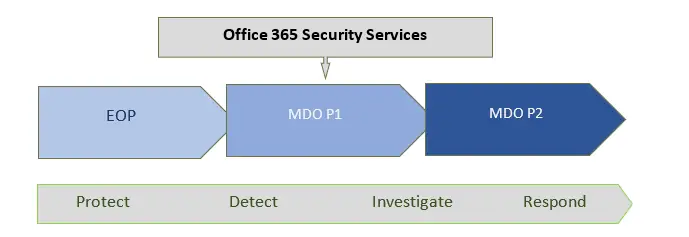
Exchange Online Protection is the core of Office 365; you’ll get this service with every Office 365 subscription plan. Defender for Office 365 P1 consists of EOP capabilities, and Defender for Office 365 P2 contains EOP and P1. It isn’t straightforward for new users to understand this cumulative structure. So, if you’re configuring this product, start with EOP for Defender for Office 365.
Note: If you have EOP, you must configure email authentication because it occurs in Public DNS.
EOP includes Office 365 E3 or below subscription plans, but these plans allow you to upgrade your plan and buy a standalone Defender for Office 365 P1. In contrast, Defender for Office 365 P2 is included with Office 365 E5.
Tip: If you have neither Office 365 E3 nor E5 subscriptions, check if you can upgrade to Defender for Office P1 in your plan.
Why Upgrade to Microsoft Defender for Office 365 Plan 1 and Plan 2?
At first, it is challenging to understand the advantage of adding Defender for Office 365 P1 and P2 with EOP. However, Defender for Office 365 plans offer comprehensive capabilities for your existing security infrastructure. Let’s look at the faculty of Defender for Office 365 P1 and P2 and understand the difference between these security services.
| Exchange Online Protection (EOP) | Defender for O365 Plan 1 | Defender for O365 Plan 2 |
| Investigate threat Explorer and trackers | Everything included in EOP | Everything included in EOP and P1 |
| Detect spoof intelligence and impersonation | Safe attachments and links | AIR from Threat Explorer |
| Prevent Admin quarantine | MS Defender for Office 365 protection for workloads | Automated investigation and response (AIR) |
| Detect Admin and user submissions of False positives/negatives | Time-of-click protection in email, Office clients, Teams | AIR from threat explorer |
| Allow/block URLs and Files | User and domain impersonation protection | AIR for compromised users |
| Investigate audit log search and message trace | Anti-phishing in Defender for Office 365 | SIEM integration API for automated investigations |
| Zero-hour auto purge | Alerts and SIEM integration API for alerts | |
| Refinement, Testing of Allow and Blocklists | SIEM integration API for detections Real-time detection tools |
Microsoft Defender for O365 Plan 1 expands towards the prevention side while adding different forms of detection. It also provides Real-time detections for investigation as an add-on. However, the real-time detection doesn’t appear in Defender for Office P2, as it has been replaced with another hunting tool.
Microsoft Defender for O365 P2 expands towards investigation and response while adding a new hunting strength – Automation. The primary hunting tool in Defender for Office P2 is Threat Explorer.
Tip: Exchange Online Protection and Microsoft Defender for Office 365 act differently for end-users. These services focus on awareness, including the Report Message Outlook add-in, which helps you report suspicious emails for further analysis.
Defender for Office 365 P2 (which contains everything in EOP and P1) focuses on training end-users, which is why the Security Operations Center has access to a powerful Threat Simulator tool and end-user metrics.
How Can We Help You?
At Server Consultancy, we can help you choose the Microsoft Defender for Office 365 plan that best suits your business needs and make configuration changes to provide you with a comprehensive report at a reasonable price.


