


Mobile device management features have been around for decades for implementing security for devices on-premises or remotely. Businesses must manage how users use their company-owned devices, allow them to work, and automate patch management to assess security vulnerability and compliance needs, including Endpoint management, comprehensive Inventory, endpoint distribution, and security.
The landscape of modern IT is rapidly evolving, and companies are seeking effective ways to manage their mobile devices and applications. Mobile Device Management policies (MDM) have become essential to modern IT infrastructure. By implementing MDM solutions like Microsoft Endpoint Manager and Intune, companies can streamline device management, enhance security, and improve productivity.
The Need for Mobile Device Management
In today’s fast-paced business environment, employees often rely on multiple devices, such as smartphones, tablets, and laptops, to access company resources and complete tasks. This increase in device usage presents a challenge for IT departments, which must manage and secure these devices to protect sensitive data and maintain compliance with regulatory requirements.
Mobile device management system (MDM) solutions enable companies to manage, monitor, and secure their devices remotely. This capability ensures that devices are configured correctly, updated with the latest software, and protected against threats, making MDM an indispensable tool for modern IT.
Microsoft Endpoint Manager: The Unified Solution
Microsoft Endpoint Manager is a comprehensive and unified solution that combines the power of Microsoft Intune and Configuration Manager. This integration simplifies the management of devices and applications across various platforms, including Windows, macos, ios, and Android.
By leveraging Microsoft Endpoint Manager, companies can:
- Streamline device management: Endpoint Manager provides a single console for managing all devices and applications, reducing complexity and enhancing efficiency.
- Enhance security: Endpoint Manager enables IT teams to enforce security policies, apply updates, and monitor devices for potential threats.
- Improve productivity: With Endpoint Manager, employees can access company resources on any device while ensuring compliance with corporate policies.
Intune: Managing Apps and Data in a Mobile World
Intune is Microsoft’s cloud-based MDM solution, providing the flexibility and scalability needed for modern IT. As part of Microsoft Endpoint Manager, Intune enables companies to securely manage devices, applications, and data.
Some of the critical benefits of Intune include the following:
- Comprehensive app management: Intune supports the management of in-house and third-party applications, offering granular control over app usage and data access.
- Data protection: Intune’s features allow companies to separate corporate and personal data, ensuring that sensitive information remains secure.
- Remote device management: With Intune, IT teams can configure, update, and troubleshoot devices remotely, minimising downtime and enhancing user experience.
Migrating to MDM with Microsoft Endpoint Manager and Intune
Companies planning to migrate to MDM using Microsoft Endpoint Manager and Intune can follow these steps:
- Assess current infrastructure: Evaluate the existing IT infrastructure to identify devices, applications, and data that must be managed and secured.
- Define management policies: Establish policies addressing device configuration, application management, and data protection requirements.
- Deploy Microsoft Endpoint Manager and Intune: Implement Endpoint Manager and Intune, ensuring smooth integration with existing systems and processes.
- Enrol devices: Enrol devices in the MDM solution and apply the defined management policies.
- Monitor and manage: Monitor and manage devices to ensure policy compliance, detect potential security threats, and support users as needed.
Your Trusted Partner for Migrating to MDM in London
As a Microsoft Solutions provider and an expert IT support company in London, Server Consultancy is uniquely positioned to help your organisation migrate to Mobile Device Management (MDM) using Microsoft Endpoint Manager and Intune. Our experienced engineers are dedicated to delivering customised solutions that cater to your organisation’s unique requirements, guaranteeing a smooth transition towards modern IT.
Here’s how Server Consultancy can assist your organisation in migrating to MDM:
- Comprehensive Assessment and Planning: Our tech support engineers will work closely with you to assess your existing IT infrastructure and understand your unique business requirements. We will evaluate the devices, applications, and data that must be managed and secured and develop a strategic plan for your MDM migration.
- Customised Policy Development and Implementation: The team at Server Consultancy will collaborate with you to create custom management policies tailored to your organisation’s specific requirements. These policies will focus on device configurations, application management, and data protection, ensuring your MDM solution aligns with your security and compliance goals. Our experts will also share best practices for managing various devices and platforms, guaranteeing a consistent and practical approach to MDM across your organisation.
- Training and Support: Server Consultancy offers training sessions for your IT staff and end-users as part of our commitment to providing comprehensive IT support. This ensures that all stakeholders are well-versed in the capabilities and functionalities of Microsoft Endpoint Manager and Intune. Furthermore, our ongoing support services guarantee that your organisation can address any potential challenges that may arise during the MDM migration process and beyond.
- Monitoring and Optimisation: Once your organisation has successfully migrated to MDM using Microsoft Endpoint Manager and Intune, Server Consultancy will continue to support your efforts by providing monitoring and optimisation services. This includes regularly assessing the effectiveness of your MDM policies and making any necessary adjustments to improve security, productivity, and user experience.
By partnering with Server Consultancy, a leading Microsoft Solutions provider and expert IT support company in London, your organisation can confidently embrace modern IT and migrate to Mobile Device Management. Our tailored solutions and dedicated support services ensure a smooth transition, empowering your business to thrive in today’s digital landscape.
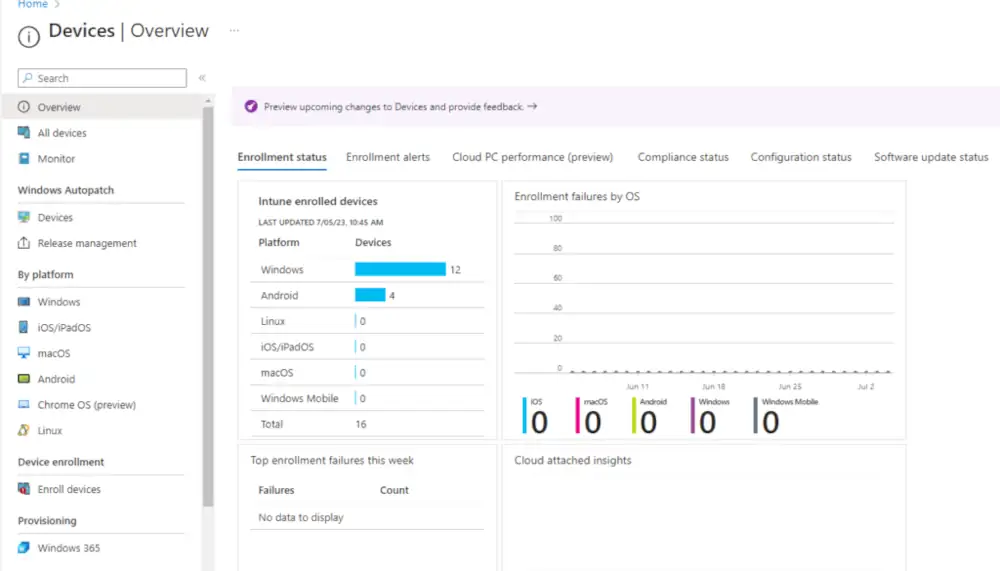
Microsoft Office 365 provides a built-in Mobile Device Management (MDM) facility to secure and manage your users’ portable devices, such as iPhones, iPads, Androids, and Windows phones. Microsoft Endpoint Manager ( Intune) allows your IT manager to create and manage device security policies, remotely wipe a device, and view detailed device reports, enabling a business to comply with GDPR.
The benefits of mobile device management let the IT department control how employees use applications and share data. Maintaining this data means there is no risk of crucial privileged information getting into the hands of unnecessary individuals. The use of MDM across the business industry continues to grow worldwide. Server Consultancy recommends organisations use MDM to benefit them and enable businesses to control devices sooner rather than later.
Windows 10 and 11 MDM
Windows 10 and 11 provide an integrated experience with Azure Active Directory (AD), enabling devices to be registered in Azure Active Directory and enrolled in MDM. Once a device is enrolled in MDM, the MDM can apply compliance with business policies, add or remove apps and many more. Businesses are integrating MDM with Azure AD to enable these experiences.
“Bring your own device” (BYOD) refers to employees using personal devices such as mobile phones, laptops, and more. These individual devices are then sometimes connected to the corporate wireless network. MDM software is how a business can deliver secure solutions to its BYOD workforce.
Moving to Mobile device management to manage devices can be pretty time-consuming, as businesses must examine their current policy settings to see what needs to be transitioned to MDM.
Server Consultancy can help prepare businesses to migrate to MDM at an affordable price. For more information, feel free to contact us.
Conclusion
Migrating to modern IT with Mobile Device Management solutions such as Microsoft Endpoint Manager and Intune is essential for companies to remain competitive in today’s digital landscape. By embracing MDM, companies can streamline device management, enhance security, and improve productivity across all devices and platforms.
What does mobile device management do?
Mobile Device Management, or MDM, is about keeping your organisation’s smartphones, tablets, and laptops secure and under control—especially when employees use them for work outside the office. It allows businesses to monitor, manage, and secure these devices remotely.
With MDM in place, you can:
-Enforce security policies like passcodes and encryption
-Remotely lock or wipe lost or stolen devices
-Push apps, settings, or updates to users automatically
-Control access to sensitive data and company resources
-Monitor compliance and usage in real time
At Server Consultancy, the best IT support company in London, we help businesses set up reliable Mobile Device Management solutions that allow users to be flexible without compromising control or security.
What is a mobile device management example?
A typical example of Mobile Device Management is managing a remote sales team’s smartphones. Using MDM, a business can ensure that:
-All phones have the same secure apps installed
-Devices are encrypted and protected with PINS
-Company data can be wiped instantly if a phone is lost
-Users can’t install unauthorised or risky apps
-VPN and email settings are automatically configured
This setup ensures the team can work efficiently from anywhere while the business stays compliant and protected. Server Consultancy provides tailored MDM configurations to match exactly how your team works.
What is mobile device management in Windows?
Mobile Device Management allows administrators to configure and secure Windows 10 and 11 devices using a central platform in a Windows environment. It’s beneficial for managing company laptops and tablets, whether in the office or remotely.
Through MDM for Windows, businesses can:
-Apply security policies like BitLocker encryption
-Control Windows updates and patch schedules
-Push Wi-Fi, VPN, and email settings
-Deploy and restrict access to applications
-Enforce compliance with company IT policies
Server Consultancy helps London businesses configure Windows MDM efficiently using tools like Microsoft Intune, ensuring smooth onboarding and consistent protection across devices.
Why is MDM important?
Mobile Device Management (MDM) is vital in securing business data while allowing employees to work from anywhere as the workplace becomes more mobile and hybrid. It also strengthens your broader IT infrastructure security, ensuring every endpoint is accounted for and protected.
It’s important because:
-Devices can be lost, stolen, or compromised. MDM ensures you stay protected
-It enables quick onboarding of new staff or devices with pre-set configurations
-You can meet compliance requirements (like GDPR) more easily
-It reduces IT overhead by automating app deployments and updates
-It gives you visibility into device usage, health, and policy compliance
-It integrates seamlessly with your IT infrastructure security strategy to reduce vulnerabilities across the network
Server Consultancy, London’s best IT support company, supports businesses with end-to-end Mobile Device Management solutions that reinforce security without compromising user productivity. With us, you never have to choose between mobility and control.
Who Uses Mobile Device Management (MDM) Software?
MDM is used across various industries and business sizes—from small startups to large enterprises. Common users include:
-Healthcare organisations, to secure patient data on mobile devices
-Finance firms, to meet strict compliance and security requirements
-Educational institutions need to manage tablets and laptops for staff and students
-Retail and field service teams need to manage POS devices and mobile workers
-Any business with remote or hybrid staff needs to secure company data on personal or company-owned devices
No matter the industry, Server Consultancy tailors MDM solutions that support your business’s goals, protect your data, and make managing devices simple and effective.


